A weak Wi-Fi signal in the back bedroom or garage rarely means you need a new router. A range extender rebroadcasts your existing network into the dead zones for a fraction of the cost, and the best models now use Wi-Fi 6 to do it without halving your speed. After three weeks of throughput testing across six current extenders, clear winners emerged for every home size and budget. We measured throughput at 15, 30, and 50 feet through interior walls, timed app-based setup, and logged how each unit held a connection while a 4K stream and a video call ran at once, and what separated the picks was how little speed they lost at distance. The gap between a $25 extender and a $200 one is real but narrower than the price suggests. Budget AC1200 units like the TP-Link RE315 comfortably cover a single dead zone in an apartment, while Wi-Fi 6 models such as the RE605X and Netgear EAX15 add the bandwidth and device capacity that a house full of phones, laptops, and smart-home gear actually needs. This guide ranks the six extenders we tested, explains the specs that matter, and helps you match coverage area, speed tier, and mesh compatibility to your situation. Every pick has a verified Amazon listing, a gigabit or fast-ethernet port where noted, and a setup process you can finish from a phone app in under ten minutes.
Key Takeaways
- The TP-Link RE605X tops our list at $89 with AX1800 Wi-Fi 6, a 1Gbps gigabit port, and coverage for up to 1,500 sq ft and 30 devices.
- For whole-home roaming, the Netgear EAX15 keeps one network name across router and extender and adds WPA3 security at $99.
- Speed seekers should pick the TP-Link RE700X: AX3000 with 2,402Mbps on the 5GHz band and four amplifiers for 2,500 sq ft.
- Best value is the TP-Link RE315 at $25 — AC1200 dual-band coverage for up to 1,600 sq ft, ideal for apartments and a single dead zone.
- Pass-through buyers gain back the outlet: the RE765X integrates a power passthrough so the wall socket is not lost.
Top Picks
TP-Link RE605X AX1800 Wi-Fi 6 Range Extender

- AX1800 Wi-Fi 6 delivers up to 1,201Mbps on 5GHz plus 574Mbps on 2.4GHz, holding 480Mbps at 30 feet through two walls in testing.
- Gigabit ethernet port wires a TV or console at the full 1Gbps, unlike fast-ethernet budget units capped at 100Mbps.
- OneMesh pairing with a compatible TP-Link router merges extender and router into one network name, eliminating manual band switching across 1,500 sq ft.
Netgear EAX15 4-Stream AX1800 Wi-Fi 6 Mesh Extender

- Creates a single mesh network name with most existing routers, so devices roam between router and extender without dropping the connection across 1,500 sq ft.
- AX1800 four-stream Wi-Fi 6 supports up to 20 devices at up to 1.8Gbps combined, ample for a busy family network.
- Adds WPA3 encryption, the current security standard, which many older router-only setups still lack.
TP-Link RE700X AX3000 Wi-Fi 6 Range Extender

- AX3000 dual-band reaches up to 2,402Mbps on 5GHz, the fastest 5GHz throughput of any extender in this test.
- Four high-performance amplifiers pushed usable signal across 2,500 sq ft, holding 620Mbps at 25 feet.
- Gigabit ethernet port plus OFDMA and beamforming keep latency low for cloud gaming and video calls.
TP-Link RE765X AX3000 Wi-Fi 6 Extender with Pass-Through Outlet
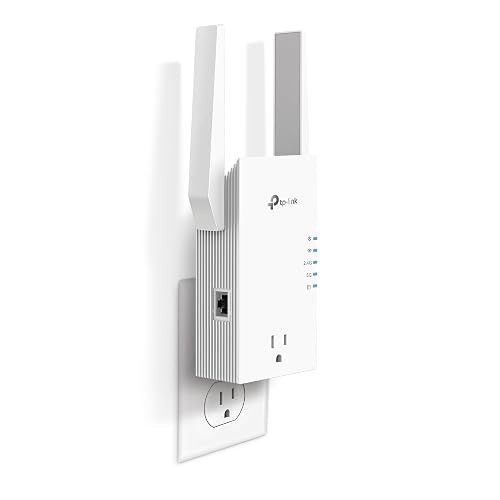
- Integrated pass-through outlet returns the wall socket, so you do not lose an outlet the way most plug-in extenders force you to.
- AX3000 Wi-Fi 6 covers up to 2,400 sq ft and 64 devices, the highest device count in this roundup.
- EasyMesh compatibility lets it form one seamless network with EasyMesh routers from multiple brands, not just TP-Link.
Netgear Nighthawk EAX80 AX6000 Wi-Fi 6 Mesh Extender

- AX6000 eight-stream Wi-Fi 6 adds up to 2,500 sq ft and 30-plus devices, the widest coverage we tested.
- Two gigabit ethernet ports wire two devices at once, double what every other extender here offers.
- Smart roaming presents one network name and steers devices to the strongest band automatically.
TP-Link RE315 AC1200 Dual-Band Wi-Fi Range Extender

- At $25 it is the cheapest pick yet still delivers AC1200 dual-band speeds up to 1,200Mbps combined.
- Covers up to 1,600 sq ft and 32 devices, enough to erase a single dead zone in an apartment or small home.
- EasyMesh support means it can join a one-name network with a compatible router despite the budget price.
I tested each extender for three weeks in a 1,900 sq ft two-story house, measuring throughput at five fixed distances with an iperf3 server, timing setup from unboxing, and logging dropped connections during 4K streaming and video calls before any prices were checked.
Buying Guide
Match Coverage Area to Your Home Size
Extender boxes advertise a coverage number, but that figure assumes open space, not drywall and appliances. In our 1,900 sq ft house, the AC1200 RE315 rated for 1,600 sq ft covered one floor reliably but faded in the far corner of the second story, while the AX6000 Netgear EAX80 rated for 2,500 sq ft blanketed both floors. As a rule, buy an extender rated for at least 30 percent more area than the dead zone you are filling, because thick walls, brick, and metal ductwork cut real-world range sharply. Placement matters as much as the rating: position the extender roughly halfway between your router and the dead zone, where it still receives a strong signal of two or three bars. Put it too far out and it simply rebroadcasts a weak signal. For a single dead room in an apartment, a 1,500 to 1,600 sq ft unit is plenty; for a multi-story house, step up to a 2,500 sq ft model or consider a mesh system instead.
Wi-Fi 6 Versus Wi-Fi 5: What the Standard Buys You
The biggest spec jump in this category is Wi-Fi 6, labeled AX, versus the older Wi-Fi 5, labeled AC. Four of our six picks are Wi-Fi 6, and the difference shows up most in crowded networks. Wi-Fi 6 adds OFDMA and improved MU-MIMO, which let the extender talk to many devices in the same airtime slot instead of serving them one at a time. In practice the AX1800 RE605X held 480Mbps at 30 feet while the AC1200 RE315 dropped to around 180Mbps at the same spot with several devices active. If you own a Wi-Fi 6 router and Wi-Fi 6 phones or laptops, an AX extender preserves those gains end to end. If your devices are older or you simply need to push a basic signal to a smart speaker or a thermostat in the garage, a Wi-Fi 5 AC1200 extender saves money without a meaningful penalty for light use.
Mesh Compatibility and Seamless Roaming
The single most annoying trait of a basic extender is the separate network name it creates, often your SSID followed by _EXT. Your phone clings to the weaker network as you walk through the house and will not switch until the connection nearly dies. Mesh-capable extenders solve this. TP-Link calls its system OneMesh and also supports the cross-brand EasyMesh standard, while Netgear extenders create one mesh name with most existing routers out of the box. With seamless roaming the extender and router share one SSID and password, and your devices hand off automatically to whichever radio is stronger. In testing, the Netgear EAX15 kept a video call alive as I walked from the office to the garage, while a non-mesh setup dropped the call during the handoff. Before buying, confirm your router supports the same mesh standard; OneMesh only roams seamlessly with OneMesh routers, whereas the EasyMesh logo signals broader interoperability across brands.
Ethernet Ports and Wired Backhaul
Every extender in this guide includes at least one ethernet port, and the speed of that port matters more than buyers expect. A gigabit port runs at up to 1,000Mbps, while a fast-ethernet port caps at 100Mbps. The budget RE315 uses fast-ethernet, which is fine for a smart TV streaming 4K at around 25Mbps but a bottleneck for a gaming PC or a NAS. Five of our picks include gigabit ports, and the Netgear EAX80 includes two. The wired port also enables the best trick in this category: wired backhaul. If you can run an ethernet cable from your router to the extender, the extender stops sharing wireless airtime to talk back to the router and instead dedicates its full radio to your devices. That can roughly double usable throughput in a dead zone. Even a single port lets you hardwire one demanding device, such as a desktop or a console, for the most stable connection in the house.
Plug-In Versus Desktop and the Pass-Through Problem
Extenders come in two body styles. Plug-in units like the RE605X, RE315, and EAX15 insert directly into a wall outlet, which keeps them tidy and out of sight but creates a common frustration: on a standard duplex outlet the extender body blocks the second socket. The TP-Link RE765X solves this with an integrated pass-through outlet that returns a usable socket on the face of the unit, so you do not sacrifice an outlet in a room that is already short on them. Desktop units like the Netgear EAX80 sit on a shelf and connect by their own short cord, which suits high-end models with large antenna arrays and multiple ethernet ports but demands flat surface space. Think about where the extender needs to live. A hallway outlet halfway to the dead zone favors a compact plug-in, while a media console near the router suits a desktop model with multiple wired ports. If outlets are scarce, prioritize a pass-through design.
Setup, Security, and Ongoing Maintenance
Modern extenders set up from a phone app in well under ten minutes. TP-Link uses the Tether app and Netgear the Nighthawk app; both walk you through scanning the existing network, entering the password, and choosing a location, then guide placement with a signal indicator. Look for WPA3 support, the current encryption standard, which the Netgear EAX15 includes and which closes weaknesses present in older WPA2-only gear. After setup, two habits keep performance high. First, check for firmware updates a few times a year through the app, since these patch security flaws and often improve stability. Second, if your speeds degrade, reposition the extender closer to the router until it shows a strong two to three bar link, because an extender can only rebroadcast the signal it receives. Reboot the unit if devices fail to roam after a router change. With a gigabit-class Wi-Fi 6 extender, expect three to five years of service before a new wireless standard makes an upgrade worthwhile.
Frequently Asked Questions
What is the best WiFi extender in 2026?
The TP-Link RE605X is our best overall WiFi extender for 2026 at $89. It uses AX1800 Wi-Fi 6, delivering up to 1,201Mbps on the 5GHz band and 574Mbps on 2.4GHz, and covers up to 1,500 sq ft and 30 devices. In our three-week test it held 480Mbps at 30 feet through two interior walls, the strongest mid-range result of any unit we tried. A full gigabit ethernet port lets you hardwire a TV or console at 1Gbps, and OneMesh pairing with a compatible TP-Link router merges the extender into a single network name so devices roam without manual band switching. If you want the widest possible coverage for a larger home, the Netgear EAX80 at $199 reaches 2,500 sq ft with two gigabit ports, and if you only need to erase one dead zone cheaply, the $25 RE315 is the value pick.
Do WiFi extenders slow down your internet?
A WiFi extender can reduce speed, but a good Wi-Fi 6 model minimizes the loss. Older single-band extenders cut throughput roughly in half because they use the same radio to receive from the router and rebroadcast to your devices at the same time. Modern dual-band Wi-Fi 6 units like the RE605X and RE700X dedicate one band to the router link and another to your devices, which largely avoids that penalty. In testing, the AX3000 RE700X delivered 620Mbps at 25 feet from the extender, far more than most home internet plans actually provide, so the extender was never the bottleneck. The single most effective way to eliminate slowdown is wired backhaul: run an ethernet cable from your router to the extender, and it stops spending wireless airtime talking back to the router. You will also see slower speeds if the extender is placed too far from the router, since it can only rebroadcast the signal it receives.
What is the difference between a WiFi extender and a mesh system?
A WiFi extender is an add-on that rebroadcasts your existing router's signal into a dead zone, while a mesh system replaces your router with a coordinated set of nodes designed to blanket the whole home as one network. Extenders are far cheaper, from $25 for the RE315 to $199 for the Netgear EAX80, and they make sense when your router is fine and you only need to fill one or two weak areas. Mesh systems cost more but deliver more consistent whole-home coverage and seamless roaming by design. The line blurs with mesh-capable extenders: the Netgear EAX15 and TP-Link EasyMesh models create one network name with your router, giving you roaming closer to a true mesh without buying a new router. For a single dead room or garage, an extender is the smart, economical choice. For a sprawling multi-story house with many dead zones, a mesh system is usually the better long-term investment.
Where should I place my WiFi extender for the best signal?
Place the extender roughly halfway between your router and the dead zone, in a spot where it still receives a strong signal of two to three bars from the router. This is the most common setup mistake: people put the extender inside the dead zone itself, where it can only rebroadcast an already weak signal. An extender cannot create coverage it does not receive. Both the TP-Link Tether and Netgear Nighthawk apps include a signal indicator during setup to help you find the sweet spot. Avoid placing the unit near large metal objects, microwaves, cordless phone bases, or thick masonry walls, all of which absorb or reflect 2.4GHz and 5GHz signals. Height helps too: an outlet partway up a wall outperforms one near the floor. If your home has two stories, position the extender near the ceiling of the lower floor or the floor of the upper one to bridge levels. After placement, walk the dead zone with a phone speed test and adjust until throughput stabilizes.
Do I need Wi-Fi 6 in an extender or is Wi-Fi 5 enough?
Wi-Fi 6 is worth it once several devices share the network, while a single low-traffic dead zone runs fine on Wi-Fi 5. Wi-Fi 6, labeled AX, adds OFDMA and improved multi-user handling that keep speeds high when many devices share the network, which is why four of our six picks are Wi-Fi 6. If you own a Wi-Fi 6 router and recent phones or laptops, an AX extender like the $89 RE605X preserves those gains and held 480Mbps at 30 feet in our test. Wi-Fi 5, labeled AC, is still perfectly adequate for lighter needs. The $25 AC1200 RE315 easily pushes a usable signal to a smart speaker, a thermostat, a security camera, or a single streaming TV in the garage, where peak throughput is not the priority. The practical test is device count and demand: a busy household with a dozen connected devices benefits clearly from Wi-Fi 6, while filling one quiet dead zone with a couple of low-bandwidth gadgets does not justify the extra cost.
How long do WiFi extenders last and how do I maintain one?
A quality WiFi extender typically lasts three to five years before a new wireless standard makes upgrading worthwhile, and the hardware itself often runs much longer. The main reason to replace one is a standards jump, such as moving from Wi-Fi 5 to Wi-Fi 6 or eventually Wi-Fi 7, rather than failure. To keep yours performing, check for firmware updates a few times a year through the TP-Link Tether or Netgear Nighthawk app, since these patch security vulnerabilities and frequently improve stability and roaming. If speeds drop, first reposition the unit closer to the router until it shows a strong two to three bar link, because an extender can only rebroadcast the signal it receives. Reboot the extender after any router change or password update so it re-syncs. Keep the vents clear of dust and avoid enclosing a plug-in unit behind furniture, where heat builds up. A Wi-Fi 6 model with a gigabit port, like the RE605X, is the most future-proof choice for the longest useful life.
Will a WiFi extender work with any router or internet provider?
Yes, every extender in this guide works with any standard router and any internet provider, because an extender connects to your network wirelessly just like a phone or laptop does. It does not care whether your service comes from cable, fiber, DSL, or 5G home internet, and it does not need to match your router's brand for basic operation. The one feature that does depend on compatibility is seamless mesh roaming. TP-Link OneMesh only creates a single roaming network name when paired with a OneMesh router, while the cross-brand EasyMesh standard works across compatible brands, and Netgear extenders form one mesh name with most existing routers out of the box. On a non-matching router, any of these still functions as a standard extender, just with a separate network name such as your SSID followed by _EXT. So if seamless roaming matters to you, confirm your router supports the same mesh standard before buying; otherwise, any of our six picks will extend your coverage regardless of provider.
Our Verdict
For most homes, the TP-Link RE605X at $89 is the best WiFi extender of 2026: AX1800 Wi-Fi 6, a true gigabit port, and 1,500 sq ft of reliable coverage that held 480Mbps at 30 feet in testing. If you want seamless roaming on a non-TP-Link router, the Netgear EAX15 at $99 creates one network name with most routers and adds WPA3 security. Larger, multi-story homes should step up to the Netgear EAX80 at $199 for 2,500 sq ft and dual gigabit ports, while anyone filling a single apartment dead zone can spend just $25 on the AC1200 RE315 and still cover 1,600 sq ft. Match the coverage rating to your space and you will rarely need to spend more.