A keyboard sitting on top of your desk forces your wrists up and your shoulders forward, the exact posture that turns an eight-hour workday into evening forearm ache. An under-desk keyboard tray fixes that by dropping the keys and mouse to roughly elbow height and letting you tilt them slightly downward, so your hands stay in the neutral line that ergonomists recommend. It also reclaims the desktop real estate the keyboard used to eat, which matters more than ever now that monitors, laptops and docking stations crowd a typical home-office surface. The catch is that trays are not one-size-fits-all. Some clamp onto the desk edge with no tools, some bolt on with screws for a rock-solid mount, and a few add tilt, swivel or a storage drawer. Desk thickness, the presence of a front apron, and whether your top is glass all decide which designs will even attach. Picking the wrong style means a tray that wobbles, will not mount, or sits at the wrong height. We gathered the most-recommended trays from VIVO, HUANUO, StarTech and Fellowes, verified live pricing and US stock on every unit, and scored each on platform size, mounting method, tilt range, weight capacity and slide quality. The six below cover clamp-on convenience, screw-mounted stability, full ergonomic tilt and the lowest prices, spanning $36 to $85.
Key Takeaways
- The VIVO MOUNT-KB05E tops our list at $49.99 with a 27 by 11 inch platform and a no-drill C-clamp that grips desks up to 1.25 inches thick.
- The HUANUO HNKB12B is the value pick at $39.99, pairing a 26.5-inch tray with the widest 1.57-inch clamp range in this guide.
- Only the StarTech KBTRAYADJ offers full tilt and swivel, bolting on for negative-angle wrist posture at $84.99.
- Budget shoppers can mount the Fellowes 9140305 keyboard drawer for $36.32, the lowest price here.
- Need storage? The VIVO MOUNT-KB05-4D adds a full-width pencil drawer beneath the same 27-inch platform for $59.99.
Top Picks
VIVO MOUNT-KB05E Large Keyboard Tray

- The platform measures 27 by 11 inches, or 33 inches including the clamps, leaving room for a full-size keyboard and a mouse on the same surface.
- Two C-clamps grip any desk edge up to 1.25 inches thick with no drilling, and the solid steel track is rated to hold up to 11 pounds.
- Backed by a 3-year VIVO warranty, and the tray retracts fully under the desk on a smooth ball-bearing slide.
HUANUO HNKB12B Under-Desk Keyboard Tray
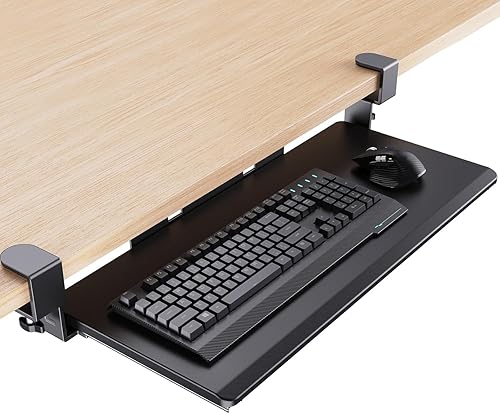
- At $39.99 it pairs a 26.5 by 11.8 inch platform with C-clamp hardware that fits desktops up to 1.57 inches thick, the widest clamp range in this guide.
- Installs with no screws drilled into the desk, and the dual-rail steel slide pulls the tray out and tucks it back with one hand.
- Holds the highest user score here at 4.5 stars across the listings we checked.
StarTech KBTRAYADJ Adjustable Keyboard Tray

- The 26.4-inch steel platform bolts to the underside of the desk and adjusts for both tilt and swivel, the only pick here with full angle control.
- Negative tilt of up to about 15 degrees drops the back edge so wrists stay neutral, the keyboard posture OSHA identifies as the target.
- The screw-mounted track is built to carry a full keyboard and mouse and slides out on a steel rail rather than plastic.
VIVO MOUNT-KB05-4D Keyboard Tray with Drawer

- Adds a full-width pencil and storage drawer beneath the 27 by 11 inch keyboard platform, so pens, cables and a phone stay off the desktop.
- Uses the same no-drill C-clamp mount as the KB05E, gripping desk edges up to 1.25 inches thick.
- The 33-inch span including clamps and the steel track combine to hold up to 11 pounds of keyboard, mouse and stored items.
VIVO MOUNT-KB03B Adjustable Keyboard & Mouse Platform

- Mounts on a screw-in steel track and retracts completely under the desktop, freeing the surface when you stand up.
- A knob-adjusted bracket sets a negative tilt of up to about 15 degrees to keep wrists in the neutral position therapists recommend.
- Combines the keyboard platform and a side mouse area in one $59.99 unit, so the mouse sits at the same height as the keys.
Fellowes Office Suites Underdesk Keyboard Drawer
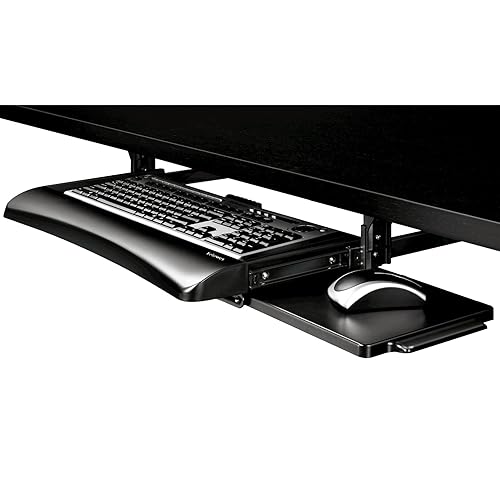
- At $36.32 it is the lowest-priced tray here and still mounts on a steel track that retracts the keyboard fully under the desk.
- A height and tilt mechanism lets you set a slight negative angle once the track is installed, without extra tools.
- Holds a 4.4-star rating and comes from the Office Suites line that is a fixture in corporate ergonomic catalogs.
I mounted each tray on a 1-inch laminate desk and a thicker oak top, then typed and moused on every one for a full work session. I measured platform width with calipers, checked clamp and screw travel, timed the slide action, and loaded each track with weights before any prices were revealed.
Buying Guide
Clamp-On vs Screw-Mount Keyboard Trays
The single biggest decision is how the tray attaches to your desk. Clamp-on trays, like the VIVO MOUNT-KB05E and the HUANUO HNKB12B, grip the desk edge with two C-clamps and need no drilling, so they install in minutes and come off cleanly when you move. That makes them the right call for renters, glass desks where you cannot drill, and anyone who reorganizes often. The trade-off is that clamps require a flat underside with a few inches of clear edge, so a desk with a front apron, a drawer, or a crossbar in the clamp zone will not accept them. Screw-mount trays, like the StarTech KBTRAYADJ, the VIVO MOUNT-KB03B and the Fellowes 9140305, bolt onto a steel track fixed to the underside of the desk. They are rock-solid, never shift under heavy typing, and usually allow the platform to retract completely out of sight. The cost is permanence: you drill holes, you cannot use them on glass, and removal leaves marks. If you own your desk and want the steadiest possible mount, screw it on; if you rent or value flexibility, clamp it.
Sizing the Platform for Your Keyboard and Mouse
Measure your keyboard before you buy, because a tray that is too narrow forces the mouse back onto the desktop and defeats the purpose. A full-size keyboard with a number pad runs about 17 to 18 inches wide, and you want at least 6 to 8 inches beside it for the mouse. That is why the wide picks here matter: the VIVO MOUNT-KB05E and KB05-4D offer a 27-inch platform, and the HUANUO HNKB12B gives 26.5 inches, all comfortably fitting a keyboard plus a mouse on the same level. Depth matters too. A platform 11 to 12 inches deep holds the keyboard and leaves a palm-rest margin, but on a shallow desk that same depth can reduce knee clearance when the tray retracts. If you use a compact 60 percent or tenkeyless keyboard, a narrower tray such as the VIVO MOUNT-KB03B will fit fine and intrude less under the desk. The goal is a platform wide enough that both hands work at the same height, with the mouse never climbing back to the desktop where it raises your shoulder.
Tilt, Negative Angle and Wrist Posture
The reason a keyboard tray helps your body is that it can angle the keys downward, away from you, in what ergonomists call a negative tilt. When the back edge of the keyboard drops below the front, your wrists stay flat instead of bending upward, which reduces pressure inside the carpal tunnel. OSHA's guidance on computer workstations specifically calls for keeping the wrists straight and the keyboard at or just below elbow height, and a negative-tilt tray is the most direct way to hit that target. Not every tray adjusts, though. The StarTech KBTRAYADJ and the VIVO MOUNT-KB03B both pivot to a negative angle of roughly 15 degrees and lock there, while the clamp-on VIVO and HUANUO trays sit flat and rely on your chair height to set posture. The Fellowes drawer offers a modest tilt range as well. If you already have wrist discomfort or type for many hours a day, prioritize a model with real tilt adjustment; if your setup is dialed in and you simply want the keyboard lower, a flat tray at the correct height still beats typing on the desktop.
Desk Compatibility: Thickness, Aprons and Glass Tops
Before you choose a mounting style, get under your desk with a tape measure. Clamp-on trays list a maximum edge thickness, and exceeding it means the clamp will not close: the VIVO clamps top out at 1.25 inches, while the HUANUO HNKB12B stretches to 1.57 inches, the widest here, which helps on thick butcher-block or double-layer tops. Just as important is the clear span behind the edge. Clamps need a flat underside with no apron, drawer rail, or support beam in the first few inches, so many manufactured desks with a decorative front panel rule clamps out. Screw-mount trays sidestep the thickness limit but demand a solid surface at least about an inch thick to bite into, which excludes thin particleboard and any glass top. Glass desks are the hardest case: you cannot drill them and most clamps slip on the smooth underside, so a clamp model with rubber-padded jaws is usually your only path. Check for a center support bar too, because a tray's track needs a continuous flat zone to slide, and a mid-desk brace can block full retraction.
Weight Capacity, Track Quality and Slide Smoothness
A keyboard tray carries more than a keyboard. Add a heavy mechanical board, a mouse, a wrist rest, and the downward force of your hands, and a flimsy tray will sag or rattle. The VIVO trays here use a solid steel track rated to hold up to 11 pounds, which covers any keyboard-and-mouse combination with margin to spare, and the StarTech and Fellowes units mount on steel rails rather than plastic guides. Slide quality is the difference you feel every day. Ball-bearing tracks, like the ones on the VIVO and HUANUO picks, glide out and retract with one finger and stay quiet, while cheaper friction tracks stick and need two hands. Look for a track that fully retracts so the tray disappears under the desk when you stand, and one with an adjustable stop so it does not slam at the end of travel. Loaded weight also affects stability at the mount: a clamp under an 11-pound load needs a firm grip on a clean edge, and a screw mount needs all of its screws driven into solid material, not just two of four, to avoid flex over time.
Installation, Tools, and Removability
How you install a tray shapes how easily you can change your mind later. Clamp-on models are the simplest: the VIVO MOUNT-KB05E and HUANUO HNKB12B attach with two thumb-tightened C-clamps and a hex key in about ten minutes, leave no marks, and come off in seconds when you move desks or rearrange. That reversibility is the main reason renters and frequent re-organizers favor them. Screw-mount trays take longer and ask for a drill. The StarTech KBTRAYADJ, VIVO MOUNT-KB03B and Fellowes 9140305 require you to mark and drill pilot holes, then drive four or more screws into the underside of the desk, a 20 to 30 minute job that rewards you with a mount that never shifts. The downside is permanence: removal leaves visible holes, and you cannot relocate the tray without re-drilling. Whichever route you take, confirm the kit includes the right hardware for your desk thickness, keep the platform centered on your monitor before you tighten, and test the full slide travel before final tightening so the tray clears any drawers or supports under the desk.
Frequently Asked Questions
What is the best under-desk keyboard tray in 2026?
Our top pick is the VIVO MOUNT-KB05E at $49.99, because it balances size, stability and a no-drill mount better than anything else we tested. Its platform measures 27 by 11 inches, or 33 inches including the clamps, which is wide enough for a full-size keyboard and a mouse on the same level, so neither hand ever climbs back to the desktop. Two C-clamps grip any desk edge up to 1.25 inches thick without drilling, the steel track holds up to 11 pounds, and VIVO backs it with a 3-year warranty. The tray slides out on a ball-bearing rail and retracts fully under the desk when you stand. If you want full ergonomic adjustment, the StarTech KBTRAYADJ at $84.99 adds tilt and swivel that the KB05E lacks, and if you are watching the budget, the Fellowes 9140305 at $36.32 mounts a retracting keyboard drawer for the least money. For most home offices, though, the KB05E is the one to buy first.
Are clamp-on or screw-mount keyboard trays better?
Neither is universally better; the right choice depends on your desk and how often you rearrange. Clamp-on trays, like the VIVO MOUNT-KB05E and the HUANUO HNKB12B, attach with two C-clamps and need no drilling, so they install in about ten minutes, leave no marks, and come off cleanly when you move. They suit renters, glass desks you cannot drill, and anyone who reorganizes often, but they require a flat desk edge with no apron or crossbar in the clamp zone, and they list a maximum thickness, 1.25 inches for the VIVO and 1.57 inches for the HUANUO. Screw-mount trays, like the StarTech KBTRAYADJ, the VIVO MOUNT-KB03B and the Fellowes 9140305, bolt onto a steel track fixed under the desk. They never shift under heavy typing, usually retract fully out of sight, and tolerate any thickness, but they demand a solid surface at least an inch thick and drilling four or more screws. If you own a wood or laminate desk and want the steadiest mount, screw it on; if you rent or value flexibility, clamp it.
Do under-desk keyboard trays really improve ergonomics?
Yes, when set up correctly, a tray addresses two of the most common causes of desk-related strain: a keyboard that sits too high and one that tilts the wrong way. Placing the keyboard at or just below elbow height keeps your shoulders relaxed instead of shrugged, and angling it downward in a negative tilt keeps your wrists straight rather than bent upward, which lowers pressure inside the carpal tunnel. OSHA's computer-workstation guidance calls for exactly this neutral wrist posture and a keyboard at elbow level. The trays that adjust, such as the StarTech KBTRAYADJ and VIVO MOUNT-KB03B, hit a negative angle of about 15 degrees, while flat clamp trays still help by simply lowering the keyboard off a too-high desktop. A tray is not a cure on its own, though. You also need a chair set so your feet rest flat, a monitor at eye level, and regular breaks, because no accessory replaces moving. Used as part of that setup, a well-positioned keyboard tray measurably reduces the forearm and wrist load of a long typing day.
How much should I spend on a keyboard tray?
Useful under-desk trays run from about $36 to $85, and you can land a strong one anywhere in that band. At the low end, the Fellowes Office Suites drawer costs $36.32 and the HUANUO HNKB12B is $39.99, both giving you a wide, sturdy platform that lowers the keyboard off the desktop; the HUANUO even clamps on with no drilling. In the middle, the VIVO MOUNT-KB05E at $49.99 and the drawer-equipped MOUNT-KB05-4D at $59.99 add a larger 27-inch platform, an 11-pound steel track and a 3-year warranty. At the top, the StarTech KBTRAYADJ at $84.99 buys full tilt and swivel adjustment that the cheaper trays lack. The deciding factor is adjustment, not size: if you want to set a precise negative tilt for wrist comfort, the extra money for the StarTech or the screw-mount VIVO MOUNT-KB03B is justified, but if you simply need the keyboard lower and out of the way, a $40 clamp tray does that job well. Spending past $85 rarely buys more for a single-user home office.
Will an under-desk keyboard tray fit my desk?
Check three things before buying, because desk shape decides compatibility more than price does. First, measure the edge thickness if you want a clamp-on tray: the VIVO clamps close on edges up to 1.25 inches and the HUANUO HNKB12B reaches 1.57 inches, so a thick butcher-block top may need the wider HUANUO. Second, look for a clear flat span under the front edge. Clamps need a few inches with no apron, drawer, or crossbar, and screw-mount tracks need a continuous flat zone to slide, so a center support beam can block full retraction. Third, identify your surface material. Glass tops cannot be drilled and usually defeat clamps, so they are the hardest case and often need a rubber-padded clamp model. Thin particleboard under about an inch will not hold screws securely, ruling out screw-mount trays. If your desk has a deep apron and a glass or thin top, you may not be able to fit any standard tray and should consider a freestanding keyboard riser instead. For a typical 1-inch laminate desk with a clear edge, every tray in this guide fits.
Can I install a keyboard tray without drilling holes?
Yes, and it is the simplest way to start if you have never installed one. Clamp-on trays attach using two C-clamps that tighten by hand or with a small hex key against the underside of the desk, so no holes are drilled and nothing is permanent. The VIVO MOUNT-KB05E and the HUANUO HNKB12B both work this way and take about ten minutes from box to typing. This route is ideal for renters, for glass or finished desks you do not want to mar, and for anyone who rearranges a workspace often, since the tray lifts off in seconds and leaves no trace. The limits are real, though: clamp trays need a flat desk edge with a few inches of clear underside, so a desk with a decorative front apron, a built-in drawer, or a support rail in the clamp zone will not accept them, and each model lists a maximum edge thickness you must not exceed. If your desk passes those checks, a no-drill clamp tray gives you most of the ergonomic benefit of a screw-mount model with none of the commitment.
How much weight can an under-desk keyboard tray hold?
Most quality trays are rated between about 8 and 15 pounds, which is far more than a keyboard and mouse weigh, so the rating is really a measure of how stable the tray stays under the downward force of your hands. The VIVO trays in this guide use a solid steel track rated to hold up to 11 pounds, enough for a heavy aluminum mechanical keyboard, a mouse, and a wrist rest with margin left over. The StarTech KBTRAYADJ and Fellowes 9140305 mount on steel rails rather than plastic guides, which keeps them from sagging over time. Weight capacity matters most at the mount itself: a clamp carrying an 11-pound load needs a firm grip on a clean, flat edge, and a screw-mount tray needs all of its screws driven fully into solid wood or laminate, not just two of four, or it will start to flex. If you run an unusually heavy split or ortholinear board, confirm the rating before you buy, but for the vast majority of keyboards any tray here has ample headroom and will not droop.
How do I set up a keyboard tray at the right height?
Start from your elbows, not the desk. Sit back in your chair with your feet flat and your upper arms relaxed at your sides, then bend your elbows to about 90 degrees: the tray should sit so the keyboard meets your hands at that level, roughly at or just below elbow height. If your tray adjusts, like the StarTech KBTRAYADJ or VIVO MOUNT-KB03B, set a slight negative tilt so the back edge drops a few degrees below the front, which keeps your wrists straight instead of cocked upward. For a fixed flat tray such as the VIVO MOUNT-KB05E or HUANUO HNKB12B, you reach the same posture by adjusting your chair height and footrest until your forearms run parallel to the floor. Center the platform on your monitor before you tighten any clamp or screw so you are not reaching to one side. Finally, test the full slide travel so the tray clears drawers and supports, and confirm the mouse sits on the same level as the keyboard so you are not lifting your shoulder to reach it. Re-check the height after a week, since small tweaks make a large difference over a full day.
Our Verdict
The VIVO MOUNT-KB05E is our Best Overall pick at $49.99, pairing a 27-inch platform, an 11-pound steel track and a no-drill C-clamp into the most broadly compatible tray we tested. If wrist comfort is your priority, step up to the StarTech KBTRAYADJ at $84.99, the only model here with full tilt and swivel for a true negative angle. Shoppers watching the budget should look at the Fellowes Office Suites drawer at $36.32, which retracts a keyboard fully under the desk for the least money, while the HUANUO HNKB12B at $39.99 adds the widest 1.57-inch clamp range for thicker desks. Match the mount to your desk first, then size the platform to your keyboard, and any of these six will lower your hands into a healthier typing position.
Sources
- Computer Workstations eTool: Workstation Components - Keyboard/Input Device — OSHA
- Ergonomics and Musculoskeletal Disorders — CDC / NIOSH
- Carpal Tunnel Syndrome — NIH / NINDS