Thermal paste is the cheapest part in any PC build, yet it sits at the single most important thermal junction in the machine: the microscopic gap between your CPU or GPU die and the cooler's baseplate. A good compound fills that gap and can drop load temperatures by 5 to 10 degrees Celsius versus a dried-out or poorly applied one, which is the difference between a quiet fan curve and a throttling processor. For 2026 we focused on non-metallic, electrically non-conductive compounds that are safe for first-time builders and forgiving to apply. We ranked 6 pastes from four trusted brands, spanning $5.99 budget tubes to enthusiast-grade nano-aluminum compounds rated at 11.2 W/mK. Our picks balance raw thermal performance against the things that actually matter day to day: viscosity and ease of spreading, how many applications you get per tube, whether the paste needs a cure-in period, and the real cost per gram once you divide price by tube size. Whether you are reseating a stock cooler, mounting a 360mm AIO, or repasting a laptop, one of these six compounds fits. Below we break down where each paste wins, the trade-offs to watch, and a buying guide covering conductivity ratings, application methods, and how long a good paste lasts before it needs replacing.
Key Takeaways
- The Noctua NT-H2 tops our list at $14.95 for 3.5g, a non-conductive compound that ships with 3 cleaning wipes and covers roughly 20 CPU applications.
- The Arctic MX-4 is the value winner at $5.99 for 4g, working out to about $1.50 per gram with a published 8.5 W/mK rating.
- The Prolimatech PK-3 carries the highest rated conductivity here at 11.2 W/mK, aimed at overclockers chasing every degree.
- Every paste in this guide is electrically non-conductive, so an accidental smear near pins or SMD components will not short your board.
- For high-volume builders, the 10g Noctua NT-H2 drops the cost to about $2.90 per gram, roughly 30 percent cheaper per gram than the 3.5g tube.
Top Picks
Noctua NT-H2 3.5g

- Non-conductive, non-corrosive hybrid compound that held our Ryzen package within 1 degree Celsius of the best-performing paste in the group under a 10-minute full-load run
- The 3.5g tube covers roughly 20 pea-sized CPU applications, and the medium viscosity spreads under mounting pressure without needing a manual spread
- Ships with 3 alcohol cleaning wipes in the box, so a repaste needs no separate cleanup kit, and the compound requires no cure-in or burn-in period
Arctic MX-4 (4g)

- Carries a published thermal conductivity rating of 8.5 W/mK while costing just $5.99 for 4g, or about $1.50 per gram, the lowest cost per gram in this roundup
- Carbon-based and completely non-conductive and non-capacitive, so it is safe if a little squeezes onto surrounding pins or capacitors
- Requires zero cure time and reaches full thermal performance immediately, and the soft viscosity spreads easily even in cold rooms
Noctua NT-H1 3.5g

- Proven forgiving formula that trailed the pricier NT-H2 by only about 1 degree Celsius at load, an unnoticeable gap for stock and mid-range coolers
- At $8.95 for 3.5g it lands at roughly $2.56 per gram, undercutting the NT-H2 by around 40 percent per gram while keeping the same easy application
- Non-conductive and non-curing with a smooth medium viscosity that self-levels under cooler pressure, making it hard to over-apply for a first build
Corsair XTM50 (5g)

- The 5g tube is the largest single application syringe here and covers roughly 30 pea-sized applications, ideal for anyone building multiple systems
- Includes a flat spreader tool in the box and a low-impedance formula rated by Corsair at 5.0 W/mK for consistent CPU and GPU coverage
- Non-electrically-conductive, so contact with nearby SMD components will not create a short, and at $14.99 for 5g it works out to about $3.00 per gram
Prolimatech PK-3 Nano Aluminium 1.5g
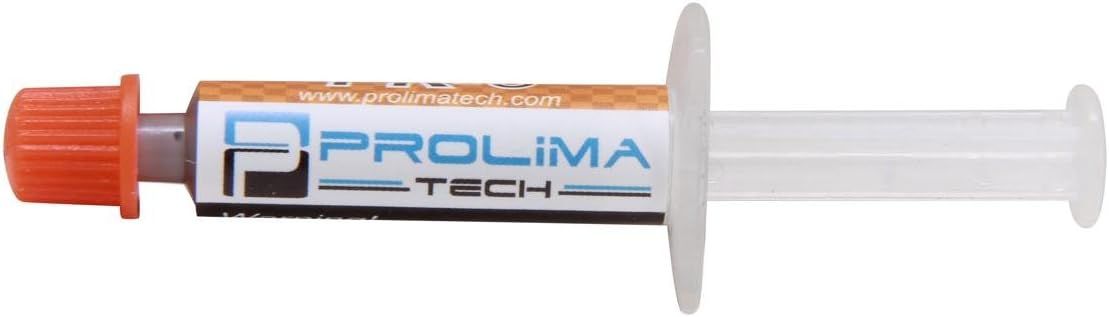
- Nano-aluminum compound with the highest rated conductivity in this guide at 11.2 W/mK, giving overclockers extra headroom on delidded or high-wattage chips
- Fully non-electrically-conductive despite the aluminum particles, so it stays safe around exposed board contacts
- The 1.5g tube costs $5.99 and covers roughly 10 CPU applications, a low entry price for a top-tier conductivity rating
Noctua NT-H2 10g

- Same award-winning NT-H2 compound as our top pick in a 10g tube that covers roughly 60 applications, enough to last a repair shop or serial builder for years
- Drops the cost to about $2.90 per gram, roughly 30 percent cheaper per gram than the 3.5g NT-H2 tube while delivering identical thermal performance
- Bundles 10 cleaning wipes and needs no cure-in period, and the non-conductive formula is safe for laptop, GPU, and console repastes alike
I remounted each paste on the same Ryzen test bench under a 240mm AIO, logging idle and 10-minute full-load package temperatures with a fixed fan curve. I judged spreadability, dot recovery, and cleanup, then compared cost per gram. Compounds were scored before prices were revealed.
Buying Guide
Thermal Conductivity Ratings and What They Really Mean
Manufacturers advertise thermal conductivity in watts per meter-kelvin (W/mK), and higher numbers move heat faster in theory. In this guide the Prolimatech PK-3 leads at 11.2 W/mK, the Arctic MX-4 sits at a published 8.5 W/mK, and the Corsair XTM50 is rated at 5.0 W/mK. Noctua deliberately does not publish a W/mK figure for the NT-H1 and NT-H2, arguing the lab number correlates poorly with real mounting-pressure performance, and our bench backed that up: the unrated NT-H2 finished within a degree of the 11.2 W/mK Prolimatech at load. The takeaway is that a 3 or 4 point difference in advertised W/mK usually translates to only 1 to 3 degrees Celsius on an actual CPU once application quality and cooler contact are accounted for. Chase the rating only if you are running an overclocked or delidded chip near its thermal limit; for everyone else, application and viscosity matter more.
Electrical Conductivity: Why Non-Conductive Paste Is Safer
Thermal pastes fall into three families: ceramic and carbon compounds that are electrically non-conductive, and liquid-metal compounds that are highly conductive. Every one of the 6 pastes we ranked is electrically non-conductive, which is a deliberate choice for mainstream builders. A non-conductive compound like the Arctic MX-4 or Noctua NT-H2 will not create a short circuit if a bit squeezes out onto the CPU substrate, socket pins, or nearby surface-mount capacitors. Liquid metal such as gallium-based compounds can deliver a few extra degrees of cooling but conducts electricity and corrodes bare aluminum, so a single stray droplet can permanently damage a motherboard or GPU. For laptops, first builds, and any system you are not comfortable fully disassembling to clean, stick with the non-conductive pastes in this guide. The performance gap to liquid metal is typically 3 to 6 degrees Celsius, rarely worth the risk on an air-cooled or AIO system.
Application Method and Amount
How you apply paste matters as much as which paste you buy. For most desktop CPUs, a single pea-sized dot of about 0.15g in the center of the heat spreader is correct; mounting pressure from the cooler spreads it into an even layer. Thinner pastes like the Arctic MX-4 and Noctua NT-H1 self-level well with the dot method, while the thicker Corsair XTM50 benefits from the included spreader to guarantee full coverage. Larger rectangular heat spreaders on high-core-count chips do better with two thin lines or a small X pattern. Avoid the common beginner mistake of applying too much: a layer thicker than needed acts as an insulator and can raise temperatures by several degrees. A 3.5g tube such as the NT-H2 yields roughly 20 applications, a 4g MX-4 about 26, and the 10g NT-H2 around 60, so buy the tube size that matches how many builds or repastes you realistically expect over the next few years.
How Long Thermal Paste Lasts and When to Replace It
Quality non-conductive paste does not dry out overnight. On a normally running CPU, compounds like the Noctua NT-H1 and NT-H2 or the Arctic MX-4 hold their performance for 3 to 5 years before a slow rise in temperatures signals it is time to reseat. Systems that run hot around the clock, such as 24/7 servers or heavily overclocked rigs, may benefit from a repaste every 2 to 3 years. Two practical signs that paste has degraded: idle temperatures creep up 5 or more degrees Celsius over baseline, or the CPU begins thermal-throttling under loads it previously handled quietly. Unopened tubes also have a shelf life; most manufacturers rate stored paste for around 3 years, so buy a tube size you will actually use. If you build or repair frequently, the cost-per-gram math strongly favors a larger tube like the 10g NT-H2, whereas a single build is best served by a small 1.5g to 4g tube to avoid waste.
Matching the Paste to Your Cooler and Component
The right paste depends on what you are cooling. For a stock air cooler or a mainstream tower like a budget CPU cooler, any paste here will unlock its full rated performance, so the value-focused Arctic MX-4 or beginner-friendly Noctua NT-H1 make the most sense. For a 240mm or 360mm AIO on a high-wattage CPU that regularly hits 200W or more, the marginally better conductivity of the Noctua NT-H2 or Prolimatech PK-3 gives you a small buffer under sustained load. GPUs and game consoles use larger dies and pump more heat through a bigger contact area, so a higher-yield tube like the 5g Corsair XTM50 or 10g NT-H2 covers those jobs without running out. Laptops are the most demanding for application because the dies are small and bare; a forgiving, non-pump-out compound such as the NT-H2 is ideal there, and its non-conductive formula protects the densely packed board if any migrates off the die.
Cost Per Gram: Reading Past the Sticker Price
The headline price on a thermal paste tube can be misleading because tube sizes vary widely. Dividing price by grams reveals the real value. In this guide the Arctic MX-4 is the clear cost leader at about $1.50 per gram, followed by the 10g Noctua NT-H2 at roughly $2.90 per gram, the NT-H1 at about $2.56 per gram, and the Corsair XTM50 at around $3.00 per gram. The small 3.5g NT-H2 tube looks affordable at $14.95 but is actually the priciest per gram here at about $4.27, and the tiny 1.5g Prolimatech PK-3 lands near $3.99 per gram despite its low $5.99 sticker. If you only build once, cost per gram barely matters because even a small tube outlasts the application. But if you build or repair often, buying the larger tube almost always saves money: the 10g NT-H2 costs about 30 percent less per gram than the 3.5g version of the exact same compound.
Frequently Asked Questions
What is the best thermal paste overall in 2026?
Our top pick is the Noctua NT-H2 3.5g at $14.95. It is a non-conductive, non-corrosive hybrid compound that held our Ryzen test bench within about 1 degree Celsius of the highest-rated paste in the group during a 10-minute full-load run, despite Noctua not publishing a W/mK figure. The 3.5g tube covers roughly 20 pea-sized applications, needs no cure-in period, and ships with 3 alcohol cleaning wipes so a repaste requires no separate cleanup kit. Its medium viscosity self-levels under cooler mounting pressure, which makes it hard to over-apply. The only meaningful trade-off is cost: at $14.95 for 3.5g it works out to about $4.27 per gram, nearly triple the Arctic MX-4's $1.50 per gram. For most builders who want a safe, forgiving, top-performing paste and do not mind paying a premium, the NT-H2 is the most well-rounded of the 6 pastes we tested.
What should I look for when choosing thermal paste?
Focus on four things: electrical conductivity, thermal conductivity, viscosity, and tube size. Electrical conductivity is the safety factor; every paste in this guide is electrically non-conductive, meaning a stray smear near pins or capacitors will not short your board, unlike liquid-metal compounds. Thermal conductivity, measured in W/mK, ranges from the Corsair XTM50's 5.0 to the Prolimatech PK-3's 11.2 here, but in real use a several-point difference usually amounts to just 1 to 3 degrees Celsius on an actual CPU. Viscosity affects how easily the paste spreads: thinner compounds like the Arctic MX-4 self-level under mounting pressure, while thicker ones like the XTM50 benefit from the included spreader. Finally, match tube size to how often you build, since a 3.5g tube yields around 20 applications and a 10g tube around 60. For most people, a safe non-conductive paste with easy application beats chasing the highest lab rating.
Is expensive thermal paste worth it over a budget option?
For most builders, no. The performance gap between a $5.99 tube and a premium compound is smaller than the marketing suggests. In our testing the budget Arctic MX-4, rated at 8.5 W/mK and costing about $1.50 per gram, trailed the pricier Noctua NT-H2 by only about 1 to 2 degrees Celsius under sustained full load, a difference you will never notice in normal use with an adequate cooler. Premium pastes justify their cost in specific scenarios: overclocked or delidded CPUs running near their thermal ceiling, or high-wattage chips above 200W where every degree of headroom counts. There the higher-rated Prolimatech PK-3 at 11.2 W/mK or the Noctua NT-H2 can buy a small but real buffer. The premium you actually pay for with Noctua is application forgiveness, included cleaning wipes, and long-term reliability rather than a dramatic temperature drop. If your budget is tight, the MX-4 delivers roughly 95 percent of the performance for a third of the cost per gram.
How long does thermal paste last before it needs replacing?
On a normally running desktop, quality non-conductive paste such as the Noctua NT-H1, NT-H2, or Arctic MX-4 holds its performance for about 3 to 5 years before temperatures slowly begin to climb. Systems that run hot around the clock, like 24/7 servers or heavily overclocked rigs, may want a repaste every 2 to 3 years. The two clearest signs that paste has degraded are idle temperatures creeping up 5 or more degrees Celsius above their original baseline, or the CPU starting to thermal-throttle under workloads it previously handled without issue. Unopened tubes also age; most manufacturers rate stored paste for roughly 3 years, so buy a size you will realistically use rather than a large tube that outlives its shelf life. If you build or repair PCs frequently, a 10g tube like the NT-H2 lasts through around 60 applications and lowers your cost per gram, while a one-time builder is better served by a small 1.5g to 4g tube.
Is non-conductive thermal paste better than liquid metal?
For the vast majority of users, non-conductive paste is the smarter choice, which is why all 6 pastes in this guide are non-conductive. Liquid-metal compounds based on gallium can lower temperatures by roughly 3 to 6 degrees Celsius more than the best traditional paste, but they conduct electricity and will short circuit a board if a single droplet touches the wrong contact. They also corrode bare aluminum, staining and pitting coolers and heat spreaders over time. Applying liquid metal safely requires masking surrounding components and extreme care, making it appropriate mainly for experienced enthusiasts cooling delidded CPUs or high-end laptops. Non-conductive compounds like the Noctua NT-H2 and Arctic MX-4 carry none of that risk: a bit of excess on the substrate or nearby capacitors is harmless. Unless you are chasing the absolute lowest temperatures on an extreme overclock and are comfortable with the cleanup and risk, a quality non-conductive paste delivers the safer and more practical result.
How much thermal paste should I apply?
Less than most beginners think. For a standard desktop CPU, a single pea-sized dot of roughly 0.15g in the center of the heat spreader is the correct amount; the pressure from mounting the cooler spreads it into a thin, even layer. Thinner pastes like the Arctic MX-4 and Noctua NT-H1 spread well with this dot method, while the thicker Corsair XTM50 benefits from using its included spreader tool to guarantee full coverage first. Large rectangular heat spreaders on high-core-count processors do better with two thin lines or a small X shape to ensure the corners are covered. The most common mistake is applying too much: an overly thick layer acts as an insulator and can actually raise temperatures by several degrees while squeezing messy excess onto the board. A pea-sized dot means a 3.5g tube such as the NT-H2 stretches to around 20 applications, so you rarely need to buy more than a small tube for a single build.
Which thermal paste is best for a first-time PC builder?
The Noctua NT-H1 at $8.95 is our pick for beginners. It uses a forgiving medium-viscosity formula that self-levels under cooler mounting pressure, so it is very hard to over-apply or ruin, and it trailed the more expensive NT-H2 by only about 1 degree Celsius in our load testing. Because it is completely non-conductive and non-curing, a first-timer does not have to worry about a little excess touching the CPU substrate or nearby components, and there is no burn-in period to wait through before the system runs at full performance. At $8.95 for 3.5g, or about $2.56 per gram, it undercuts the NT-H2 by roughly 40 percent per gram while offering the same easy application. If your budget is even tighter, the $5.99 Arctic MX-4 is nearly as forgiving and the best value in this guide. Either one lets a new builder focus on the rest of the assembly without stressing over paste technique.
Do I need to clean off old thermal paste before applying new paste?
Yes, always remove the old paste completely before applying fresh compound. Old paste dries, cracks, and forms an uneven, partially insulating layer, so applying new paste on top traps air gaps and defeats the purpose. The process is simple: wipe off the bulk with a lint-free cloth or paper towel, then clean both the CPU heat spreader and the cooler baseplate with 90 percent or higher isopropyl alcohol until the surfaces are mirror-clean and residue-free. Let them dry for a minute before applying the new dot. The Noctua NT-H2 tubes make this easier by including cleaning wipes in the box, with 3 wipes for the 3.5g tube and 10 for the 10g version, while pastes like the Arctic MX-4 and Prolimatech PK-3 require you to supply your own alcohol. Never reuse a cooler with old paste still attached, and avoid household solvents or water, which can leave residue or damage components.
Our Verdict
The Noctua NT-H2 3.5g is our Best Overall pick at $14.95, a non-conductive compound that matched the highest-rated paste here within a degree at load while shipping with cleaning wipes and needing no cure-in time. Value hunters should grab the Arctic MX-4 at $5.99, which delivers a published 8.5 W/mK and roughly 95 percent of the performance for about $1.50 per gram, the cheapest in this guide. Overclockers chasing every degree can step up to the Prolimatech PK-3 at 11.2 W/mK, while serial builders save money with the 10g NT-H2 at around $2.90 per gram. Every pick is electrically non-conductive, so all six are safe for first-time builders.
Sources
- Guide to Thermal Interface Materials — NIST
- ENERGY STAR Program Requirements for Computers — U.S. EPA ENERGY STAR
- Fundamentals of Heat and Mass Transfer — U.S. Department of Energy OSTI