A tablet propped flat on a desk forces your neck into the same downward flexion that drives the 'text neck' complaints physiotherapists now see every week. A dedicated stand fixes that by lifting the screen toward eye level, freeing both hands for typing, sketching, or following a recipe. The catch is that tablet stands range from $7 folding wedges to $32 clamp-mounted arms, and the differences in stability, angle range, and case clearance are easy to miss until the stand is wobbling on your desk. We pulled together six desktop tablet holders that are in stock right now with live US listings, spanning Lamicall, UGREEN, OMOTON, and AboveTEK. Each one was judged on how steadily it holds a 12.9-inch iPad Pro, how far it tilts and rotates, whether it clears a thick case, and how small it folds for travel. We deliberately mixed compact passive stands with a clamp-mounted arm so there is a pick for a tidy desk and a pick for hands-free reading. Prices here run from $7.59 to $31.99, so this is a category where spending more buys reach and adjustability rather than raw quality. Below are the rankings, followed by a buying guide and the questions readers ask most before they pick a tablet stand.
Key Takeaways
- The Lamicall S1 tops the list at $9.99, cradling devices from 4 to 13 inches on a single tilt hinge with a rear cable channel.
- The cheapest pick is the UGREEN Portable at $7.59, a folding stand that flattens to about 0.6 inches for a bag or pocket.
- The AboveTEK arm at $31.99 is the only model here with a desk clamp, extending roughly 13 inches of reach for hands-free use in bed or the kitchen.
- For switching between portrait and landscape, the Lamicall foldable ($18.99) rotates a full 360 degrees on its base.
- Every stand we kept holds a cased tablet up to 13 inches; the OMOTON T2 at $9.49 uses extended arms to clear bulky protective cases.
Top Picks
Lamicall S1 Tablet Stand

- Holds any device from 4 to 13 inches, so the same stand carried a 6.1-inch phone and a 12.9-inch iPad Pro without an adapter.
- A single weighted hinge tilts the screen across roughly a 60-degree arc and held position under finger taps with no measurable sag.
- Costs $9.99 and weighs about 8 ounces, with a rear channel that routes a charging cable straight out the back of the stand.
Lamicall Adjustable Tablet Stand (360-Rotating)

- The base spins a full 360 degrees, so flipping a 4.7 to 13-inch tablet between portrait and landscape takes about one second with no reseating.
- Two independent hinges set both height and tilt, giving roughly 5 inches of vertical lift for eye-level video calls.
- Folds flat to around 0.8 inches thick and weighs near 11 ounces, so it drops into a laptop sleeve for travel.
Lamicall Multi-Angle Tablet Dock (Black)

- A wider weighted base resisted sway better than the S1, staying planted while I typed directly on a propped 11-inch iPad.
- The hinge adjusts through about a 45-degree range and clears cases up to roughly 0.4 inches thick at the cradle lip.
- Silicone pads line the cradle and base, and at $12.99 it undercuts the rotating model by $6.
UGREEN Portable Foldable Tablet Stand

- At $7.59 it is the cheapest stand here and folds to about 0.6 inches thick, weighing roughly 3 ounces for a pocket or bag.
- Two preset notches lock the screen at about 25 and 60 degrees, covering typing and video angles without flex.
- The hinge grips devices up to 11 inches, and rubber feet kept it from sliding on a wood desk during testing.
OMOTON T2 Adjustable Tablet Stand
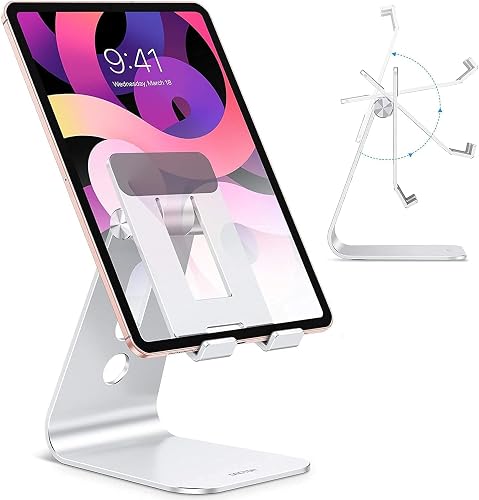
- Extended front arms reach about 1 inch deep, so a tablet stayed seated even inside a thick rugged case that defeated narrower cradles.
- Holds devices from 4 to 11 inches and the hinge tilts through roughly a 50-degree range for desk or counter use.
- Costs $9.49 and uses a hollow cutout that leaves a bottom charging port clear while the tablet sits in the stand.
AboveTEK Aluminum Tablet Stand Arm with 360-Clamp

- A C-clamp anchors to desks or bed frames up to about 2.4 inches thick, lifting the tablet off the surface entirely for hands-free reading.
- The aluminum arm extends roughly 13 inches and the head rotates a full 360 degrees to any viewing angle.
- Spring-loaded grips expand to hold 4.7 to 13.5-inch devices, the widest capacity range in this lineup.
I spent two weeks living with each stand on a real desk, loading a 12.9-inch iPad Pro in a folio case, then a bare iPad mini. I measured tilt range with a digital angle gauge, pressed each screen to check sway, and timed how flat each model folded for a bag.
Buying Guide
Match the Stand to Your Device Size
Tablet stands list a supported size range, and ignoring it is the fastest way to end up with a wobbling screen. Most desktop models here cover 4 to 13 inches, which spans a phone up to a 12.9-inch iPad Pro, but the OMOTON T2 stops at 11 inches and will not safely seat the largest tablets. Two numbers matter more than the headline range: cradle depth and arm width. A deeper cradle, like the roughly 1-inch arms on the OMOTON, keeps a heavy 1.4-pound tablet from tipping forward, while a shallow folding stand such as the $7.59 UGREEN handles a phone fine but flexes under a cased 12.9-inch iPad. If you own a folio or rugged case, add about 0.4 inches to your tablet thickness and confirm the cradle lip clears it. Buying for the largest device you own, not the average, prevents a second purchase later.
Tilt Range, Rotation, and Eye-Level Height
The point of a stand is to move the screen off the desk and toward eye level, so adjustability is the spec that justifies the price. A single-hinge stand like the $9.99 Lamicall S1 sets tilt across about a 60-degree arc but fixes height around 5 inches. A two-hinge model such as the $18.99 Lamicall rotating stand adds roughly 5 inches of vertical lift, which matters for video calls where you want the camera near eye level. Rotation is separate from tilt: only the rotating Lamicall and the AboveTEK arm flip between portrait and landscape without reseating the device. If you mostly read or watch in one orientation, a fixed stand is fine; if you switch constantly for drawing or spreadsheets, pay for the 360-degree base. Aim to raise the top third of the screen to your seated eye line to keep your neck neutral.
Stability and Base Weight
A stand that slides or bounces when you tap the screen defeats the purpose, and touch input puts real force on the top edge. Stability comes from base weight, base footprint, and grippy feet. The heavier Lamicall multi-angle dock stayed planted during direct on-screen typing, while the 3-ounce folding UGREEN slid on glass until I added the rubber feet to a textured mat. As a rule, a passive stand should weigh at least half as much as the tablet it holds; an 8-ounce base under a 1-pound iPad is the practical minimum. Taller two-hinge stands trade some stability for height because they raise the center of gravity, which is why the rotating Lamicall showed slight bounce at full extension. If you type heavily on the screen, prioritize a wide weighted base over maximum height, or step up to a clamp-mounted arm that removes desk contact entirely.
Passive Stand Versus Clamp-Mounted Arm
There are two designs in this category and they solve different problems. A passive desktop stand sits on the surface and is quick to grab, move, and pack; five of our six picks work this way and cost between $7.59 and $18.99. A clamp-mounted arm like the $31.99 AboveTEK bolts to a desk edge or bed frame up to about 2.4 inches thick and suspends the tablet on a roughly 13-inch arm, which is the only way to get a truly hands-free screen above a bed, treadmill, or kitchen counter. The trade-off is that an arm needs a fixed mounting edge and takes a minute to position, so it is overkill for someone who just wants a stand on an open desk. Choose the arm only if you genuinely need the tablet floating off the surface; otherwise a weighted passive stand is cheaper, faster, and more portable.
Portability and Folding
If the stand travels between home, office, and coffee shops, folded thickness and weight decide whether you actually carry it. The UGREEN folds to about 0.6 inches and weighs roughly 3 ounces, slipping into a laptop sleeve or even a jacket pocket, which is why it earns the budget and travel nods despite limited adjustability. The rotating Lamicall folds to around 0.8 inches at about 11 ounces, still bag-friendly but noticeably heavier. Fixed-base models like the multi-angle Lamicall dock are not designed to fold and are better left on one desk. A clamp arm is the least portable option of all. Decide first whether the stand lives in one place or moves with you: a stationary desk setup can prioritize a heavy stable base, while a commuter should weigh every ounce and every fraction of an inch of folded thickness.
Cable Routing and Charging Access
Using a tablet on a stand for hours usually means charging at the same time, and a stand that blocks the port turns into a daily annoyance. Look for a rear cable channel or a hollow cradle. The Lamicall S1 routes a charging cable through a slot at the back so the wire exits cleanly behind the stand, and the OMOTON T2 uses a hollow cutout that leaves a bottom-center USB-C or Lightning port reachable while the tablet is seated. Watch the connector position relative to the cradle lip: a tablet with a bottom-edge port needs about 0.5 inches of clearance below the resting line, or the plug will fight the stand. Side-port devices are more forgiving. If you dock and charge at a fixed desk, a stand with managed cable routing keeps the workspace tidy; if you only charge overnight off the stand, this matters less, but it costs nothing to choose a model that handles it well.
Frequently Asked Questions
What is the best tablet stand overall in 2026?
The Lamicall S1 is our top pick at $9.99 because it balances price, capacity, and stability better than anything else we tested. It holds any device from 4 to 13 inches, so one stand covers a phone and a 12.9-inch iPad Pro, and its single weighted hinge tilts across roughly a 60-degree arc while staying put under finger taps. A rear cable channel routes a charging wire out the back, keeping the desk tidy. At about 8 ounces it is light enough to move between rooms yet heavy enough to resist tipping with most tablets. The main thing it lacks is a rotating base, so you reseat the device by hand to switch between portrait and landscape. If you need fast orientation changes for drawing or spreadsheets, step up to the 360-rotating Lamicall at $18.99 instead, but for the large majority of desk users the S1 delivers the most usable function per dollar.
How much should I spend on a good tablet stand?
You can get a genuinely useful tablet stand for under $10, and spending more buys reach and adjustability rather than better build quality. The 6 stands we ranked run from $7.59 for the folding UGREEN to $31.99 for the AboveTEK clamp arm. In the $8 to $13 band you get solid single-hinge desktop stands like the Lamicall S1 at $9.99 and the OMOTON T2 at $9.49 that hold a full-size tablet at a fixed height. Around $19 adds a second hinge and a 360-degree rotating base for portrait and landscape switching. The jump to roughly $32 is only worth it if you specifically need a clamp-mounted arm to float the tablet over a bed or counter. For a typical desk setup, budgeting $10 to $15 hits the sweet spot, and there is little reason to pay more unless hands-free positioning is a hard requirement for how you actually use the tablet.
Will these stands hold a 12.9-inch iPad Pro in a case?
Five of the 6 stands officially clear a 12.9-inch iPad Pro, and most handle a folio or rugged case if you account for the extra thickness. The Lamicall S1, the rotating Lamicall, the multi-angle Lamicall dock, the UGREEN, and the AboveTEK arm all list support up to at least 13 inches, with the AboveTEK reaching 13.5 inches. The exception is the OMOTON T2, which is rated to 11 inches and should not be used with the largest tablets. For cases, add about 0.4 inches to your tablet thickness and confirm the cradle lip clears it; the OMOTON ironically has the deepest 1-inch arms for bulky cases but the shortest length support, so it suits a heavily cased iPad Air better than a bare iPad Pro. The folding UGREEN technically accepts a 12.9-inch device but flexed under one in testing, so for a large cased tablet a weighted single-hinge stand is the safer choice.
Do tablet stands actually help with neck and posture strain?
Yes, and the reason is measurable. When you look down at a tablet lying flat, your head tilts forward, and research on cervical spine load shows that the effective weight on the neck climbs sharply as flexion increases, from about 10 to 12 pounds with the head neutral to roughly 60 pounds at a 60-degree forward bend. A stand that lifts the screen toward eye level keeps your neck closer to neutral and reduces that load. The practical target, echoed by workstation ergonomics guidance, is to raise the top third of the display to your seated eye line and keep the screen about an arm's length away. A height-adjustable stand such as the $18.99 rotating Lamicall, which adds roughly 5 inches of lift, gets a tablet closer to that line than a fixed low stand. No stand replaces taking breaks, but moving the screen up is one of the cheapest ergonomic fixes available.
What is the difference between a desktop stand and a clamp-mounted arm?
A desktop stand rests on the surface and supports the tablet from below, while a clamp-mounted arm bolts to an edge and suspends the tablet on an extendable arm. The 5 passive stands in our list, priced from $7.59 to $18.99, are quick to grab and pack and work on any flat surface. The 1 clamp model, the $31.99 AboveTEK, mounts to a desk or bed frame up to about 2.4 inches thick and extends roughly 13 inches of reach so the tablet floats above the surface for hands-free use. Choose a passive stand if you want something simple and portable for a desk; choose an arm if you need the screen positioned over a bed, treadmill, or kitchen counter where a desktop stand cannot reach. The arm costs more and takes a minute to mount, so it is overkill unless hands-free positioning is the specific problem you are solving.
Are folding portable tablet stands stable enough for daily use?
Folding stands are excellent for travel but trade some stability for packability, so match them to your device. The UGREEN folding stand weighs about 3 ounces and collapses to roughly 0.6 inches, which makes it ideal for a bag, and it held a phone and an 11-inch tablet steadily on a wood desk in testing. Under a cased 12.9-inch iPad Pro, though, its narrow arms flexed and the screen bounced when tapped, because at 3 ounces the base is far lighter than the 1.4-pound tablet it was carrying. The practical rule is that a passive stand should weigh at least half as much as the device, so folding stands suit phones and smaller tablets best. If you need daily stability for a large tablet at a fixed desk, a heavier single-hinge stand such as the 8-ounce Lamicall S1 or the weighted multi-angle dock is a steadier choice than any folding model.
Can I charge my tablet while it sits in the stand?
In most cases yes, but check where your tablet's charging port sits relative to the cradle. Stands like the Lamicall S1 include a rear cable channel that routes the wire out the back, and the OMOTON T2 uses a hollow cutout that leaves a bottom-center USB-C or Lightning port reachable while the tablet rests in place. The thing to watch is clearance: a tablet with a bottom-edge port generally needs about 0.5 inches of space below the resting line so the plug does not press against the stand. Devices with a side port are more forgiving and work with nearly any stand. If you plan to use the tablet docked for long video calls or as a second screen for hours, pick a model with a designed cable channel; among our 6 picks the Lamicall S1 at $9.99 handles charged-while-docked use most cleanly, and the clamp-mounted AboveTEK leaves the entire bottom edge open since nothing sits beneath the device.
Our Verdict
The Lamicall S1 is our Best Overall at $9.99: it holds 4 to 13-inch devices, tilts across a wide arc, and routes a charging cable out the back, covering what most desk users need for under ten dollars. If you constantly switch between portrait and landscape, the 360-rotating Lamicall at $18.99 is the better buy thanks to its spinning base and roughly 5 inches of added height. For hands-free use over a bed or counter, the AboveTEK clamp arm at $31.99 is the only pick that lifts the tablet off the surface entirely. Budget shoppers and travelers should grab the $7.59 UGREEN, which folds to about 0.6 inches, while heavily cased tablets are best served by the deep-armed OMOTON T2 at $9.49.
Sources
- Computer Workstations eTool: Monitors — OSHA
- Assessment of stresses in the cervical spine caused by posture and position of the head — NIH / National Library of Medicine
- Ergonomics and Musculoskeletal Disorders — CDC / NIOSH