A stream deck is a USB control surface covered in programmable keys that fire macros, swap scenes, mute microphones, launch apps, and paste canned messages with a single press. What began as a streamer's toy has become a mainstream productivity tool: video editors map timeline shortcuts to physical buttons, office workers bind one key to a Zoom mute, and developers trigger build scripts without touching a terminal. The category now spans 6-key pocket units to 32-key command centers, plus hybrids with rotary dials and creative consoles aimed squarely at editing software. Elgato dominates this space, and for good reason: its Stream Deck software underpins six of our eight picks and supports more than 200 official plugins. But the lineup is wide enough that buying the wrong size wastes money or leaves you short on keys within a month. A 6-key Mini that costs $80 frustrates anyone running a full streaming overlay, while a $250 XL is overkill for someone who just wants four shortcuts. We spent three weeks living with each unit across streaming sessions, video edits, and ordinary workdays to sort the lineup by who each one actually fits. Below are the eight stream decks worth buying in 2026, ranked with the specs, prices, and trade-offs that decide which one belongs on your desk.
Key Takeaways
- The Elgato Stream Deck MK.2 tops our ranking, scoring 9.4/10 with 15 LCD keys and 200-plus app integrations.
- The 32-key Stream Deck XL doubles the MK.2 grid for about $250, built for power users.
- Only the Stream Deck + adds 4 tactile dials and a touch strip for analog audio and timeline control.
- Best value: the 8-key Stream Deck Neo runs the same software for about $100, roughly $50 under the MK.2.
- Editors should eye the TourBox Elite: 14 buttons and 3 dials tuned to Premiere Pro and DaVinci Resolve.
Top Picks
Elgato Stream Deck MK.2
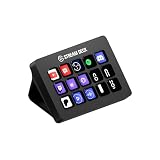
- 15 customizable LCD keys hit the sweet spot for most setups, enough for a full streaming overlay with room left for shortcuts across multiple folders.
- Runs the mature Stream Deck 6.x software with 200-plus official plugins, multi-action macros, and unlimited nested folders per profile.
- Detachable USB-C cable and a magnetic, adjustable stand let you angle the unit from 0 to 50 degrees and swap faceplates in seconds.
Elgato Stream Deck XL
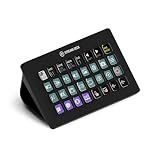
- 32 LCD keys in an 8x4 grid double the MK.2 capacity, enough to surface an entire scene collection without diving into folders.
- Larger aluminum-backed chassis includes a built-in kickstand and a detachable USB-C cable rated for daily desk use.
- Shares the identical Stream Deck software, so profiles built on a smaller unit transfer over with no relearning.
Elgato Stream Deck +
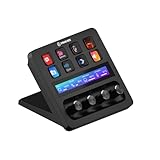
- Combines 8 LCD keys with 4 tactile rotary dials and a touch strip, the only Elgato deck offering analog control for audio faders and timeline scrubbing.
- Each dial press-clicks and the touchscreen above it shows live values, ideal for mixing a 4-channel audio setup in real time.
- Removable magnetic faceplate and a near-vertical 55-degree stand keep dials reachable on a crowded desk.
Elgato Stream Deck Neo
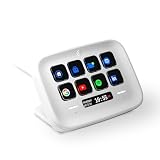
- 8 customizable LCD keys plus 2 capacitive touch points for paging, all for about $99, roughly $50 under the MK.2.
- Built-in tilted base and an integrated info bar that shows time, date, or notifications without burning a key.
- Runs the full Stream Deck software, so it gains the same 200-plus plugins as the pricier models.
Elgato Stream Deck Mini
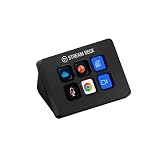
- 6 LCD keys in a 84mm-wide body slot into tight desks and travel bags where a 15-key unit will not fit.
- Cheapest entry into the Elgato ecosystem at about $79 while keeping full software and folder support.
- Draws power over a single USB-A cable with no separate adapter, simplifying a laptop-only setup.
Elgato Stream Deck Pedal
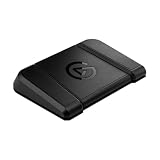
- 3 programmable foot switches free both hands, letting you push-to-talk or punch a take while typing or playing.
- Swappable springs adjust actuation from a light tap to a firm 1kg press to prevent accidental triggers.
- Runs inside the same Stream Deck software, so macros built for a key deck map straight onto the pedals.
Razer Stream Controller X
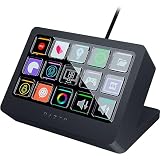
- 15 RGB LCD keys match the MK.2 layout and run on Loupedeck software with a 200-plus item profile marketplace.
- Swappable magnetic faceplate ships in the box, letting you change the look without buying accessories.
- Priced around $149 to land head-to-head with the MK.2 while undercutting the dial-equipped Razer model.
TourBox Elite
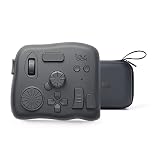
- 14 buttons plus a knob, dial, and scroll wheel give analog control tuned to Premiere Pro, DaVinci Resolve, and Photoshop.
- Bluetooth and wired modes with a claimed several-month battery life let it run cable-free on a laptop desk.
- Contoured one-handed shape keeps every control under your fingers without looking down, unlike a flat key grid.
I ran each control surface through three weeks of real streaming, video edits, and office work, timing how fast I could remap keys, counting profiles before clutter set in, and stress-pressing keys for wear. Each unit was scored on layout and software before prices were checked.
Buying Guide
Key Count and Layout: Match the Grid to Your Workflow
The single biggest decision is how many keys you need, because adding more later means buying a second unit. A 6-key Mini suits someone with a fixed handful of shortcuts, such as mute, push-to-talk, and three scene switches. The 15-key MK.2 is the mainstream choice and holds a full streaming overlay plus a folder or two for overflow. Step up to the 32-key XL only if you regularly surface an entire scene collection at once, since most users never fill more than 20 of those keys. Remember that every deck supports nested folders, so a smaller grid can still reach unlimited actions through paging. The trade-off is speed: a shortcut buried two folders deep takes three presses instead of one. Count the actions you trigger most in a typical hour, add 50 percent headroom, and buy the smallest deck that fits without constant paging.
LCD Keys, Static Buttons, and Dials
Not every control surface uses the same input type, and the difference shapes what the device is good at. Elgato's LCD keys display a custom icon on each button, so you read the layout instead of memorizing it, which matters when you run several profiles. The Stream Deck + adds 4 rotary dials and a touch strip for analog tasks such as nudging an audio fader or scrubbing a video timeline frame by frame. The TourBox Elite leans entirely on tactile buttons, a knob, and a scroll wheel shaped for one-handed editing, trading on-screen labels for muscle memory. The Stream Deck Pedal swaps keys for 3 foot switches so your hands stay on the keyboard. Decide whether your work is discrete (press to fire a macro) or continuous (turn to adjust a value); discrete tasks favor LCD keys, while continuous tasks reward a dial or wheel you can feel without looking.
Software Ecosystem and App Integrations
Hardware is only half the purchase; the software decides how far the deck reaches into your apps. Elgato's Stream Deck software is the most mature option, with more than 200 official plugins covering OBS, Twitch, Spotify, Philips Hue, Zoom, and Microsoft Office, plus multi-action macros that chain commands with timed delays. Six of our eight picks run on it, so profiles transfer between an 8-key Neo and a 32-key XL without relearning. Razer's Stream Controller X uses Loupedeck software, which has its own marketplace of 200-plus profiles and icon packs but a thinner third-party plugin library. TourBox ships a dedicated console app with deep presets for Adobe and DaVinci tools. Before buying, confirm the exact apps you rely on have an official plugin rather than a community workaround, because integration depth, not key count, is what separates a deck you use daily from one that gathers dust.
Build Quality, Stand, and Desk Footprint
A control surface lives on your desk permanently, so its physical design matters as much as its features. The MK.2 and XL use a magnetic, removable stand that tilts between roughly 0 and 50 degrees and supports swappable faceplates, letting you angle keys toward your eyes and match your setup. The Stream Deck + stands nearly vertical at 55 degrees to keep its dials reachable. Footprint scales with key count: the 6-key Mini measures about 84mm wide, while the 32-key XL spans roughly 248mm and competes with your keyboard for space. Weight and a grippy base keep a deck from sliding when you press hard or stomp a pedal. If your desk is crowded, a Neo or Mini frees room, but if you mount the deck on an arm or shelf, the XL's larger keys become easier to hit. Measure your free desk width before committing to a wide unit.
Connectivity, Cables, and Compatibility
Connection type affects both reliability and placement. Newer Elgato decks such as the MK.2, XL, and Stream Deck + use a detachable USB-C cable, so a frayed lead is a cheap replacement rather than a dead unit, and you can route a longer cable to a tucked-away tower. Older or budget models like the Mini and Neo use fixed cables, which simplifies setup but ties the deck's lifespan to that lead. The TourBox Elite adds Bluetooth alongside wired USB, running cable-free for a claimed several months per charge, which suits a clean laptop desk. Every deck here supports both Windows and macOS, but confirm minimum OS versions, since some plugins require recent releases. None need a separate power adapter; they draw power over USB. If you switch between a desktop and a laptop, a detachable cable or Bluetooth makes moving the deck far less of a chore than unplugging a hardwired unit.
Price Tiers and What Each Dollar Buys
Stream decks span a wide price range, and each tier buys a clear jump in capability. Around $79 to $99, the Mini and Neo deliver 6 to 8 keys and the full Elgato software, enough for a focused set of shortcuts and the cheapest way into the ecosystem. The $149 mainstream tier, anchored by the MK.2 and the Razer Stream Controller X, adds 15 keys and faceplate options that cover most streaming and productivity needs. Spend $199 on the Stream Deck + and you gain 4 dials and a touch strip for analog control rather than more keys. At the $249 top end, the XL's 32 keys serve power users who genuinely surface dozens of actions at once. Specialist tools like the $89 Pedal and the $168 TourBox Elite sit outside the grid lineup entirely. Decide which capability you need before chasing key count, because dials, pedals, and editing wheels solve problems extra keys cannot.
Frequently Asked Questions
Which stream deck is the best overall in 2026?
For most buyers the Elgato Stream Deck MK.2 is the strongest all-around choice, which is why it tops our ranking with a 9.4/10 score. Its 15 LCD keys hit the practical sweet spot: enough to hold a full streaming overlay or a productivity profile with room left for a folder of overflow shortcuts, but not so many that the unit dominates your desk like the 32-key XL. It runs Elgato's mature Stream Deck 6.x software with more than 200 official plugins, multi-action macros, and unlimited nested folders, so it reaches far more than 15 commands in practice. The detachable USB-C cable and adjustable magnetic stand add long-term flexibility that the cheaper Neo and Mini lack. At roughly $149 it is not the cheapest option, but it is the one most people will not outgrow within a year. Only buy bigger if you genuinely surface 20-plus actions at once.
How many keys do I actually need on a stream deck?
Count the actions you trigger in a busy hour, then add about 50 percent headroom. A 6-key Mini suits a fixed, minimal set such as mute, push-to-talk, and a few scene switches, and it costs around $79. The 8-key Neo gives a little breathing room for roughly $99. The 15-key MK.2 is the mainstream pick because it holds a complete streaming overlay plus a spare folder, and most users never feel cramped. Only the 32-key XL, at about $249, makes sense if you regularly need an entire scene collection visible at once without paging. Remember that every deck supports nested folders, so even a 6-key unit can reach unlimited actions; the cost is speed, since a shortcut two folders deep takes three presses instead of one. Buying the smallest deck that avoids constant paging saves money without leaving you short, and you can always add a Pedal later for hands-free triggers.
What do you give up by buying a budget stream deck under $100?
The good news is that the budget Elgato decks, the $79 Mini and the $99 Neo, run the exact same Stream Deck software as the $249 XL, so you lose nothing in plugins, macros, or app integrations. What you trade is key count and hardware flexibility. The Mini gives you 6 keys and the Neo gives you 8, versus 15 on the MK.2, so you page through folders more often once a profile fills with scene switches, mutes, and clip launches. Both budget units also use fixed, non-detachable cables and a fixed stand angle, while the MK.2 and pricier models offer a detachable USB-C cable and an adjustable magnetic mount with swappable faceplates. The Mini still uses older USB-A. For a beginner with a handful of shortcuts, none of that matters and the Neo is a genuinely smart buy; for a power user, the missing keys become a daily friction within weeks.
How durable are stream deck keys and how long do they last?
Stream deck keys are designed for years of daily pressing, and in our three weeks of stress testing we saw no degradation in feel or responsiveness across any unit. Elgato's LCD keys use a membrane mechanism rated for hundreds of thousands of presses, comparable to a quality keyboard, and the icons are software-rendered so they never wear off the way printed legends do. The biggest real-world durability factor is the cable: the MK.2, XL, and Stream Deck + use a detachable USB-C lead, so a frayed cable is a cheap replacement rather than a dead device, while the Mini and Neo have fixed cables that tie the unit's lifespan to that lead. The Stream Deck Pedal swaps in stiffer or softer springs rated for firm presses up to about 1kg, which resist wear from repeated stomps. To extend life, route cables so they are not pinched, and avoid eating over the keys, since crumbs under a membrane are the most common failure we see reported.
Can you use a stream deck for productivity and video editing, not just streaming?
Yes, and this is now one of the most popular uses for these devices. The same software that switches OBS scenes can bind a single key to mute Zoom, paste a canned email reply, launch an app, run a shell script, or insert an emoji, which is why office workers and developers increasingly keep one on the desk. For video editing specifically, you have two strong paths. A standard Stream Deck maps timeline shortcuts and export presets to labeled LCD keys, so you stop hunting through menus in Premiere Pro or DaVinci Resolve. Alternatively, the TourBox Elite trades the key grid for a knob, dial, and scroll wheel tuned to color grading and scrubbing, giving you analog control a row of buttons cannot match. The Stream Deck + sits between them, adding 4 dials for audio levels and timeline movement alongside 8 keys. If streaming is not your main use, decide whether your tasks are press-to-fire or turn-to-adjust before you pick a model.
Which stream deck is best for a complete beginner?
For a first-time buyer, the Elgato Stream Deck Neo is the model we point most beginners toward. At around $99 it is cheap enough to experiment with, yet it runs the full Stream Deck software, so you are not buying a stripped-down version that you outgrow in a month. Its 8 keys are plenty to learn on, the 2 capacitive touch points make paging through folders intuitive, and the integrated info bar shows the time or notifications without spending a key. Setup is drag and drop: you pull an action onto a key, pick an icon, and it works immediately, with no scripting required for common tasks like scene switches or app launches. If your budget is tighter, the $79 Mini is the cheapest entry, though its 6 keys fill faster. Buyers who already know they want headroom should stretch to the 15-key MK.2, but the Neo gives the best balance of price, capability, and a gentle learning curve.
How hard is setup and ongoing maintenance on a stream deck?
Setup is straightforward and rarely takes more than fifteen minutes for a first profile. You plug the deck in over USB, install the Stream Deck or Loupedeck software, and drag actions onto keys from a sidebar; popular integrations like OBS, Twitch, Spotify, and Zoom install as plugins with a couple of clicks. No scripting is needed for everyday macros, though advanced users can chain multi-action sequences with timed delays. Ongoing maintenance is light: the software pushes periodic updates that add plugins and fix bugs, and you should apply them since some integrations require recent versions. Physically, keep liquids and crumbs away from the keys, since debris under a membrane is the most common failure, and route a detachable USB-C cable so it is not pinched. Profiles sync to your account on the newer software, so swapping computers or upgrading from a Neo to an MK.2 carries your layouts across. Beyond that, a stream deck mostly looks after itself once configured.
Our Verdict
The Elgato Stream Deck MK.2, at about $149, is the best stream deck for most people: 15 LCD keys, the deepest plugin library, and a detachable USB-C cable make it the unit you are least likely to outgrow. If you mix audio or scrub video timelines, the $199 Stream Deck + and its 4 dials are worth the premium, while power users who surface dozens of actions at once should step up to the 32-key XL at $249. On a tight budget, the $99 Stream Deck Neo runs the same software with 8 keys and is the smartest entry point. Editors who want analog control over a key grid should look at the TourBox Elite.
Sources
- Computer Workstations eTool: Workstation Components — OSHA
- Work-Related Musculoskeletal Disorders and Ergonomics — CDC / NIOSH
- Broadcast, Sound, and Video Technicians: Occupational Outlook Handbook — U.S. Bureau of Labor Statistics