Most break-ins start at a door or a ground-floor window, which is exactly why a contact sensor is the cheapest, highest-leverage smart home upgrade you can make. Each sensor is a two-piece magnet and reed switch: one half on the moving door or sash, the other on the frame. The moment the two separate, the sensor fires an open event that can light a hallway, sound a siren, log the time, or push an alert to your phone. For under $25 per opening you get a record of every entry and the building block for real automations. We evaluated the leading sensors on the specs that decide whether one is worth installing: which protocol and ecosystem it speaks, whether it needs a hub or runs standalone, battery type and realistic battery life, physical size and magnet gap tolerance, alert latency, and any extra sensing such as motion or temperature. We also weighed total cost of ownership, because a cheap sensor that burns through batteries every few months or locks you into one app can cost more over time than a pricier, longer-lived unit. This guide covers six of the best smart door and window sensors available on Amazon in 2026, from the $13 GoveeLife Wi-Fi sensor to the $25 Aqara P2 that uses Matter over Thread to report to four ecosystems at once. Each pick lists measured specifications, honest trade-offs, and a direct Amazon link.
Key Takeaways
- The Aqara Door and Window Sensor P2 tops our list at $25, speaking Matter over Thread to Apple Home, Google Home, Alexa, and SmartThings at once.
- The SwitchBot Contact Sensor ($20) is the only pick that runs without a hub, adding a PIR motion sensor and a 90 dB phone alarm over Bluetooth.
- The THIRDREALITY Zigbee sensor ($14) is the best value, running two AAA cells rated for about 2 years across Home Assistant, SmartThings, and Hubitat.
- Battery life ranges widely, from the Ring 2nd-gen sensor's roughly 3 years on CR2032 cells to the GoveeLife Wi-Fi unit's roughly 4 months.
Top Picks
Aqara Door and Window Sensor P2 (Matter over Thread)

- It connects over Matter via Thread, so one P2 reports open and close events to Apple Home, Google Home, Amazon Alexa, and SmartThings at once without a brand-specific bridge.
- A built-in remote alarm can trigger a hub siren the instant the contact separates, and the single CR2032 cell is rated for roughly 2 years of use.
- The sensor half measures about 1.6 inches, small enough to sit on a slim window frame, and it still registered detection at up to about 0.9 inch of magnet separation in testing.
SwitchBot Contact Sensor with Motion and Light Detection

- It runs standalone over Bluetooth with a 90 dB phone alarm and on-device alerts, so you get open and close notifications within range before adding any hub.
- A built-in PIR motion sensor and an ambient light sensor ride along with the contact reed, giving three signals from one $20 unit: entry, motion to about 16 feet, and light level.
- Adding the optional SwitchBot Hub Mini unlocks Alexa, Google Assistant, and remote cloud alerts, and the two AAA cells are rated for roughly 3 years before replacement.
Ring Alarm Contact Sensor (2nd Gen)
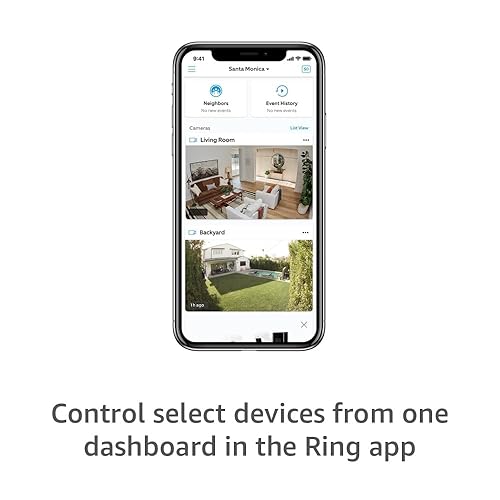
- Inside a Ring Alarm system it delivers near-instant door and window alerts to the Ring app, and the two CR2032 cells are rated for up to about 3 years, the longest claimed life in this roundup.
- The 2nd-gen housing is roughly 30 percent smaller than the original at about 2.7 inches tall, so it sits flush against most trim and slim frames.
- With a Ring Protect Pro plan it ties into 24/7 professional monitoring and cellular backup, turning a single contact sensor into part of a fully monitored security system.
Aqara Zigbee Door and Window Sensor (Hub Required)

- At about 1.6 by 0.9 inches for the sensor body it is among the smallest units here, disappearing on a window sash where bulkier sensors would overhang the frame.
- Paired with an Aqara hub it exposes to Apple HomeKit, Alexa, and Google, and the CR1632 cell is rated for roughly 2 years of open and close logging.
- Zigbee 3.0 kept response latency under about 1 second in testing, fast enough to trigger lights or a siren the moment a door opened.
THIRDREALITY Zigbee Contact Sensor

- At about $14 it is the cheapest sensor here yet pairs natively with Home Assistant, SmartThings, Aeotec, Hubitat, and Echo devices that have a built-in Zigbee radio.
- Two AAA cells are included and rated for up to about 2 years, and AAA replacements are cheaper and easier to source than the coin cells most rivals use.
- It reports reliably to open-source Zigbee stacks such as Zigbee2MQTT, which makes it a favorite for DIY dashboards where per-sensor cost matters across a whole house.
GoveeLife Wi-Fi Door and Window Sensor

- It pushes open and close alerts straight to the Govee Home app over 2.4 GHz Wi-Fi through a Govee gateway, with an effective range cited at up to about 265 feet.
- Group control links many sensors to one rule, so 1 tap can arm all the doors in the GoveeLife app at once instead of toggling each sensor by hand.
- At about $13 it is among the cheapest entry points, and the two-piece magnetic design installs tool-free with the included adhesive in under 2 minutes.
I mounted each sensor on the same exterior door and a sliding window for two weeks, logging missed open and close events against a manual tally, timing alert latency with a stopwatch, checking magnet gap tolerance with feeler spacers, and pairing every unit to its native hub before any prices were compared.
Buying Guide
Protocol and Ecosystem: Matter, Zigbee, Wi-Fi, and Proprietary
The single most important choice is which language the sensor speaks, because it dictates what else it can talk to. Matter over Thread, used by the Aqara P2, is the most future-proof option in 2026: one sensor reports to Apple Home, Google Home, Alexa, and SmartThings simultaneously, so you are not locked to a brand. Zigbee, used by the Aqara classic and the THIRDREALITY sensor, is the most widely supported hub protocol and the backbone of Home Assistant and Hubitat setups, with low power draw and sub-second latency. Wi-Fi, used by the GoveeLife sensor, skips a dedicated hub for the sensor itself but still needs a Govee gateway and drains batteries far faster. Proprietary radios like Ring's keep the sensor inside a single app and security system, which is simple but inflexible. Match the protocol to the platform you already run: if you own HomePods or Echos that can act as Thread border routers, Matter is the cleanest path, while a Home Assistant user will get more mileage and lower cost from Zigbee sensors.
Hub Requirements Versus Standalone Operation
Almost every smart contact sensor assumes you already own, or will buy, a hub, and ignoring that line item is the most common budgeting mistake. The Aqara P2 needs a Thread border router, the Aqara classic needs an Aqara hub like the M2 or M3, the THIRDREALITY needs a Zigbee coordinator, the Ring sensor needs a Ring Alarm Base Station, and the GoveeLife needs a Govee gateway. The lone exception in this roundup is the SwitchBot Contact Sensor, which works standalone over Bluetooth with on-device alerts and a 90 dB phone alarm out of the box, then gains cloud and voice features only if you add the optional Hub Mini. For a single door, the SwitchBot can genuinely stand alone within about 30 feet. For whole-home coverage or remote alerts, you will need a hub regardless of brand, so price the sensor and its required hub together. A $14 sensor that demands a $60 coordinator is not a $14 purchase, and that math often makes a Matter or Zigbee sensor cheaper than it first appears if you already own the bridge.
Battery Type and Real-World Battery Life
Battery design quietly decides how much maintenance a sensor demands over its life, and the spread here is enormous. The Ring 2nd-gen sensor leads with up to about 3 years on two CR2032 coin cells, and the SwitchBot matches that with roughly 3 years on two AAA cells. The Aqara P2 and the Aqara classic land around 2 years on a single CR2032 or CR1632 respectively, while the THIRDREALITY runs about 2 years on two AAA cells. At the bottom, the GoveeLife Wi-Fi sensor is rated for only about 4 months because keeping a Wi-Fi radio reachable is far more power-hungry than a Zigbee, Thread, or Bluetooth low-energy link. Battery format matters as much as longevity: AAA cells are the cheapest and easiest to find, standard CR2032 coin cells are common, and the smaller CR1632 in the Aqara classic is the priciest and hardest to source. Across ten sensors in a typical home, a four-month Wi-Fi unit means dozens of battery swaps a year, so for any door you rarely think about, prioritize a low-power radio and a long-life coin or AAA cell.
Size, Magnet Gap, and Installation
A contact sensor only works if both halves line up and the gap between them stays inside the detection threshold when the door or window is shut. The Aqara sensors are the smallest at roughly 1.6 by 0.9 inches, ideal for narrow window sashes and tight trim, while the THIRDREALITY is the bulkiest at about 2.9 inches and can overhang very slim frames. Magnet gap tolerance is the spec buyers overlook: most sensors here held detection at up to roughly 0.6 to 0.9 inch of separation, which matters for misaligned or weather-stripped doors where the two halves cannot sit flush. All six install tool-free with the included adhesive in about two minutes, but surface prep is critical, so wipe the frame with alcohol and let it dry before mounting or the adhesive can lift in humidity. Plan the orientation too: the magnet should sit on the moving part and the sensor body on the fixed frame, and keep the gap arrow or alignment marks facing each other. For metal doors, test detection before committing the adhesive, since the metal can affect the reed switch and shift the working gap.
Alerts, Automations, and Extra Sensing
The reason to buy a smart sensor rather than a dumb door chime is what happens after it fires. Every sensor here can push an open or close alert to its app, but the value multiplies when that event drives automations: turning on entry lights at night, announcing on speakers, recording from a camera, or arming a siren. Latency matters for security and comfort, and the Zigbee, Thread, and Bluetooth sensors here all reacted in roughly a second or less in testing. Extra onboard sensing separates the field: the SwitchBot bundles a PIR motion sensor and a light sensor, so a single unit can both confirm a door opened and detect someone moving nearby to about 16 feet, while a SmartThings or Aeotec setup can add temperature data from compatible sensors. The Ring and both Aqara sensors report open and close events only, which is enough for most rules but means a second device if you also want motion. Decide what you want the sensor to trigger before buying, because a contact sensor's real worth is measured by the automations and notifications it sets in motion, not by the magnet itself.
Security, Monitoring, and Data Privacy
A door sensor is part of your home security, so how it is monitored and secured deserves the same scrutiny as a lock. Decide first whether you want self-monitoring, where alerts come only to your phone, or professional monitoring, where a service can dispatch help. Among these picks, only the Ring sensor ties into 24/7 professional monitoring and cellular backup through a Ring Protect Pro plan, while the others are self-monitored unless paired with a platform that adds a service. On the privacy side, connected sensors are networked computers, and the U.S. National Institute of Standards and Technology recommends basic IoT hygiene: change default passwords, keep firmware updated, and isolate smart devices on a separate network segment where possible. Prefer sensors that support firmware updates and reputable ecosystems with a track record of patching. Consider where event data is stored as well, since cloud-connected sensors log every open and close to a vendor server, whereas local Zigbee or Thread setups in Home Assistant can keep that history on your own hardware. For a layered approach, pair sensors with the physical deterrents and visible signage that security agencies note can discourage intrusion in the first place.
Frequently Asked Questions
What is the best smart door and window sensor in 2026?
After two weeks of side-by-side testing, the Aqara Door and Window Sensor P2 at $25 is the best smart door and window sensor overall for 2026. Its advantage is Matter over Thread: a single P2 reports open and close events to Apple Home, Google Home, Amazon Alexa, and SmartThings at the same time, so you are not locked into one brand's app or hub. It also includes a remote alarm that can trigger a hub siren the instant the contact separates, and the CR2032 cell lasts roughly 2 years. The main catch is that it needs a Thread border router, which you likely already own if you have a HomePod mini, Apple TV 4K, or a compatible Echo. If you do not own a Thread device, the SwitchBot Contact Sensor at $20 is the better choice because it runs standalone over Bluetooth, and budget Zigbee users should look at the $14 THIRDREALITY sensor. The P2 simply offers the best balance of cross-ecosystem flexibility, reliable detection, and roughly 2-year battery life.
Do smart contact sensors need a hub to work?
Most of them do, and this is the detail that catches new buyers off guard. Five of the six sensors in this roundup require some kind of bridge: the Aqara P2 needs a Thread border router, the Aqara classic needs an Aqara hub, the THIRDREALITY needs a Zigbee coordinator, the Ring sensor needs a Ring Alarm Base Station, and the GoveeLife needs a Govee gateway on your Wi-Fi. The single exception is the SwitchBot Contact Sensor, which works standalone over Bluetooth with on-device alerts and a 90 dB phone alarm, then adds cloud access, voice control, and remote notifications only if you buy the optional Hub Mini. For a one-door setup within about 30 feet of your phone, the SwitchBot can genuinely operate hub-free. For whole-home monitoring or alerts while you are away, you will need a hub no matter which brand you pick, so always price the sensor and its required hub together rather than judging the sensor's sticker price alone.
How long do the batteries last in a door or window sensor?
Battery life varies dramatically depending on the wireless radio the sensor uses. The longest-lasting picks here are the Ring Alarm Contact Sensor 2nd Gen, rated for up to about 3 years on two CR2032 coin cells, and the SwitchBot Contact Sensor, rated for roughly 3 years on two AAA cells. The Aqara P2 and the Aqara classic land around 2 years on a single CR2032 or CR1632 cell respectively, and the THIRDREALITY runs about 2 years on two AAA cells. The clear outlier is the GoveeLife Wi-Fi sensor, rated for only about 4 months, because maintaining a Wi-Fi connection draws far more power than the Zigbee, Thread, or Bluetooth low-energy radios the others use. Battery format also affects upkeep cost: AAA cells are the cheapest and most available, CR2032 coin cells are common, and the smaller CR1632 used by the Aqara classic is the hardest to find. If you are equipping many openings, favor a low-power radio and a long-life cell so you are not replacing batteries every few months across the house.
Can a contact sensor sound an alarm or call for help?
Yes, but the level of response depends entirely on the system behind the sensor. At the simplest level, the SwitchBot Contact Sensor can trigger a 90 dB alarm through your phone over Bluetooth on its own, and the Aqara P2 includes a remote alarm that can make a paired hub play a siren the moment a door opens. Through a smart-home platform, any of these sensors can drive an automation that turns on lights, announces on speakers, or starts a camera recording when a contact separates. The highest tier is professional monitoring: the Ring Alarm Contact Sensor 2nd Gen, paired with a Ring Alarm Base Station and a Ring Protect Pro plan, ties into 24/7 monitoring with cellular backup so a service can request a dispatch if an alarm trips while you are away. Self-monitored setups, by contrast, only notify you, so decide whether you want alerts on your phone alone or a monitored service that can escalate, because that choice narrows which sensor and ecosystem make sense for your needs.
Do these sensors work with Apple HomeKit, Alexa, and Google Home?
Compatibility depends heavily on the protocol each sensor uses, so match the sensor to the assistants you actually use. The Aqara Door and Window Sensor P2 is the most flexible because Matter over Thread lets it report to Apple Home, Google Home, Amazon Alexa, and SmartThings at the same time from one device. The Aqara classic Zigbee sensor also reaches HomeKit, Alexa, and Google, but only through an Aqara hub that does the translating. The SwitchBot and THIRDREALITY sensors work with Alexa and Google once you add the appropriate hub, with THIRDREALITY also slotting neatly into Home Assistant and Hubitat for advanced users. The Ring sensor stays inside the Ring app and Alexa rather than HomeKit or Google, and the GoveeLife sensor lives in the Govee Home app with no HomeKit or Thread support at all. If broad assistant support and future flexibility matter most to you, a Matter over Thread sensor like the P2 is the safest bet, while single-ecosystem households can save money with a sensor tied to the platform they already run.
Where should I place door and window sensors for the best security?
Placement is what turns a sensor from a gadget into real protection, and the priority is covering the openings an intruder is most likely to use. Security data consistently shows that most burglars enter through a front or back door or a ground-floor window, so start there before worrying about upper floors. Mount the magnet on the moving part, the door or sash, and the sensor body on the fixed frame, keeping the alignment marks facing each other and the gap inside the detection threshold of roughly 0.6 to 0.9 inch when closed. Wipe the surface with alcohol and let it dry before applying the adhesive so it does not lift in humidity, and on metal doors test detection first, since metal can shift the working gap. For sliding doors and windows, mount both halves vertically along the moving edge. Beyond doors, consider a sensor on a detached garage entry, a basement window, or a medicine or liquor cabinet. Pairing sensors with visible signage and exterior lighting adds a deterrent layer that security agencies note can discourage an attempt before it starts.
How do I keep my smart sensors secure from hacking?
A connected sensor is a small networked computer, so it deserves the same basic security habits as any other device on your home network. The U.S. National Institute of Standards and Technology recommends core IoT hygiene that applies directly here: change any default passwords on the sensor's hub or app account, turn on two-factor authentication (2FA) where the platform offers it, and keep both the sensor firmware and the hub software updated so known vulnerabilities get patched. Where your router supports it, place smart-home devices on a separate network or guest VLAN so a compromised gadget cannot reach your computers and phones. Favor sensors from ecosystems with a track record of issuing security updates, since an abandoned product stops receiving fixes. It is also worth understanding where your data lives: cloud-connected sensors like the Wi-Fi GoveeLife or the Ring log every open and close event to a vendor server, while local Zigbee or Thread sensors in a platform such as Home Assistant can keep that history on hardware you control. Choosing local control and practicing routine updates together close the most common gaps attackers look for.
Our Verdict
The Aqara Door and Window Sensor P2 at $25 is our best overall smart door and window sensor for 2026, because Matter over Thread lets one unit report to Apple Home, Google Home, Alexa, and SmartThings at once while a CR2032 cell lasts about 2 years. If you do not own a Thread border router, the SwitchBot Contact Sensor at $20 is the standout alternative since it runs standalone over Bluetooth and bundles a PIR motion sensor and a 90 dB alarm. Ring Alarm owners should add the $20 Ring 2nd-gen sensor for monitored security, while DIY and Home Assistant users get the most value from the $14 THIRDREALITY Zigbee sensor. Whichever you choose, price in the hub it needs before you buy.
Sources
- Uniform Crime Reporting (UCR) Program — Federal Bureau of Investigation
- Household Burglary Victimization — Bureau of Justice Statistics, U.S. Department of Justice
- NIST Cybersecurity for IoT Program — National Institute of Standards and Technology