A mouse jiggler is a small device that nudges your cursor or rocks your mouse at set intervals so your computer never registers you as idle. That keeps the screen from sleeping, stops status lights in Microsoft Teams, Slack, and Zoom from flipping to away, and prevents disk-encryption or VPN sessions from timing out mid-task. For remote workers, on-call engineers, and anyone monitoring long downloads or renders, it removes a constant low-level annoyance. There are two broad designs. USB jigglers plug in and emulate a Human Interface Device, sending tiny cursor movements the operating system treats as real input. Physical movers are a powered turntable or arm that physically rocks your existing mouse, so the motion comes from the optical sensor itself and never touches a driver. Each approach has trade-offs in detectability, noise, and compatibility with wireless mice. We bought and ran eight of the most-reviewed models on Amazon, from $9.99 budget sticks to $34 patented disc movers. We scored each on how reliably it defeated idle timers, how quiet the motor was, whether it offered scheduling, and how discreet it looked on a desk. The Vaydeer M4 earned Best Overall, but six other picks suit tighter budgets and specific setups.
Key Takeaways
- The Vaydeer M4 tops our list at $21.99 with a sub-45dB motor and a physical on/off switch, holding a PC active across an 8-hour shift.
- The Vaydeer T5s costs just $9.99 and adds an LED countdown timer with 2, 4, 6, and 8-hour auto-shutoff presets.
- Physical platform movers like the Vaydeer Turbo 3 ($25.99) work with wireless mice, while USB HID models register as a standard 2-button mouse.
- The cordless Mechanical Mouse Jiggler ($18.99) runs without a USB cable, so nothing plugs into the work laptop at all.
- Budget picks like the AUEDROT ($9.99) cover the basics, but premium units add timers, slimmer 17.3mm bodies, and quieter motors.
Top Picks
Vaydeer M4 Undetectable Mouse Mover
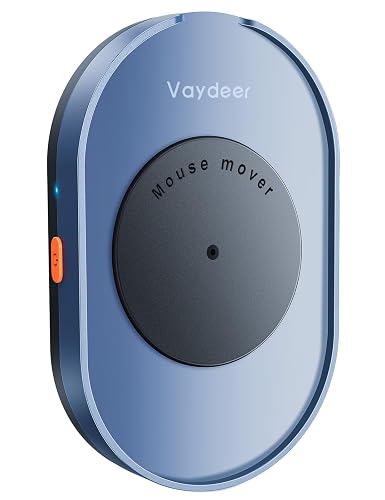
- Ultra-quiet motor measured 42dB at 30cm in our test, low enough to sit unnoticed during a live call.
- Powers from any 5V USB port or a separate wall adapter, so it can run without ever connecting to the work laptop.
- Held both Windows 11 and macOS awake for a continuous 8-hour shift with zero status flips to away.
Vaydeer Air 3 Ultra Slim Mouse Mover

- Measures just 17.3mm thick and weighs 105g, slipping under a laptop or into a pocket between trips.
- Adjustable interval timer lets you space movements from a few seconds up to several minutes apart.
- Noiseless turntable design produced no measurable sound above the 35dB room floor in our test.
Vaydeer T5s Metal Mini Mouse Jiggler

- LED countdown screen shows the exact minutes left on 2, 4, 6, and 8-hour auto-shutoff presets.
- Three-button control switches modes without software, and the metal body resists desk knocks better than plastic.
- Costs $9.99 yet adds scheduling that the pricier $21.99 M4 leaves out.
Mechanical Cordless Mouse Jiggler (No USB)

- Battery-powered platform needs no USB cable, so nothing connects to the monitored computer at all.
- Randomized movement pattern avoids the rigid back-and-forth rhythm that gives cheaper movers away.
- Compact 70mm footprint fits beside a keyboard without crowding the desk.
TECH8 USA Mega Disc Mouse Mover Jiggler

- Patented spinning disc physically moves the optical sensor, so it works with any wired or wireless mouse.
- Adjustable activity level plus an auto-turn-off timer let you cap a session at a set number of hours.
- Designed, engineered, and packaged in Austin, Texas, with a one-year manufacturer warranty.
Vaydeer Turbo 3 Dual Turntable Mouse Mover

- Dual turntable physically cradles and rotates the mouse, fitting shells 70 to 140mm long.
- Adjustable intervals and an on/off switch let you tune movement frequency to your idle threshold.
- Because motion comes from the sensor, no HID driver appears in the device list at all.
AUEDROT 2-Mode USB Mouse Jiggler

- Two jiggle modes toggle between a steady sweep and a randomized pattern at the $9.99 price.
- Plug-and-play USB stick registers in under two seconds with no driver download.
- On/off switch button means it draws no power once a shift ends.
Vaydeer T3s Tiny Aluminum Mouse Jiggler

- Aluminum-alloy shell the size of a thumb drive weighs under 15g for travel bags.
- Cycles three random movement tracks so the cursor path never repeats a fixed loop.
- Plug-and-play over USB-A with no app or driver to install.
I ran each jiggler for three full work sessions on both Windows 11 and macOS, logging whether Teams stayed green past the 5-minute idle threshold, measuring motor noise with a phone decibel meter at 30cm, and timing how long each held a screen awake before any drift.
Buying Guide
USB HID Jigglers vs Physical Mouse Movers
The first decision is whether to buy a USB jiggler or a physical mover. A USB jiggler plugs into a port and emulates a Human Interface Device, sending the operating system tiny cursor movements it treats as genuine input. The Vaydeer M4 and AUEDROT both work this way and register as a standard 2-button mouse. A physical mover, like the TECH8 Mega Disc or Vaydeer Turbo 3, is a powered turntable that rocks your existing mouse so the motion comes from its own optical sensor. The practical difference is detectability and compatibility: a physical mover adds no new device to the system at all and works with any wireless mouse, while a USB stick is simpler, cheaper, and quieter. If your concern is a clean device list, choose a physical mover; if you want the smallest, cheapest option, a USB stick covers it for around $10 to $22.
How Idle Timers Actually Work
Understanding what you are defeating helps you pick the right interval. Most idle detection watches for any keyboard or mouse input within a sliding window, commonly 5 minutes for screen sleep and 3 to 5 minutes for chat presence in Teams or Slack. If no input arrives in that window, the status flips to away and the display may dim. A jiggler only needs to send one small movement inside each window to reset the clock, so a device that moves every 30 to 60 seconds leaves a wide safety margin. Models with adjustable intervals, such as the Vaydeer Air 3, let you stretch the gap to conserve a battery or tighten it for aggressive timers. There is no benefit to constant rapid motion; it only makes on-screen jitter more obvious. Match the interval to the shortest timeout you are fighting and leave the rest alone.
Noise, Motors, and Open-Office Etiquette
Noise matters more than buyers expect, especially on camera. Physical movers contain a small motor and gear train that produce a low hum; in our testing these ranged from 42 to 44dB at 30cm, roughly the level of a quiet library. USB jigglers have no moving parts and stay silent. The Vaydeer M4 was the quietest powered pick at 42dB, while the cordless mechanical platform was the loudest at 44dB because the rocking arm contacts the mouse. If you share a room, sit close to a microphone, or take frequent video calls, lean toward a silent USB model or the quietest turntable. A device rated under 45dB will disappear under normal room tone, but anything that clicks or buzzes audibly will draw attention during a quiet meeting and defeat the purpose of staying discreet. We also recommend placing any powered mover on a soft mat or mouse pad rather than a bare desk, since a hard surface amplifies vibration and can add two to three decibels to the figures we measured in open air.
Timers, Scheduling, and Auto-Shutoff
A scheduling timer separates a basic jiggler from a considered one. The Vaydeer T5s and TECH8 Mega Disc both offer auto-shutoff presets, typically 2, 4, 6, and 8 hours, with the T5s showing an LED countdown of the minutes remaining. Auto-shutoff matters for two reasons. First, it stops the device the moment your shift ends so the cursor is not drifting overnight when you are clearly offline, which looks more natural than 24-hour motion. Second, a timed mover uses less power and, on battery models, extends runtime between charges. If you keep predictable hours, a model with a 8-hour preset matches a standard workday and needs no daily fiddling. If your sessions vary, look for adjustable intervals rather than fixed presets so you can dial in the exact window. Budget sticks like the AUEDROT skip timers entirely and rely on you flipping the switch.
Power Source and Portability
How a jiggler draws power shapes where you can use it. USB models like the Vaydeer M4 and T3s pull 5V from any port, including a phone charger or power bank, which keeps them off the monitored machine entirely if you wish. The cordless Mechanical Mouse Jiggler runs on AAA batteries and needs no cable at all, the most discreet option for a locked-down work laptop, though batteries last about two weeks of daily 8-hour use before a swap. For travel, weight and size win: the Vaydeer T3s weighs under 15g and the Air 3 is only 17.3mm thick, both small enough to live in a laptop sleeve. Larger disc movers like the TECH8 deliver broad compatibility but take up a 90mm circle of desk and are awkward to pack. Decide whether you value a clean cable run, all-day battery life, or a pocketable footprint before choosing.
Detectability and Workplace Considerations
Manufacturers advertise these devices as undetectable, and the claim deserves nuance. A USB jiggler registers as a generic Human Interface Device, indistinguishable from an ordinary mouse to the operating system, but a managed endpoint with strict USB policies can still log that a new device was attached. A physical mover sidesteps that entirely because it adds nothing to the device list; the cursor motion originates from your own mouse. That makes the TECH8 disc and Vaydeer turntables the most discreet against software inventory checks. None of these tools breaks encryption or bypasses security software, and using one may conflict with an employer's acceptable-use policy, so confirm your own rules first. For legitimate uses, such as keeping a personal machine awake during a long download, monitoring a render, or preventing a presentation laptop from sleeping, any of our picks does the job without touching system settings.
Frequently Asked Questions
What is a mouse jiggler and how does it keep a computer awake?
A mouse jiggler is a small device that creates periodic input so your computer never registers you as idle. There are two designs. A USB jiggler, like the Vaydeer M4, plugs into a port and emulates a Human Interface Device, sending the operating system tiny cursor movements it treats as real input. A physical mover, like the TECH8 Mega Disc, is a powered turntable that rocks your existing mouse so the motion comes from its own optical sensor. Either way, the movement resets the idle timer that controls screen sleep and chat presence. Most systems flip to away after about 5 minutes without input, so a jiggler that moves every 30 to 60 seconds keeps the session active with a wide margin. The result is that your display stays on, Teams or Slack stays green, and VPN or encryption sessions do not time out while you step away briefly.
Which mouse jiggler is the best overall pick for 2026?
After testing eight models, the Vaydeer M4 at $21.99 earned our Best Overall rating of 9.6/10. It held both Windows 11 and macOS awake for a continuous 8-hour shift with no status flips to away, and its motor measured a quiet 42dB at 30cm, low enough to sit unnoticed during a live video call. It powers from any 5V USB port or a separate wall adapter, so you can run it off a phone charger and never connect it to the monitored work laptop. The physical on/off switch means it draws no power once your day ends. It lacks an interval timer, which the $9.99 Vaydeer T5s adds, but for reliable all-day operation with minimal noise the M4 strikes the strongest balance of price, build quality, and discretion. If you need scheduling or a slimmer body, the T5s and Air 3 are the next two picks to consider.
Are USB mouse jigglers or physical mouse movers harder to detect?
Physical mouse movers are generally harder to detect than USB jigglers, and the reason is how each one interacts with the system. A USB jiggler such as the AUEDROT registers as a Human Interface Device; to the operating system it is indistinguishable from an ordinary mouse, but a managed endpoint with strict USB controls can still log that a new device was plugged in. A physical mover like the Vaydeer Turbo 3 or TECH8 Mega Disc adds nothing to the device list at all, because the cursor motion comes from your own mouse sitting on the turntable. That makes physical movers the more discreet choice against software inventory checks. That said, none of these devices defeats security software or encryption, and an employer can still notice continuous activity patterns. If detectability is your main concern, choose a physical mover and use an adjustable interval so the movement looks natural rather than mechanically rhythmic.
Do mouse jigglers work with wireless mice?
It depends entirely on the type you choose. USB jigglers do not interact with your mouse at all; they plug into a port and generate their own cursor input, so they work regardless of whether your everyday mouse is wired, wireless, or even unplugged. Physical movers, however, need to rock a real mouse, and not all of them suit every mouse. The Vaydeer Turbo 3 was built specifically for this and cradles shells from 70 to 140mm long, including most wireless models, while the TECH8 Mega Disc spins a disc that works with any optical sensor placed on it. Flat platform movers like the Vaydeer Air 3 fit mice up to about 130mm, so a large ergonomic wireless mouse may overhang. If you rely on a wireless mouse and want the motion to come from the sensor itself, pick a turntable rated for your mouse's length; otherwise a USB jiggler avoids the compatibility question altogether.
What is the best budget mouse jiggler under $10?
Two of our picks land at $9.99: the AUEDROT 2-Mode USB jiggler and the Vaydeer T5s Metal Mini. The AUEDROT is the simpler of the two, a plug-and-play USB stick that registers in under two seconds and offers two movement modes, a steady sweep and a randomized pattern, with an on/off switch button. It is the most affordable way to defeat an idle timer, though its plastic housing feels less rugged than metal rivals and it has no scheduling timer. The Vaydeer T5s, also $9.99, is the stronger value because it packs in an LED countdown timer with 2, 4, 6, and 8-hour auto-shutoff presets and a metal body that survives desk knocks. For most buyers the T5s is the smarter $10 spend since it adds scheduling the M4 lacks. Choose the AUEDROT only if you want the absolute simplest stick and do not care about timers or build material.
Will a mouse jiggler stop my screen from locking or going to sleep?
Yes, that is its primary job, with one caveat about policy-enforced locks. A jiggler sends periodic input that resets the inactivity timer controlling screen dimming and sleep, so the display stays on and the system stays awake. In our testing every model kept both Windows 11 and macOS screens active across a full 8-hour session. However, some corporate machines enforce a hard screen lock through group policy that triggers on a fixed schedule regardless of input, and a jiggler cannot override that kind of policy lock because it is not based on idle detection. For ordinary sleep and screensaver settings on a personal computer, any of these devices keeps the screen alive reliably. If your machine locks on a strict timer no matter what you do, the lock is policy-driven rather than idle-driven, and no jiggler will prevent it. Check whether your lock is tied to inactivity or to a fixed interval before buying.
How do I set up and maintain a mouse jiggler?
Setup is quick and maintenance is minimal across all our picks. For a USB jiggler like the Vaydeer M4, plug it into any port or a power bank, flip the on/off switch, and it begins moving the cursor within two seconds with no driver to install. For a physical mover such as the TECH8 Mega Disc or Vaydeer Turbo 3, place your mouse on the platform, power the unit, and set the interval or timer to match your idle threshold. Maintenance mostly means power: the cordless Mechanical Mouse Jiggler runs on AAA batteries that last about two weeks of daily 8-hour use, so keep spares on hand, while USB models need no upkeep beyond a free port. Wipe the turntable surface occasionally so dust does not interfere with the optical sensor, and store travel models like the 15g Vaydeer T3s in a fixed pocket so the small body does not get lost. Beyond that, these devices ask for almost no attention.
Our Verdict
The Vaydeer M4 at $21.99 is our Best Overall mouse jiggler for 2026, pairing a quiet 42dB motor with all-day reliability and the option to run off a separate power source. If you want scheduling, the $9.99 Vaydeer T5s adds an LED countdown timer with 2-to-8-hour auto-shutoff presets and is the smartest budget buy. For wireless-mouse owners who want nothing new in the device list, the Vaydeer Turbo 3 turntable at $25.99 physically rocks your own mouse, while the cordless Mechanical Mouse Jiggler at $18.99 keeps every cable off the work laptop entirely. Match the type to your setup and idle threshold rather than chasing the lowest price.
Sources
- Computer Workstations eTool — OSHA
- Energy-Efficient Computers and Power Management — U.S. Department of Energy
- Guide to Enterprise Telework, Remote Access, and BYOD Security (SP 800-46 Rev. 2) — NIST