A laptop sleeve is the thin padded layer that stands between a bare screen and the keys, chargers, and water bottles rattling around a bag. Most damage to a portable machine does not come from a dramatic fall; it comes from daily abrasion and the small knocks a laptop takes when it shares a backpack with everything else. A sleeve that fits snugly stops the machine from sliding, cushions those knocks, and keeps a light drizzle off the lid before you reach cover. The category splits into four shapes. Slim sleeves add a few millimeters of padding and slide inside a larger bag. Full 360-degree cases wrap reinforced edges around every side and often add pockets and a handle so they work on their own. Multifunction sleeves fold open into a laptop stand and a mouse pad for hybrid work. Hardshell EVA cases trade flexibility for a semi-rigid outer wall. Sizes track laptop screens at 13, 14, 15.6, and 16 inches. We tested sleeves across all four shapes from tomtoc, MOSISO, Nillkin, and Fintie, at prices from $16.99 to $37.99. The single most important decision is size: a 14-inch MacBook Pro and a 14-inch Windows laptop can differ by half an inch, so we list the internal dimensions of every pick.
Key Takeaways
- The tomtoc 360 Protective Sleeve Set tops our list at $34.95, passing a military-standard drop test and shipping with a matching accessory pouch for a 14-inch MacBook Pro.
- The $28.99 MOSISO 360 case adds four pockets, a carry handle, and a luggage trolley strap for 15-inch laptops that need more than a plain sleeve.
- For hybrid work, the $34.99 Nillkin 15.6-inch sleeve folds open into a two-angle laptop stand and a mouse pad.
- The $21.99 Fintie EVA sleeve uses a semi-hard shell and is the cheapest pick that fits a 16-inch MacBook Pro.
- Prices run from $16.99 for the MOSISO vertical sleeve to $37.99 for the Nillkin 14-inch multifunction case, so match the size to your laptop before buying.
Top Picks
tomtoc 360 Protective Laptop Sleeve Set (14-inch)

- Passed a military-standard drop test using CornerArmor corner reinforcement and high-density padding, and the 12.31 x 8.71 x 0.61-inch interior grips a 14-inch MacBook Pro, a 13.8-inch Surface Laptop 7, or a Dell XPS 14.
- Ships with a matching 8.86 x 5.12 x 1.97-inch accessory pouch that carries a charger, cables, and a mouse in two mesh pockets, plus a strap for an AirTag or keys.
- Built from spill-resistant recycled fabric closed with snag-free YKK zippers; Wirecutter named it the best laptop sleeve in April 2024, and it carries a 12-month warranty.
MOSISO 360 Protective Laptop Case (15-inch)

- A reinforced 360-degree interior edge and a polyester foam padding layer shield the laptop, while the side-opening zipper keeps the machine from sliding out during a grab.
- Four front zipper pockets, an extendable carry handle, and a rear luggage trolley strap turn the 14.96 x 10.63 x 0.79-inch case into a light day bag.
- The 14.37 x 10.04-inch interior fits a 15-inch MacBook Air M4 or a 15-inch Dell XPS, and the fleece lining resists scratches.
Nillkin 15.6-inch Laptop Sleeve (3-in-1 Stand)
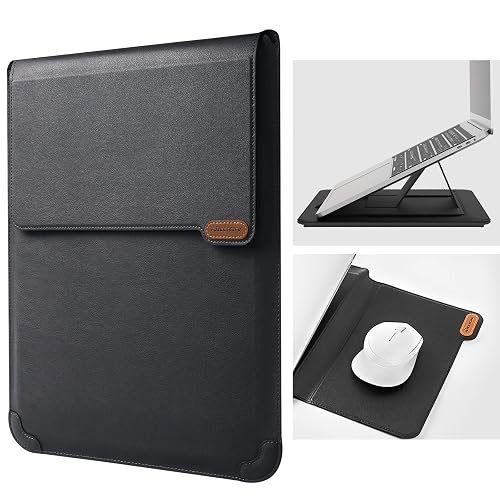
- The fold-out flap works as a laptop stand with two adjustable angles and doubles as a mouse pad, turning a flat table into a raised, typing-friendly desk.
- A PU leather shell over a flannel lining and shock-absorbing sponge padding protects a 13-inch to 15.6-inch laptop; the interior measures 14.09 x 9.84 x 0.78 inches.
- The open stand frame leaves the underside exposed, which improves airflow and heat dissipation during long working sessions.
Fintie Shockproof EVA Sleeve (16-inch)

- A semi-hard EVA shell with a water-repellent, wear-resistant exterior guards against drops, bumps, and spills more firmly than a soft fabric sleeve.
- A shock-absorbing foam air-cushion interior lines every side, and the 14.56 x 10.23 x 0.8-inch cavity fits a 16-inch MacBook Pro, a 15-inch MacBook Air, or a 15.6-inch Windows laptop.
- A durable YKK zipper and two exterior pockets hold a charger and cables, and at $21.99 it undercuts every other 16-inch-capable pick in this guide.
Nillkin 14-inch Laptop Sleeve (4-in-1 with Handle)

- A 4-in-1 design combines a laptop stand, a fold-out mouse pad, a magnetic retractable handle, and sponge padding in one 13.97 x 9.56 x 0.78-inch case.
- The built-in stand sets to 15-degree and 25-degree angles for typing and screen viewing, and the open frame improves airflow under the laptop.
- A dual-purpose side strap works as a one-handed grip while carrying or as an anti-slip retainer when the laptop sits docked on the stand.
MOSISO Vertical Laptop Sleeve (16-inch)

- At $16.99 it is the lowest-priced pick, yet a polyester foam padding layer and a fleece lining still cushion the laptop against bumps and scratches.
- The 15.55 x 11.42-inch vertical interior swallows a 16-inch MacBook Pro or a 15.6-inch Dell, HP, or Lenovo laptop, and the top-opening zipper gives quick access.
- A large front vertical pocket measuring 11.81 x 11.02 inches holds a tablet, charger, or notebook, and the 0.79-inch profile slides into a backpack.
I loaded each sleeve with the laptop it was rated for, carried it in a commuter backpack for a week, and checked zipper action, corner padding, water beading under a light spray, and how far the internal dimensions strayed from the laptops I measured before ranking them on protection, features, and price.
Buying Guide
Measuring your laptop and reading sleeve dimensions
Sizing is the decision that makes or breaks a sleeve, and a screen-size label is only a starting point. A sleeve sold as 14-inch is built around a specific internal cavity, and two laptops with the same 14-inch screen can differ by half an inch in width and depth because of bezels, hinges, and rubber feet. Always compare the sleeve's stated internal dimensions against your laptop's actual footprint. The tomtoc set here has a 12.31 x 8.71 x 0.61-inch interior tuned to a 14-inch MacBook Pro, while the Nillkin 14-inch case runs 13.97 x 9.56 x 0.78 inches to swallow slightly larger Windows ultrabooks. If your laptop is thicker than the listed height, the zipper will strain; if the cavity is much larger, the machine slides. Measure width, depth, and thickness with the lid closed, add a few millimeters for a snug rather than tight fit, and confirm the sleeve lists your exact model or dimension range before buying, because a 16-inch MacBook Pro will not close in a case cut for 15 inches.
Sleeve materials: neoprene, EVA, polyester, and PU leather
The outer material sets how a sleeve protects, weighs, and ages. Neoprene is the stretchy wetsuit fabric found on many budget sleeves; it hugs the laptop and shrugs off light splashes but offers little rigid impact defense. Polyester, used on both MOSISO cases here, is light and holds a foam padding layer plus a fleece lining for scratch and bump protection at low cost. EVA, the semi-hard foam on the Fintie sleeve, molds into a rigid shell that resists crushing and spreads the force of a drop, at the cost of flexibility. PU leather, on the two Nillkin sleeves, adds a firm, wipeable exterior over sponge padding and looks at home in an office. Match the material to the risk: EVA and 360-degree polyester cases for crowded commutes and checked bags, slim neoprene or polyester for a laptop that mostly rides inside a padded backpack. Water repellency is a separate coating layer, so check for a water-resistant treatment rather than assuming any one fabric is weatherproof.
Slim sleeve, 360-degree case, or multifunction design
The shape of a sleeve decides whether it rides inside another bag or replaces one. A slim sleeve, like the $16.99 MOSISO vertical model, adds a few millimeters and is meant to slip into a backpack that already carries your other gear. A 360-degree case, such as the $28.99 MOSISO or the tomtoc set, reinforces every edge and adds pockets, a handle, and sometimes a luggage strap so it can travel on its own for a coffee-shop day. A multifunction sleeve, like the two Nillkin models, folds open into a laptop stand with two viewing angles and a mouse pad, which suits hybrid workers who set up at a different desk each day. Decide how the sleeve will be carried first. If it lives inside a larger bag, pay for padding and skip the pockets; if it is your only carrier between home and office, the handle, pockets, and trolley strap earn their extra bulk and the roughly $12 premium over a bare sleeve.
Water resistance and weather protection
No consumer laptop sleeve here is fully waterproof, but several add a water-repellent treatment that buys time in a shower. A repellent coating makes water bead and roll off the outer fabric instead of soaking through, which protects the laptop during the walk from a car to a building or a dash between buildings. The Fintie EVA shell and the tomtoc recycled fabric both list water-repellent, spill-resistant exteriors, and the tomtoc lining is rated spill-resistant on the inside as well. A YKK zipper, found on the tomtoc and Fintie picks, seals more reliably and is less likely to snag open than a generic zipper. Treat any water rating as splash protection, not submersion: none of these sleeves should be dunked, and a laptop caught in heavy rain still needs a bag over the sleeve. If you routinely commute on foot or by bike in wet weather, prioritize a repellent-coated exterior and a full-length YKK zipper over an open-top design that leaves a gap for water to enter.
Extra features: pockets, stands, handles, and mouse pads
Beyond padding, the accessories bundled with a sleeve decide how much other gear you can leave behind. Pockets matter most: the MOSISO 360 case adds four front zipper pockets sized for a mouse, earphones, pens, and a notepad, while the tomtoc ships a separate 8.86 x 5.12 x 1.97-inch pouch so cables travel in their own compartment. A built-in stand, as on both Nillkin sleeves, raises the screen to a 15-degree or 25-degree angle to ease neck and wrist strain, and the fold-out flap doubles as a mouse pad for a cleaner desk. A carry handle or a magnetic retractable handle, on the MOSISO 360 and Nillkin 14-inch cases, lets the sleeve work as a slim briefcase, and a rear trolley strap slides over luggage for travel. Weigh these against bulk: every pocket, stand, and handle adds thickness and weight, so a minimalist who only needs drop protection is better served by a plain sleeve, while a daily commuter benefits from the extra organization.
Fit, corner protection, and drop defense
How a sleeve absorbs a drop comes down to corner reinforcement and how snugly it holds the laptop. Corners take the worst of any fall, which is why the tomtoc set uses CornerArmor reinforcement and high-density padding at the edges and cites a military-standard drop test, and why the MOSISO 360 case builds up a reinforced 360-degree interior edge. A semi-hard EVA shell, like the Fintie sleeve, spreads impact across a rigid wall so the force is not concentrated on one point. Just as important is a snug fit: a laptop that shifts inside a loose sleeve builds momentum before it hits the padding, so a case cut close to your machine's dimensions protects better than a larger one with more foam. Look for reinforced or raised interior edges, padding that wraps all four corners, and a size that matches your laptop within a few millimeters. A side-opening zipper, as on the MOSISO 360 case, further reduces the chance the laptop slides out while you carry it.
Frequently Asked Questions
What size laptop sleeve do I need for a 14-inch MacBook Pro?
You want a sleeve rated for 14 inches with an internal cavity close to 12.4 x 8.7 inches, because a 14-inch MacBook Pro measures roughly 12.31 x 8.71 x 0.61 inches with the lid closed. The tomtoc 360 Sleeve Set in this guide is built to exactly those internal dimensions at $34.95, so the machine sits snug without sliding. Do not assume every 14-inch sleeve fits: many are cut for larger 14-inch Windows laptops and leave a MacBook Pro loose, while the Nillkin 14-inch case at 13.97 x 9.56 inches is deliberately roomier for thicker ultrabooks. Measure your laptop's width, depth, and thickness with the lid shut, then compare those numbers to the sleeve's stated internal dimensions rather than trusting the screen-size label alone. Aim for a cavity a few millimeters larger than the laptop in each direction so it slides in without forcing the zipper. If you also carry a charger and mouse, the tomtoc set includes a separate pouch so those accessories do not crowd the laptop compartment.
Are neoprene or EVA sleeves more protective for a laptop?
EVA sleeves protect better against drops and crushing, while neoprene protects better against scratches and light splashes. EVA is a semi-hard foam that molds into a rigid shell, so a case like the $21.99 Fintie sleeve here spreads the force of an impact across a stiff outer wall and resists being crushed inside a packed bag. Neoprene, the stretchy wetsuit material on many budget sleeves, hugs the laptop tightly and shrugs off abrasion, but it flexes under a hard knock and offers little defense if the laptop is dropped onto a corner. If your laptop rides in a crowded backpack, gets checked as luggage, or you are prone to dropping bags, the semi-rigid EVA shell is the safer pick. If the laptop mostly travels inside an already-padded bag and your main worry is surface scratches, a snug neoprene or padded polyester sleeve is lighter and thinner. For the most impact protection of all, a 360-degree case such as the $28.99 MOSISO combines reinforced edges with a foam padding layer, sitting between the two materials on both bulk and defense.
Can a laptop sleeve go inside a backpack?
Yes, and slim sleeves are designed for exactly that. A thin sleeve like the $16.99 MOSISO vertical model adds only about 0.79 inches of thickness, so it slides into a backpack's main compartment or laptop pocket and adds a padded layer that a bare backpack sleeve often lacks. This is the most common way people use a sleeve: the backpack carries books, a lunch, and a water bottle, while the sleeve keeps those items from scratching or knocking the screen. If you plan to always carry the sleeve inside a bag, choose a slim design and skip the pockets, handle, and trolley strap, since those features only add bulk you do not need. If instead the sleeve is meant to leave the house on its own for a short trip, a 360-degree case like the $28.99 MOSISO with a handle and four pockets makes more sense. The rigid EVA Fintie sleeve also fits inside a backpack, but its stiff shell will not compress into a tight space the way a soft sleeve will, so leave room for it.
Are these laptop sleeves water-resistant or waterproof?
Several are water-resistant, but none of the 6 sleeves here is waterproof. Water-resistant means the outer fabric has a repellent coating that makes light rain or a spill bead up and roll off before it soaks through, which protects the laptop during a short walk in a drizzle. The $34.95 tomtoc set lists spill-resistant recycled fabric, and the $21.99 Fintie EVA shell has a water-repellent, wear-resistant exterior; both also use full-length YKK zippers that seal more reliably than generic ones. Waterproof, by contrast, would mean the sleeve could be submerged without water reaching the laptop, and no fabric or standard-zipper sleeve in this guide can do that. Treat the water rating as splash and drizzle protection only: do not set the sleeve in a puddle, and in heavy rain carry it inside a bag with its own cover. If wet-weather commuting is a regular concern, prioritize a repellent-coated exterior and a YKK zipper, and consider the semi-hard Fintie shell, whose rigid surface sheds water more predictably than a soft, absorbent fabric.
Do these sleeves fit both MacBook and Windows laptops?
Most do, as long as your Windows laptop falls within the sleeve's stated internal dimensions, which is where the two platforms differ. The listings here name MacBook models first, but each also lists compatible Windows machines: the $16.99 MOSISO vertical sleeve fits a 16-inch MacBook Pro and a 15.6-inch Dell, HP, Lenovo, ASUS, or Acer laptop, and the Fintie EVA sleeve covers a 16-inch MacBook Pro plus most 15.6-inch Windows laptops and portable monitors. The catch is that a 15.6-inch Windows laptop is often physically larger than a 15-inch MacBook Air, so a case cut tightly for the MacBook, such as the $28.99 MOSISO 360 at 14.37 x 10.04 inches, may not close around a bulkier Windows machine. The Nillkin sleeves are sized generously for 13-to-15.6-inch and 12-to-14-inch ranges to accommodate thicker Windows ultrabooks. Always check the sleeve's internal dimensions against your specific laptop rather than relying on the brand names in the title, because screen size alone does not guarantee a fit across platforms.
What is the difference between a laptop sleeve and a 360-degree protective case?
A plain sleeve is a thin padded envelope, while a 360-degree case reinforces every edge and usually adds pockets, a handle, and a standalone carrying design. The $16.99 MOSISO vertical sleeve is a classic slim sleeve: a foam-padded, fleece-lined pouch that slides inside a bigger bag and adds a few millimeters of cushioning. A 360-degree case like the $28.99 MOSISO or the tomtoc set builds a reinforced interior edge around all four sides for stronger drop protection, then layers on features that let it travel on its own, such as four zipper pockets, an extendable handle, and a rear luggage trolley strap. The trade-off is bulk and price: a 360-degree case is thicker, heavier, and typically costs about $12 more than a bare sleeve. Choose a plain sleeve if it will always ride inside a padded backpack and you only want scratch and bump protection. Choose a 360-degree case if the sleeve is your main carrier between home and office, or if you need the extra edge reinforcement and pockets for a mouse, charger, and cables.
How much should I spend on a laptop sleeve?
Plan on $17 to $38 depending on the protection and features you need, since every pick in this guide falls in that band. At the low end, the $16.99 MOSISO vertical sleeve delivers foam padding and a fleece lining for a 16-inch laptop, which is enough if the sleeve will live inside a padded backpack. Around $22, the Fintie EVA sleeve adds a semi-hard shell that resists crushing and fits a 16-inch MacBook Pro, a sensible upgrade for crowded commutes. Between $29 and $35, the MOSISO 360 case and the tomtoc set add reinforced edges, pockets, and, in the tomtoc's case, a military-standard drop rating and an accessory pouch. The most you would spend here is $37.99 for the Nillkin 14-inch case, which bundles a stand, mouse pad, and handle for hybrid work. Spending more mainly buys features and certified drop protection rather than raw padding, so match the budget to how the sleeve is carried: a bare sleeve inside a bag needs less, while a standalone carrier justifies the extra $20.
Our Verdict
The tomtoc 360 Protective Sleeve Set is our best laptop sleeve of 2026 at $34.95, pairing a military-standard drop rating and CornerArmor edges with a matching accessory pouch for a 14-inch MacBook Pro. If you carry a 15-inch laptop and want the sleeve to double as a slim day bag, the $28.99 MOSISO 360 case adds four pockets, a handle, and a luggage strap. Hybrid workers should look at the $34.99 Nillkin 15.6-inch sleeve, which folds open into a two-angle stand and a mouse pad, while anyone on a budget can start with the $16.99 MOSISO vertical sleeve. Match the internal dimensions to your laptop before you choose.
Sources
- MIL-STD-810: Environmental Engineering Considerations and Laboratory Tests — U.S. Department of Defense
- ASTM D5276: Standard Test Method for Drop Test of Loaded Containers by Free Fall — ASTM International
- AATCC Test Method 22: Water Repellency, Spray Test — AATCC (American Association of Textile Chemists and Colorists)