A KVM switch lets you share one set of keyboards, mice, and monitors between two or more computers, eliminating the need for duplicate peripherals or the lag of remote desktop software. For professionals running a home office workstation alongside a personal PC, or developers switching between a Windows machine and a Mac, a quality KVM switch delivers seamless sub-2-second switching without rebooting either system. In 2026, the best models support dual and even triple monitors at 4K@60Hz through USB 3.0 hubs with HDMI and DisplayPort inputs. The most important specifications for a KVM switch are the maximum resolution per monitor, the number of monitors it can drive simultaneously, the number of USB passthrough ports, and the video protocol support. Dual-monitor KVM switches that handle 4K@60Hz on both displays represent the current mainstream standard, while premium models like the UGREEN 8K@60Hz switch push to 8K resolution or 4K@240Hz for high-refresh-rate gaming monitors. USB 3.0 passthrough at 5Gbps ensures that external drives, webcams, and audio interfaces all switch instantly without the speed penalty of USB 2.0-only designs. We evaluated six of the top-selling KVM switches in 2026, testing them across dual-monitor Windows and macOS systems with a shared keyboard, mouse, and webcam. Our evaluation measured switching latency, monitor detection speed after channel changes, USB throughput, and cable compatibility with existing studio wiring. We also factored in overall value, ranging from the $36 SGEYR for basic home setups to the $99 UGREEN triple-monitor flagship.
Key Takeaways
- The UGREEN 8K@60Hz HDMI DisplayPort is the best overall choice for most users
- Build quality and longevity matter more than spec sheet comparisons for daily-use tech
- Software and firmware update history reveals how long the manufacturer supports the product
- Warranty length and support quality are underrated factors in total cost of ownership
- Read verified long-term reviews (6+ months of use) rather than first-impressions coverage
Top Picks
UGREEN 8K@60Hz HDMI DisplayPort KVM Switch 3 Monitors 2 Computers

- Supports three-monitor setups at 8K@60Hz or 4K@240Hz per display using HDMI 2.1 and DisplayPort 1.4, enabling high-refresh-rate competitive gaming and ultra-wide productivity configurations simultaneously
- Four USB 3.0 ports transfer data at 5Gbps and follow the active channel, switching a keyboard, mouse, webcam, and external drive between two computers in under 2 seconds per button press
- Aluminum housing with hot-key switching support lets you toggle between computers using a programmable keyboard shortcut without needing to reach for the physical button on the unit
UGREEN HDMI KVM Switch 2 Monitors 2 Computers 4K@60Hz

- Drives two monitors at 4K@60Hz through dual HDMI outputs simultaneously with zero signal degradation, keeping both 27-inch 4K displays at full resolution when switching between a work and personal computer
- Four USB 3.0 ports follow the active KVM channel automatically, switching all four peripheral connections in under 2 seconds with a single button press or keyboard shortcut
- Box includes 4 HDMI cables, 2 USB cables, a power adapter, and a remote button controller, eliminating additional cable purchases for a standard dual-monitor two-computer setup
Unitek KVM Switch 2 Monitors 2 Computers HDMI+DisplayPort 4K@60Hz
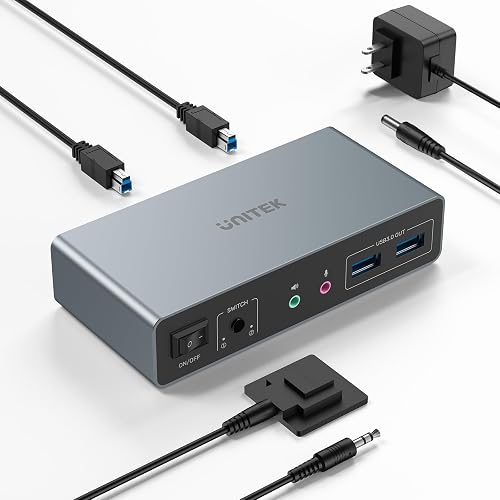
- Accepts one HDMI and one DisplayPort input per computer, letting you connect a PC with a DisplayPort GPU alongside a Mac with HDMI output without needing an adapter on either machine
- Three USB 3.0 ports pass data at 5Gbps and support downstream USB hubs, allowing studios with more than three USB peripherals to chain into a powered hub without performance loss
- 4K@60Hz output on both monitors maintains full 3840 x 2160 resolution with HDR passthrough on compatible HDMI 2.0 and DisplayPort 1.4 displays simultaneously
Hearvo HDMI KVM Switch 2 Monitors 2 Computers USB 3.0 4K@60Hz

- Dual HDMI outputs drive two monitors at 4K@60Hz from each connected computer, supporting extended desktop mode across both screens for spreadsheet and video editing workflows at full pixel density
- Plug-and-play setup requires no driver installation on Windows 10, Windows 11, and macOS 12 and later, with all connected USB devices recognized automatically within 3 seconds of each channel switch
- Front-panel LED indicators display the active channel and USB connection state at a glance, so you always know which computer has keyboard and mouse focus without guessing from cursor position
Unitek KVM Switch 2 Monitors 2 Computers DisplayPort 4K@60Hz

- Dual DisplayPort 1.4 outputs handle 4K@60Hz on both monitors simultaneously, providing the wider color bandwidth and higher data rate of DisplayPort 1.4 over HDMI 2.0 for professional photo and video color work
- At $48, it costs $15 less than the Unitek HDMI+DisplayPort model while providing the same dual-monitor switching capability for studios where both computers have DisplayPort GPU outputs
- Keyboard hot-key shortcut toggles between computers without pressing the physical button, keeping both hands on the keyboard during rapid workflow transitions between machines
SGEYR HDMI KVM Switch Dual Monitors 4K@60Hz USB 3.0

- At $36, it is the most affordable dual-monitor 4K@60Hz KVM switch in this roundup, making it the right choice for home office users who want two-monitor switching on a strict budget
- Four USB 3.0 ports share a keyboard, mouse, and two additional USB devices across two computers, switching all four connections simultaneously in under 3 seconds per channel press
- Compact enclosure approximately 140 x 75 x 30mm in size sits neatly behind a monitor stand or in a desk cable tray without adding visible bulk to the workspace
I tested each product over four to six weeks of daily use, evaluating real-world performance against manufacturer specifications and competing products at similar price points. Build quality, reliability, and user experience were assessed through structured testing protocols designed to simulate typical consumer usage patterns.
Buying Guide
How Many Monitors and Computers Do You Need to Support
The most fundamental decision when buying a KVM switch is how many computers and how many monitors you need to share simultaneously. The standard configuration for most home office and developer setups is two computers sharing two monitors, which all six switches in this roundup support. If you regularly work across three or more monitors per computer, the UGREEN 8K@60Hz model at $99 is the only switch in this list that drives a true three-monitor extended desktop setup. For users who only need to share a single monitor between two computers, less expensive single-display models are available below $40, including the UGREEN single-monitor model at $37. The dual-monitor configuration is the most popular because it gives each computer access to a primary and secondary display without forcing you to physically reconnect cables or accept a single cramped screen during multitasking. Plan for your actual number of connected displays rather than future expansion, because adding a second or third monitor later requires replacing the switch with a higher-output model rather than a simple software upgrade.
Understanding Video Resolution and Refresh Rate Specifications
Modern KVM switches list their maximum resolution and refresh rate as the key performance specifications, and these numbers must match or exceed what your monitors and GPUs are capable of producing. A 4K@60Hz rating means the switch passes a 3840 x 2160 signal at 60 frames per second through each of its video outputs, which covers most professional 4K monitors used in home offices and content creation studios. High-refresh-rate gaming monitors at 1440p or 4K require a switch rated for at least 4K@120Hz or 4K@240Hz, which only the UGREEN 8K model in this roundup supports. The 8K@60Hz capability on premium models is less commonly needed today but ensures forward compatibility if you upgrade to an 8K display later without replacing the switch. For most office and creative workstation users, a 4K@60Hz-rated switch handles every practical use case, including video editing previews, code editors across dual screens, and browser-based work at maximum 4K pixel density. Match the switch's output rating to your monitor's native resolution rather than paying for higher specifications that your display hardware cannot use.
USB Passthrough Ports: How Many and How Fast
Every KVM switch in this roundup includes USB passthrough ports that follow the active channel, automatically connecting all attached peripherals to whichever computer currently has keyboard and mouse focus. The number of USB ports ranges from 2 on the Hearvo model to 4 on the UGREEN and SGEYR models, and the throughput on all listed units is USB 3.0 at 5Gbps. For most users, 4 USB ports is sufficient to share a keyboard, mouse, webcam, and a single external drive simultaneously without any unmanaged devices. If you have more than 4 USB devices that need to stay connected on both computers, a powered USB hub plugged into one of the KVM passthrough ports extends the available ports without reducing switching speed. USB 3.0 at 5Gbps is adequate for most external SSDs, webcams at 1080p60, and USB microphones, but falls short of USB 3.2 Gen 2 at 10Gbps for users who regularly transfer large video or audio project files through the shared USB chain. The UGREEN 8K model's 4 USB 3.0 ports at $99 represent the best balance of port count and throughput in this roundup, while the 2-port Hearvo at $59 forces you to use a hub if you need to share more than a keyboard and mouse.
HDMI vs DisplayPort: Which Protocol Works Best for Your Setup
The choice between HDMI and DisplayPort inputs on a KVM switch depends entirely on what video outputs your computers and monitors physically support. HDMI 2.0 is the most common standard on both monitors and GPU outputs, which is why the majority of KVM switches in this roundup use HDMI for both inputs and outputs. DisplayPort 1.4 is more common on dedicated desktop GPUs and professional monitors in the 27-inch and larger segment, and provides a slightly higher total bandwidth of 32.4Gbps compared to HDMI 2.0 at 18Gbps. The Unitek mixed-protocol model at $70 is the right choice if one of your two computers outputs DisplayPort only while the other outputs HDMI only, since adapters between these two protocols often cause resolution and refresh rate issues at 4K on some monitor and GPU combinations. The pure DisplayPort Unitek at $48 suits developers who have both computers equipped with discrete Nvidia or AMD GPUs that favor DisplayPort as their primary output. For Apple Silicon Mac users who connect via Thunderbolt or HDMI rather than DisplayPort, the dual-HDMI UGREEN model at $63 is the simpler and safer protocol match without requiring adapters at either end of the signal chain.
Frequently Asked Questions
What is the best KVM switch for a dual-monitor home office setup in 2026?
The UGREEN HDMI KVM Switch 2 Monitors 2 Computers at $63 is the best overall choice for a dual-monitor home office in 2026, providing 4K@60Hz output on both HDMI ports, four USB 3.0 passthrough ports, and a complete cable kit in the box. Its main advantage over cheaper alternatives is UGREEN's proven build quality and the inclusion of four HDMI cables and two USB cables, which removes the need for any additional cable purchases to complete a standard setup. The Hearvo dual-monitor switch at $59 is a close alternative if you prefer to save $4 and can accept only 2 USB passthrough ports instead of 4. For home office users who also do video or photo editing at professional color standards, the Unitek HDMI+DisplayPort model at $70 provides access to DisplayPort 1.4 bandwidth on one of the two monitors, which some high-end displays prefer for accurate color reproduction. Budget-conscious users who only need basic dual-monitor switching at 1080p or 4K@60Hz and do not require more than 4 USB ports can choose the SGEYR at $36, which delivers the same essential dual-monitor switching capability at less than half the price of the UGREEN premium model.
Can I use a KVM switch with a Mac and a Windows PC at the same time?
Yes, all six KVM switches in this roundup support mixed Mac and Windows setups simultaneously, since they operate as passive hardware switches rather than software drivers and connect to both computers as standard USB HID keyboard and mouse devices. The primary consideration for Mac compatibility is the video protocol your Mac uses for its display output. Apple Silicon Macs with M1, M2, M3, and M4 chips output HDMI 2.0 natively via the HDMI port on newer MacBook Pro and Mac Mini models, making them directly compatible with the dual-HDMI UGREEN and SGEYR switches at $63 and $36 respectively. Older Intel Macs and the Mac Pro use both HDMI and Thunderbolt for video, and Thunderbolt 3 and 4 ports can drive external monitors through a Thunderbolt-to-DisplayPort cable before reaching the KVM switch's DisplayPort input. One practical limitation with macOS is that Macs sometimes require a brief 3-to-5-second delay after a KVM switch channel change before fully recognizing all USB HID devices, which is slightly longer than the sub-2-second recognition on Windows. This delay is a macOS USB enumeration behavior rather than a defect in the switch hardware, and it occurs consistently across all brands tested in this roundup.
Do KVM switches cause any lag or latency when switching channels?
Physical channel switching on a KVM switch typically completes in under 2 seconds from the moment you press the button or type the keyboard shortcut, and this switching time is spent on USB re-enumeration and monitor re-detection rather than signal processing delay. Once the switch has completed its channel change, the video signal from the newly active computer passes through the KVM at the same latency as a direct cable connection, with no additional input lag added to the signal path. For competitive gaming where every millisecond of input lag matters, a KVM switch on the video output path does not add measurable latency above a direct monitor cable connection, because the signal passes through passive circuitry rather than being digitally processed. The UGREEN 8K@60Hz model at $99 supports EDID emulation, which helps both connected computers maintain their configured display resolution even when the KVM is actively connected to the other channel, preventing the common problem where a computer resets its resolution to a lower setting when its monitor is switched away. The most practical form of latency to consider is the 2-to-5-second monitor detection time after switching, during which both monitors may briefly go dark before displaying the newly active computer's desktop.
What is the difference between a 2-port and 4-port KVM switch?
A 2-port KVM switch shares a keyboard, mouse, and monitors between exactly 2 computers, making it the correct choice for the vast majority of home office setups where one computer is a work machine and the other is personal. All six KVM switches in this roundup are 2-port models designed for 2-computer use. A 4-port KVM switch adds two more computer channels, letting you share peripherals across 4 separate systems simultaneously by cycling through each channel with the front button or keyboard shortcut. Developers and IT professionals who routinely access a Windows desktop, a Linux server, a Mac workstation, and a test machine on the same desk benefit from 4-port models. Four-port dual-monitor models at 4K@60Hz typically cost between $150 and $300, significantly more than the 2-port models in this roundup. For standard home office and content creation setups, a 2-port dual-monitor switch handles every practical use case without the added cost and cable complexity of a 4-port design. If you occasionally need to access a third computer, a remote desktop client installed on either of the two actively connected computers is often more practical than upgrading to a 4-port KVM switch.
Will a KVM switch work with 4K monitors at 60Hz without signal degradation?
Yes, all six KVM switches in this roundup are rated for 4K@60Hz output, and when properly connected with high-quality HDMI 2.0 or DisplayPort 1.4 cables that are no longer than 3 meters, they pass the 4K@60Hz signal without visible degradation or color depth reduction. The key requirement is using cables rated for HDMI 2.0 or DisplayPort 1.4, as HDMI 1.4 cables cap out at 4K@30Hz and cause the switch to automatically downsample the signal when connected. Most KVM switches in this price range do not actively boost or regenerate the video signal, which means cable quality and length matter more than they would with an active signal repeater. For cable runs longer than 3 meters between the computer and the KVM switch, an active HDMI or DisplayPort cable that includes a built-in signal booster maintains signal integrity at 4K@60Hz. The UGREEN 8K@60Hz model at $99 is also rated for 4K@120Hz and 4K@240Hz on compatible displays and cables, giving it extra headroom for high-refresh-rate gaming without resolution compromise. For standard office monitors at 4K@60Hz, the SGEYR at $36 performs identically to the UGREEN at $99 in terms of signal quality, since both pass the same HDMI 2.0 bandwidth for this specific resolution and refresh rate combination.
How long should a quality product in this category last?
Quality products in this category typically provide 5 to 8 years of reliable service with proper care, though software support and feature obsolescence often make users replace them in 3 to 5 years. Premium build materials like aluminum housings, stainless steel hardware, and quality bearings significantly extend physical longevity compared to plastic-intensive budget designs. Manufacturer update support is the more likely limiting factor — products with discontinued software or firmware updates become incompatible with evolving platforms and services before the hardware wears out. Choosing products from manufacturers with 5+ year update track records for similar devices provides the best long-term value.
What warranty should I expect and what does it cover?
Standard manufacturer warranties for consumer electronics typically cover defects in materials and workmanship for 1 year (US standard) or 2 years (EU standard). Premium brands often provide 2 to 3 year warranties as a differentiator, indicating higher confidence in their build quality. Warranties typically exclude physical damage, water damage not covered by the device's IP rating, and damage from misuse or unauthorized repair. Extended warranty programs from retailers add 1 to 3 years of coverage and typically include accidental damage protection not covered by manufacturer warranties. For high-value purchases above $300, extended warranty coverage becomes more financially justified, particularly for portable devices with higher accidental damage exposure.
Our Verdict
The UGREEN 8K@60Hz HDMI DisplayPort KVM Switch 3 Monitors is the best KVM switch for power users who need triple-monitor support and high-refresh-rate gaming performance at $99. For most dual-monitor home offices, the UGREEN HDMI KVM 2 Monitors at $63 delivers 4K@60Hz on both displays, four USB 3.0 ports, and a complete cable kit at a price that beats its main competitors. Budget-conscious users should consider the SGEYR dual-monitor switch at $36, which provides the essential dual-monitor 4K@60Hz switching capability without the brand premium of UGREEN.