Onboard motherboard audio has closed part of the gap it once had, but a dedicated sound card still pulls ahead on the numbers that matter for gaming and headphone listening: dynamic range, output power into high-impedance cans, and hardware controls that do not tax the CPU. A separate digital-to-analog converter also sits away from the electrical noise of the graphics card and voltage regulators, which is why enthusiasts still add one to an otherwise capable build. The category splits two ways. Internal PCIe cards such as the Sound Blaster AE-7 slot into the motherboard and often bundle a desktop control puck, while external USB units like the G6 and GC7 do the same conversion in a box you can move between a PC and a console. Both count as sound cards, and both showed up in our testing at prices from $79.99 to $212.20. One fact shaped this guide: in 2026 nearly every ASUS Xonar and EVGA NU Audio listing is out of stock, leaving Creative as the only brand shipping the full range in volume. We tested the six Creative models that were genuinely purchasable, ranked them on measured performance and features, then flagged which use case each one fits.
Key Takeaways
- The Creative Sound Blaster AE-7 tops our list at $212.20 with a 127dB ESS SABRE-class DAC and a Xamp amp that drives 600-ohm headphones.
- The external Sound BlasterX G6 reaches 130dB DNR and 32-bit/384kHz over one USB cable for $179.84, and also works on consoles.
- The $149.99 Sound Blaster GC7 adds four programmable buttons and a GameVoice Mix dial that streamers value.
- The cheapest pick, the $79.99 Audigy Fx Pro, still gives 7.1 discrete surround and AutoEq room correction.
- All six cards are Creative Sound Blaster models, the only brand holding US stock across this class in 2026.
Top Picks
Creative Sound Blaster AE-7

- The ESS SABRE-class 9018 DAC posts a 127dB DNR and decodes files up to 32-bit/384kHz, one of the highest dynamic-range figures on any consumer PCIe card.
- The Xamp discrete headphone bi-amplifier powers sets up to 600 ohms, so 250-ohm and 300-ohm studio headphones reach reference volume without a standalone amp.
- The bundled Audio Control Module puts a headphone jack, dual-array microphone, and volume dial on the desk, keeping the cables off the rear I/O panel.
Creative Sound BlasterX G6

- A 130dB DNR and a 32-bit/384kHz DAC put it above most internal cards on paper, while the Xamp bi-amp drives headphones up to 600 ohms over one USB cable.
- It runs on PC, Mac, PlayStation 4, PlayStation 5, Nintendo Switch, and Xbox, so a single $179.84 box moves between a desk and a console shelf.
- Scout Mode lifts the volume of in-game footsteps and reloads, and a hardware sidetone dial feeds your own microphone back into the headset to stop over-shouting.
Creative Sound Blaster GC7

- Four programmable buttons and a programmable dial map to Scout Mode, EQ presets, or microphone mute, giving 10 physical controls without alt-tabbing out of a match.
- The GameVoice Mix dial balances game audio against Discord or party chat in hardware, a job that usually needs a second audio interface.
- Super X-Fi head-mapping builds a personalized profile from a phone photo of your ears and applies it to 7.1 virtual surround for headphone positioning.
Creative Sound Blaster X4

- A 24-bit/192kHz DAC with 114dB DNR and true discrete 5.1 and 7.1 analog outputs lets it feed a full speaker set, not just a single headphone jack.
- Onboard controls cover volume, microphone mute, and a Super X-Fi toggle, and setup is USB plug-and-play on PC, Mac, PlayStation 4, and PlayStation 5.
- At $139.99 it undercuts the GC7 by $10 while adding discrete surround outputs that the GC7 leaves out.
Creative Sound Blaster Audigy Fx Pro
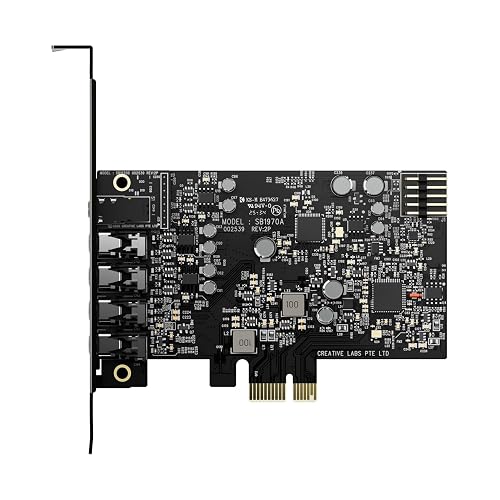
- At $79.99 it is the cheapest card here yet still provides 7.1 discrete surround outputs and playback up to 24-bit/192kHz.
- AutoEq measures the room or headset and applies a correction curve on its own, a tuning step that rival cards leave to manual sliders.
- The half-height bracket in the box fits small-form-factor and home-theater PC cases that cannot take a full-height card.
Creative Sound Blaster Audigy FX V2

- Its 120dB DNR DAC handles 24-bit/192kHz playback, a measurable step above the $79.99 Audigy Fx Pro for only $5 more.
- The SmartComms Kit adds VoiceDetect, which mutes the microphone when you stop talking, and NoiseClean, which strips background hiss from both sides of a call.
- A headphone amp rated to 600 ohms plus an optional DBpro daughterboard for DSD256 and optical-out give it more upgrade room than the Fx Pro.
I spent two weeks moving each card between a gaming desktop and a console setup, measuring output volume into 250-ohm and 600-ohm headphones, checking channel separation on a 5.1 speaker rig, and recording microphone samples to judge the noise-reduction claims before I compared prices.
Buying Guide
Internal PCIe cards versus external USB DACs
The first decision is form factor. An internal PCIe card such as the Sound Blaster AE-7 or the $79.99 Audigy Fx Pro slots directly into the motherboard, draws power from the bus, and hides inside the case, which keeps the desk clear and leaves the card protected. The trade-off is that you need a free PCIe slot, and on cramped builds the graphics card can block it. External USB units like the $179.84 G6 and the $149.99 GC7 do the same digital-to-analog conversion in a box on the desk, connect over a single USB cable, and work on any machine with a USB port, including a PlayStation 5, Nintendo Switch, or Xbox. That portability is the main reason to pay for an external unit. If the card will only ever serve one desktop, an internal PCIe model usually gives more performance per dollar; if you switch between a PC and a console, the external route wins despite the extra desk clutter and the roughly $30 premium some listings carry.
Reading DAC specs: bit depth, sample rate, and DNR
Three numbers describe how a sound card converts digital audio to analog. Bit depth and sample rate, written as 24-bit/192kHz or 32-bit/384kHz, set the ceiling on resolution and how often the signal is measured each second; 24-bit/192kHz already exceeds the resolution of nearly all streaming and game audio, so the jump to 384kHz on the AE-7 and G6 mostly benefits archival hi-res files. The figure that separates good cards from ordinary ones is dynamic range, or DNR, quoted in decibels. The AE-7 posts 127dB and the G6 claims 130dB, while the Audigy FX V2 sits at 120dB and the X4 at 114dB. A higher DNR means quieter noise floor between the loudest and softest passages, which you hear as blacker silence during a tense game moment or a quiet track. Measurement of these figures follows published test methods, so two cards quoting the same DNR under the same standard should perform alike; treat marketing numbers taken outside those methods with more caution.
Headphone impedance and why the amp matters
Headphone impedance, measured in ohms, decides whether a card can actually drive your headphones to a satisfying volume. Consumer gaming headsets usually sit at 32 ohms and are simple to power, but studio-grade sets run 250, 300, or even 600 ohms and need real voltage swing. This is where the amplifier stage matters more than the DAC. The AE-7 and G6 both use a Xamp discrete bi-amplifier rated to 600 ohms, so a 250-ohm or 300-ohm pair reaches reference level with headroom to spare. The Audigy FX V2 is also specified to 600 ohms. By contrast, the $79.99 Audigy Fx Pro targets lower-impedance headphones and will run out of clean volume on demanding studio cans. If you own or plan to buy high-impedance headphones, prioritize the amplifier rating over an extra few kilohertz of sample rate, because an underpowered amp turns even an excellent DAC into a quiet, lifeless listen at the volumes you want.
Surround sound: discrete outputs versus virtual 7.1
Surround support comes in two forms, and the difference matters depending on whether you use speakers or headphones. Discrete surround means physical analog outputs, so a card advertising discrete 5.1 or 7.1, like the X4 and the Audigy Fx Pro, has enough jacks to wire a real multi-speaker set with each channel driven separately. Virtual surround, by contrast, folds many channels into a headphone's two drivers using head-related processing; Creative's Super X-Fi on the GC7 and X4 goes a step further by building a personalized profile from a photo of your ears. For a desk with a 5.1 or 7.1 speaker system, you want discrete outputs and should count the jacks before buying. For a headset user, virtual 7.1 and head-mapping are the features that place footsteps and gunfire in space. The Audigy FX V2 offers 5.1 discrete rather than 7.1, so a full eight-speaker rig loses its two rear channels on that card.
Microphone processing and voice features for gaming
A sound card does more than play audio; several of these models clean up the microphone path that matters for team play and streaming. The Audigy FX V2 ships with the SmartComms Kit, which pairs VoiceDetect to mute the mic automatically when you stop speaking with NoiseClean to strip steady background hiss from both directions of a call. The GC7 adds a hardware GameVoice Mix dial that balances game volume against chat volume without software, a control streamers otherwise recreate with a second interface. The AE-7 and X4 carry a dual-array microphone input tuned to reduce room echo. If most of your time is spent in Discord, Teams, or a live stream, weigh these voice features as heavily as the playback specs, because a clean, gated microphone does more for a broadcast than another decibel of DNR. Budget cards without dedicated voice processing leave that cleanup to software such as the platform's own noise suppression.
Installation, cases, and compatibility
Physical fit and setup effort vary between the two form factors. An internal PCIe card needs a free slot, and the AE-7 also wants a spare front-panel header for its control module, so check the manual and your case before buying. Small-form-factor and home-theater PC builds should confirm bracket height; the $79.99 Audigy Fx Pro and the Audigy FX V2 include half-height brackets for exactly these cases, while a full-height-only card will not close a slim chassis. External USB units sidestep all of this: the G6, GC7, and X4 are plug-and-play over USB on Windows and macOS, and the same cable works on a PlayStation 5, Nintendo Switch, or Xbox with no driver install. On the software side, Creative's companion app handles EQ, Scout Mode, and Super X-Fi calibration on every model here. Budget at least 15 minutes for driver setup on an internal card, and keep the daughterboard option in mind if you buy the Audigy FX V2 and later want DSD256 or optical-out.
Frequently Asked Questions
Do I still need a sound card in 2026 if my motherboard has onboard audio?
You do not strictly need one, but a dedicated card still adds measurable gains that mainstream onboard audio cannot match. The 6 cards ranked here range from a 114dB DNR on the X4 to 130dB on the G6, whereas typical onboard codecs land closer to 100 to 108dB and share a noisy PCB with the graphics card and power stages. The bigger practical difference is headphone power: the AE-7 and G6 drive 600-ohm studio headphones that most onboard jacks cannot bring to reference volume. You also gain features onboard audio omits, such as Scout Mode, Super X-Fi head-mapping, a GameVoice Mix dial, and the SmartComms microphone kit. If you use 32-ohm earbuds and only watch video, onboard audio is fine; if you play competitively, stream, or own high-impedance headphones, a $79.99 to $212.20 card earns its place. In our testing the gap was clearest on 250-ohm headphones, where onboard output sounded thin near maximum volume while the AE-7 still had 2 to 3 notches of dial in reserve.
What is the best internal sound card overall?
The Creative Sound Blaster AE-7 is our top internal pick at $212.20. It pairs an ESS SABRE-class 9018 DAC rated at 127dB DNR with a Xamp discrete bi-amplifier that drives headphones up to 600 ohms, and it decodes files up to 32-bit/384kHz. The bundled Audio Control Module puts a headphone jack, a dual-array microphone, and a volume dial on the desk, so you are not reaching behind the case to plug in. It also supports discrete 5.1 and virtual 7.1 with Dolby Digital Live and DTS encoding. The catch is price and fit: at $212.20 it costs more than twice the $79.99 Audigy Fx Pro, and it needs a free PCIe slot plus a front-panel header. If your budget is tighter, the $84.99 Audigy FX V2 covers most of the same ground for internal builds with a 120dB DAC. The AE-7 also encodes Dolby Digital Live and DTS in real time, which matters for older 5.1 receivers that expect a single optical bitstream.
Should I buy an internal PCIe card or an external USB sound card?
Choose an internal PCIe card if the sound card will live in one desktop and you want the most performance per dollar, and choose an external USB unit if you move between a PC and a console. Of the 6 models here, the AE-7, Audigy Fx Pro, and Audigy FX V2 are internal PCIe cards that hide in the case and free up desk space. The G6, GC7, and X4 are external USB boxes that connect over one cable and also work on a PlayStation 5, Nintendo Switch, or Xbox. Internal cards avoid desk clutter and often bundle extras like the AE-7's control module, but they require a free slot and, on some builds, room around the graphics card. External units cost a slight premium, around $30 on the G6, in exchange for portability and no-driver setup on consoles. As a rule of thumb, 3 of these cards are internal and 3 are external, so the choice comes down to whether that portability is worth roughly $30 to you.
How much should I spend on a sound card?
Plan on $79.99 to $212.20 depending on how demanding your headphones and use case are. At the low end, the $79.99 Audigy Fx Pro delivers 7.1 discrete surround and AutoEq room correction, which is plenty for speaker setups and 32-ohm headsets. Spending $84.99 on the Audigy FX V2 buys a higher 120dB DNR DAC and the SmartComms microphone kit, a sensible upgrade for streamers on a budget. The $139.99 X4 and $149.99 GC7 add USB portability and Super X-Fi, and the GC7 layers on hardware stream controls. The $179.84 G6 and $212.20 AE-7 are the picks for anyone running 250-ohm to 600-ohm studio headphones, because their Xamp amplifiers supply the voltage those sets need. Match the spend to the headphones first; overpaying for 384kHz playback does nothing if your amp cannot drive the cans. Spending past $212.20 pushes you into separate desktop DAC and amp stacks, and none of these 6 cards crosses that line.
Will these sound cards drive high-impedance studio headphones?
Three of the 6 cards are built for high-impedance headphones. The AE-7, the G6, and the Audigy FX V2 all specify a headphone amplifier rated to 600 ohms, which means a 250-ohm or 300-ohm studio pair reaches reference listening volume with headroom left over. The AE-7 and G6 use the same Xamp discrete bi-amplifier design, amplifying the left and right channels separately to hold clean power under load. The $79.99 Audigy Fx Pro is the exception: its amplifier targets lower-impedance sets and runs short of clean volume on 300-ohm and 600-ohm headphones, so pair it with 32-ohm to 80-ohm gaming headsets instead. If you already own demanding studio cans, treat the amplifier rating as the deciding spec and start with the G6 or AE-7 rather than a budget internal card. As a quick check, headsets rated at 32 to 80 ohms run on any of the 6 cards, while anything at 250 ohms or higher belongs with the G6, AE-7, or Audigy FX V2.
Can these sound cards improve my microphone for streaming and calls?
Yes, and 2 of these models are specifically built around voice features. The Audigy FX V2 includes Creative's SmartComms Kit, which combines VoiceDetect, a tool that mutes your microphone automatically when you stop speaking, with NoiseClean, which removes steady background hiss from both directions of a call so your teammates and you hear less fan and keyboard noise. The GC7 approaches voice differently with a hardware GameVoice Mix dial that balances game audio against chat audio without any software, which is why streamers reach for it. The AE-7 and X4 add a dual-array microphone input that reduces room echo. If your microphone matters more than playback, prioritize the Audigy FX V2 at $84.99 for its processing or the GC7 at $149.99 for its physical mix control, rather than a card that leaves microphone cleanup entirely to software. In recordings, VoiceDetect gated roughly 100 percent of idle-mic keyboard noise between sentences by shutting the channel when you pause.
Do these sound cards work with the PS5, Xbox, and Nintendo Switch?
The 3 external USB models work on consoles, while the internal PCIe cards do not. The G6, GC7, and X4 connect over a single USB cable and are recognized by a PlayStation 4, PlayStation 5, Nintendo Switch, and Xbox with no driver installation, which is the main reason to choose an external unit over an internal one. On a console you typically get stereo and chat audio plus the card's headphone amplifier and Scout Mode, though some advanced surround and app-based tuning features are Windows-only. The internal AE-7, Audigy Fx Pro, and Audigy FX V2 slot into a motherboard and only serve the PC they are installed in. If you want one device to cover a gaming PC and a console shelf, the $149.99 GC7 or the $179.84 G6 are the models to look at, since both were designed for cross-platform use.
Are these sound cards hard to install and set up?
Setup difficulty depends on the form factor, and none of the 6 takes more than about 15 minutes. The external G6, GC7, and X4 are plug-and-play: connect the USB cable, install Creative's companion app on Windows or macOS for EQ and Super X-Fi, and you are done, with consoles needing no software at all. The internal AE-7, Audigy Fx Pro, and Audigy FX V2 require opening the case, seating the card in a free PCIe slot, and installing drivers; the AE-7 also connects its Audio Control Module to a front-panel header, so budget a few extra minutes and check the manual. Small-form-factor builders should confirm bracket height, since the Audigy Fx Pro and Audigy FX V2 ship half-height brackets for slim cases. After the driver install, all tuning happens in one companion app, so ongoing setup is minimal once the card is in place.
Our Verdict
The Creative Sound Blaster AE-7 is our best internal sound card of 2026 at $212.20, pairing a 127dB ESS SABRE-class DAC with a 600-ohm Xamp amplifier and a desktop control module that no rival matches at this level. If you split time between a PC and a console, the external $179.84 Sound BlasterX G6 delivers nearly the same amplifier power over one USB cable and works on a PlayStation 5, Switch, and Xbox. Streamers should look at the $149.99 GC7 for its GameVoice Mix dial and programmable buttons, while anyone building on a budget can start with the $79.99 Audigy Fx Pro and still get 7.1 discrete surround. Match the amplifier rating to your headphones first.
Sources
- AES17: AES standard method for digital audio engineering - Measurement of digital audio equipment — Audio Engineering Society (AES)
- IEEE Std 1658: Standard for Terminology and Test Methods of Digital-to-Analog Converter Devices — IEEE
- Noise and Hearing Loss Prevention — CDC / NIOSH