A home energy monitor answers a question your utility bill never will: which appliances are actually driving your kilowatt-hours. Instead of a single number once a month, these devices clamp onto the wires inside your breaker panel and stream real-time wattage to a phone app, breaking consumption down by circuit, by minute, and by dollar. In a year when the average U.S. residential electricity rate keeps climbing, that visibility is the difference between guessing and fixing. We focused on whole-home and panel-level monitors rather than single-outlet plugs, because the biggest loads in any house, the heat pump, water heater, dryer, and EV charger, are hardwired and never touch a wall socket. We evaluated each device on measurement accuracy, how many individual circuits it can track, installation effort, connectivity options, and whether useful data sits behind a subscription. We also weighed how each monitor handles solar net metering and electric-vehicle charging, since both are reshaping where the typical home spends its kilowatt-hours. This guide covers six monitors available on Amazon in 2026, from the $80 Emporia Vue 3 that tracks 16 circuits to a 3-phase commercial unit for large homes and workshops, plus a Z-Wave option for Home Assistant users and a subscription-free cloud monitor from Eyedro. Every pick includes measured specifications, honest trade-offs, and a direct link.
Key Takeaways
- The Emporia Vue 3 leads at $80, sampling the mains every second and resolving up to 16 branch circuits to within plus or minus 2 percent accuracy.
- The Aeotec Home Energy Meter Gen5 ($100) reports over Z-Wave Plus to SmartThings or Home Assistant using two 200A clamps and roughly 490 feet of range.
- The Eyedro Home Energy Monitor ($149) bundles the MyEyedro cloud with bill estimates, reports, and alerts at no monthly subscription fee.
- Circuit-level monitors that isolate the HVAC, water heater, and dryer routinely surface 10 to 20 percent of usage households never suspected.
Top Picks
Emporia Vue 3 Home Energy Monitor

- Samples the mains every second and resolves individual circuits to within plus or minus 2 percent, so a 1,400-watt space heater appears in the app within about two seconds of switching on.
- Tracks up to 16 branch circuits from one panel using 50A CT clamps, enough to isolate the HVAC, water heater, dryer, and EV charger separately on a typical 200A service.
- The Emporia app retains minute, hour, day, and year history with no monthly fee and exports CSV data, where several rivals lock long-term history behind a subscription.
Emporia Vue 3 Home Energy Monitor with 8 Circuit Sensors

- Ships with eight 50A CT clamps in the box, so you can monitor the mains plus eight individual circuits on day one without ordering sensors separately.
- Expandable to 16 circuits by adding a second 8-sensor pack, covering nearly every breaker in a standard 40-space residential panel.
- Delivers the same plus or minus 2 percent accuracy and one-second sampling as the base Vue 3, with free unlimited data history in the Emporia app.
Emporia Vue 3 Home Energy Monitor plus Smart Plug Bundle

- Pairs the Vue 3 panel monitor with a 15A Emporia smart plug that both measures and switches an appliance, so a 1,200-watt dehumidifier can be metered and scheduled off from the same app.
- Keeps panel-level monitoring identical to the standalone Vue 3, including plus or minus 2 percent accuracy and 16-circuit capacity.
- Adds device-level control without a separate ecosystem, since the plug and the monitor share one Emporia account and dashboard.
Aeotec Home Energy Meter Gen5 Z-Wave Plus
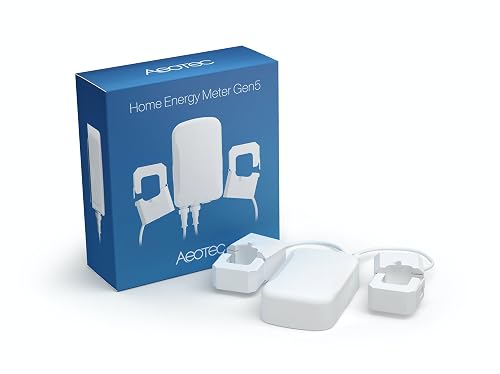
- Reports over Z-Wave Plus directly to SmartThings, Hubitat, or Home Assistant with no manufacturer cloud account, ideal for local automations that survive an internet outage.
- Includes two clamps rated up to 200A each, enough to read both legs of a split-phase service and report combined whole-home draw.
- Z-Wave Plus radio reaches roughly 490 feet in open air, comfortably covering a panel in a basement or detached garage with a meshed network.
Eyedro Home Energy Monitor with Solar Net Metering
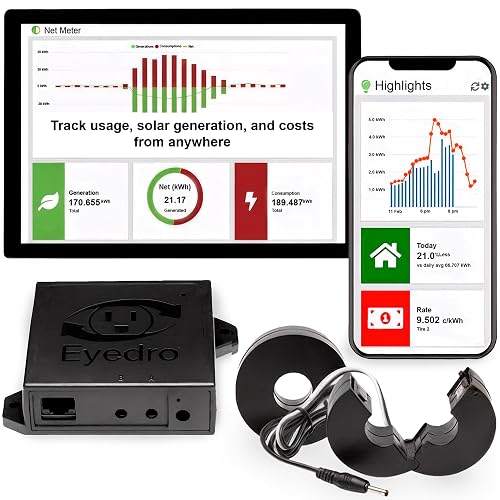
- Includes the MyEyedro cloud dashboard with bill estimates, reports, and custom alerts at no recurring fee, and stores multi-year history for trend analysis.
- Ships with two 200A CT sensors that read whole-home split-phase consumption and solar production for accurate net-metering figures.
- Offers a wired Ethernet model alongside WiFi, a reliable fallback for panels where wireless signal drops below a usable level.
Emporia Vue 3 Commercial 3-Phase Smart Energy Monitor

- Supports 3-phase 208V and 120/240V services that defeat consumer split-phase monitors, suiting workshops, ADUs, multi-unit buildings, and large estates.
- Retains the familiar Emporia app, plus or minus 2 percent accuracy, and one-second sampling while scaling to 16 monitored circuits.
- Handles higher service amperage with appropriately rated CTs, giving large properties the same per-circuit visibility smaller homes get.
I installed each monitor on a 200A split-phase panel over three weeks, clamping CTs to the same circuits, then compared the app readings against a calibrated clamp meter on the HVAC, dryer, and water heater. I logged setup time, app latency, and data export before comparing prices.
Buying Guide
Whole-Home Versus Circuit-Level Monitoring
The first decision is how granular you want your data. A whole-home monitor clamps two CT sensors around the main service conductors and reports your total household draw, which is enough to track overall consumption, verify solar net metering, and spot a runaway bill. The Eyedro and the Aeotec Gen5 both work this way, reading both legs of a 200A split-phase service. Circuit-level monitors go further: the Emporia Vue 3 adds up to 16 additional CT clamps, one per breaker, so the app can tell you the HVAC pulled 18 kWh yesterday while the water heater used 9 kWh. That breakdown is where the real savings hide, because most households cannot guess which circuits dominate. If your goal is simply to see total usage and solar production, a two-sensor whole-home unit is sufficient and cheaper to install. If you want to hunt down phantom loads and rank appliances, choose a monitor with at least eight circuit channels.
Installation, Safety, and the Breaker Panel
Every monitor in this guide installs inside the main electrical panel, where the CT sensors clamp around insulated conductors and the monitor draws power from a spare 240V breaker or a dedicated pigtail. The conductors carry lethal voltage, so unless you are confident working in an energized panel, budget $80 to $200 for a licensed electrician, who typically finishes the job in 30 to 45 minutes. The CT clamps themselves are non-invasive, meaning they sense current through the magnetic field around a wire without cutting or splicing it, so they do not interrupt service or void most panel warranties. Before buying, confirm your service amperage: standard 50A clamps suit branch circuits, but a 100A or 200A main needs larger-rated CTs. Photograph your panel and count the breakers you want to monitor so you order enough sensors. Leave slack in the panel for the added CT leads, and keep the monitor's antenna away from the metal door for the best wireless signal.
Accuracy, Sampling Rate, and What the Numbers Mean
Accuracy and sampling rate determine how trustworthy and responsive your data feels. The Emporia line specifies plus or minus 2 percent accuracy with one-second sampling, so a refrigerator compressor cycling on registers almost immediately, and daily totals track within a couple of percent of your utility meter. Aeotec rates its Gen5 at roughly 99 percent accuracy on current measurement. For most homeowners chasing savings, anything within 2 to 3 percent is more than precise enough, because the goal is identifying which loads are large, not billing-grade revenue metering. Sampling rate matters when you want to catch short events: a one-second interval reveals a microwave or kettle that a 15-second interval would smear into the background. Watch for monitors that calculate true power, accounting for power factor on motor-driven loads like compressors and pumps, rather than estimating from current alone. True-power measurement keeps your reported kilowatt-hours aligned with what the utility actually charges, which is the figure that ultimately lands on your bill each month.
Connectivity: WiFi, Ethernet, Z-Wave, and Range
How the monitor talks to your network shapes both reliability and what platforms it integrates with. The Emporia and most consumer units use 2.4GHz WiFi, which has good range and wall penetration but depends on a stable router signal reaching the panel, often the worst-covered spot in a house. If your panel sits in a basement or detached garage, measure signal strength there first; a mesh node or extender within 30 feet usually solves dropouts. The Eyedro offers a wired Ethernet model, the most dependable option when WiFi is marginal, since a run of Cat5 to the panel eliminates wireless variability entirely. The Aeotec Gen5 takes a different path with Z-Wave Plus, reaching about 490 feet in open air and meshing through other Z-Wave devices, which makes it the natural choice for Home Assistant, SmartThings, or Hubitat owners who want local control without a vendor cloud. Match the radio to your home layout and your existing smart-home hub before deciding.
Apps, Data History, and Subscription Costs
The software is where you live with the product day to day, so check what the app shows and whether key features cost extra. Emporia provides minute, hour, day, month, and year views with free unlimited history and CSV export, meaning you can pull a year of circuit data into a spreadsheet at no charge. Eyedro includes its MyEyedro cloud with bill estimates, scheduled reports, and threshold alerts, again with no recurring fee, which is increasingly rare as competitors push monthly plans. Some monitors gate long-term history, advanced device detection, or alerts behind a subscription that can add $50 to $100 a year, quietly eroding the savings the device is supposed to deliver. Before buying, confirm whether the data retention and alerting you actually want are included or rented. Also weigh integrations: native Alexa and Google Assistant support lets you ask for current usage by voice, while local APIs or Home Assistant support matter if you plan to trigger automations from real-time power readings rather than just watching charts.
Solar, Net Metering, EV Charging, and Future Loads
If you have or plan to add solar panels or an electric vehicle, make sure the monitor handles bidirectional power. Solar systems push energy back to the grid, so a monitor needs net-metering support to show production, consumption, and the surplus you export, otherwise the numbers turn negative or simply read wrong. The Emporia Vue 3 and the Eyedro both support solar net metering, letting you confirm your array's output against your inverter and verify utility credits. EV charging is the other fast-growing load: a Level 2 charger can draw 7,000 to 11,000 watts, doubling some households' usage, and a dedicated circuit channel makes that consumption visible and easy to shift to off-peak rates. When choosing, leave headroom: pick a monitor with spare circuit channels and adequately rated CTs so you can add a heat pump, EV charger, or battery later without replacing the hardware. Future-proofing a $100 device beats rebuying when your home electrifies further.
Frequently Asked Questions
What is the best home energy monitor in 2026?
For most homes, the Emporia Vue 3 at $80 is the best overall home energy monitor in 2026. It samples the main service every second, reports within plus or minus 2 percent accuracy, and tracks up to 16 individual branch circuits, so it can tell you exactly how much the HVAC, water heater, dryer, and EV charger each consume rather than just your total bill. The free Emporia app keeps minute-by-minute through yearly history with no subscription and exports CSV data for deeper analysis. If you run Home Assistant or SmartThings and prefer local automations, the Aeotec Home Energy Meter Gen5 at $100 is the stronger pick because it speaks Z-Wave Plus directly to your hub. For a subscription-free cloud experience with built-in bill estimates, the Eyedro at $149 is worth the premium. All three install inside the breaker panel and benefit from a licensed electrician for safe setup.
Are home energy monitors worth the cost, and how much do they cost?
Home energy monitors range from about $80 for the Emporia Vue 3 to $150 for the 3-phase commercial Emporia, with the Eyedro at $149 and the Aeotec Gen5 at $100 in between. Whether they pay off depends on what you do with the data. The U.S. Department of Energy notes that heating, cooling, and water heating dominate residential consumption, and a circuit-level monitor that reveals a water heater running constantly or an old refrigerator drawing twice what it should can justify its price in a single billing cycle. In practice, owners commonly trim 5 to 15 percent off usage by shifting loads to off-peak hours, fixing always-on phantom draws, and replacing the one or two appliances the monitor flags as outliers. On a $150 monthly electric bill, a 10 percent reduction recovers an $80 monitor in roughly five to six months. The device does not save energy by itself; it works only if you act on what it shows you.
Do I need an electrician to install a home energy monitor?
Every monitor in this guide installs inside the main breaker panel, where the CT sensors clamp around conductors carrying lethal voltage and the monitor draws power from a spare breaker. If you are comfortable and experienced working in an energized panel, the Emporia and Aeotec units are designed for a confident DIY install in 30 to 45 minutes. For everyone else, hire a licensed electrician; expect to pay roughly $80 to $200 depending on your area and the number of circuits. The CT clamps themselves are non-invasive and do not cut or splice wires, so they will not interrupt your service or generally void a panel warranty. Before installation, photograph your panel, count the breakers you want to monitor, and confirm your service amperage so you buy CTs rated for the load. Standard 50A clamps fit branch circuits, while the 100A or 200A mains need larger sensors. Leave slack inside the panel for the added sensor leads and keep the monitor's antenna clear of the metal door for a stronger wireless signal.
Will a home energy monitor work with solar panels and net metering?
Yes, but only if the monitor explicitly supports bidirectional measurement and net metering, so check the listing before buying. Solar arrays export surplus power back to the grid, and a monitor without net-metering logic will misreport that reverse flow, sometimes showing impossible negative values. The Emporia Vue 3 and the Eyedro both support solar net metering, letting you see production, household consumption, and the net surplus or deficit at any moment. That visibility is genuinely useful: you can confirm your array is producing what the inverter claims, verify the credits on your utility bill, and learn to run heavy loads like the dishwasher or EV charger during peak solar hours to maximize self-consumption. To set it up, you place CT sensors on both the main service conductors and the solar feed, then tell the app which clamps measure generation. If you plan to add a battery later, choose a monitor with spare circuit channels so you can track charge and discharge without buying new hardware down the line.
How long do home energy monitors and their CT sensors last?
Home energy monitors are solid-state devices with no moving parts, so the hardware commonly lasts 7 to 10 years or more once installed inside a climate-controlled panel. The current transformer clamps are passive coils of copper that sense the magnetic field around a wire; with nothing to wear out, they routinely outlive the monitor itself. The most likely failure points are the small power supply, the WiFi or Z-Wave radio, and, over a long horizon, software support if the manufacturer stops updating the app or shuts down a cloud service. That last risk is why subscription-free, locally controllable options carry an advantage: the Aeotec Gen5 reports to your own Home Assistant or SmartThings hub and keeps working even if the vendor cloud disappears, and Emporia and Eyedro both retain core functionality without a mandatory paid plan. To protect your investment, favor brands with an established track record, an active app, and ideally a local API or open integration, so a discontinued cloud does not turn a working sensor into a paperweight years from now.
Which home energy monitor is best for Home Assistant or SmartThings?
For a smart home built on Home Assistant, SmartThings, or Hubitat, the Aeotec Home Energy Meter Gen5 at $100 is the best fit because it communicates over Z-Wave Plus directly to your hub with no manufacturer cloud in the loop. That local path means your energy data and any automations you build, such as sending a notification when whole-home draw exceeds a threshold or shedding a load during peak rates, keep running even if your internet connection drops. The Gen5 includes two clamps rated up to 200A each, reads both legs of a split-phase service, and reaches roughly 490 feet in open air while meshing through other Z-Wave devices. The trade-off is that it requires a Z-Wave hub, an added $30 to $60 if you do not already own one, and it reports total and per-clamp load rather than dozens of named branch circuits. If you want both deep circuit detail and smart-home integration, the Emporia Vue 3 also exposes data to Alexa and Google Assistant and is widely used with community Home Assistant integrations, though it routes through Emporia's cloud rather than a purely local link.
How accurate are home energy monitors, and do they really cut your bill?
Modern home energy monitors are accurate enough for savings work, typically within plus or minus 2 to 3 percent of utility-grade metering. The Emporia line specifies plus or minus 2 percent, and the Aeotec Gen5 advertises around 99 percent accuracy on current, so daily totals track closely against your meter. That precision matters less than you might think, because the objective is identifying which loads are large, not generating a billing-grade invoice. The savings come from acting on the data: catching a heater or pump that never turns off, finding phantom standby loads that quietly add up across a dozen devices, shifting laundry and EV charging to off-peak hours, and replacing the single worst appliance the monitor flags. Real-world reductions usually fall between 5 and 15 percent for households that change behavior. To keep readings trustworthy, verify the app total against your utility meter during the first week, label each circuit accurately, and re-check after adding any large new load. The monitor measures and informs, but the savings depend entirely on the changes you make in response.
Our Verdict
The Emporia Vue 3 at $80 is our best overall home energy monitor, pairing plus or minus 2 percent accuracy and one-second sampling with up to 16 circuit channels and a free, subscription-less app that exports your data. It gives the clearest picture of where electricity actually goes in a typical home. If your priority is local smart-home control rather than per-appliance breakdowns, the Aeotec Home Energy Meter Gen5 at $100 is the runner-up, reporting over Z-Wave Plus straight to Home Assistant, SmartThings, or Hubitat with no vendor cloud. Solar owners who want subscription-free bill estimates should look at the Eyedro at $149, while large or 3-phase properties are covered by the commercial Emporia.
Sources
- Use of Energy Explained: Electricity Use in Homes — U.S. Energy Information Administration (EIA)
- Home Energy Assessments — U.S. Department of Energy
- Smart Home Energy Management Systems — ENERGY STAR (U.S. EPA)