Headphones left on a desk without a dedicated stand accumulate surface scratches, get knocked off edges, and suffer headband deformation from resting flat under their own weight for months. A well-chosen headphone stand prevents all three problems: it holds headphones by the headband arch, distributing weight evenly and maintaining the band's shape; it positions them at arm's reach in a consistent location; and it transforms a loose accessory into an organized part of the workspace. For studios, gaming desks, and home office setups alike, a $15–$40 headphone stand is a low-cost upgrade with lasting benefits. Headphone stands come in several configurations. Desktop stands — the most common type — use a weighted base with an upright arm and hook that holds headphones above the desk surface. Under-desk clamp stands attach to the desk's edge and suspend headphones below the surface, freeing up the entire desktop footprint. Wall mounts anchor with two screws and add zero desk footprint. Dual-mount stands hold two pairs simultaneously, useful for studios or users who switch between a gaming headset and audiophile headphones. Some premium stands integrate USB hubs into the base, combining storage with a charging and connectivity hub. We evaluated six headphone stands across stability, build quality, compatibility with full-size over-ear and on-ear headphones, desk footprint, and extra features such as USB hub integration. Prices in this guide range from $14.99 to $39.99. Here are the best headphone stands for home office, studio, and gaming desk use in 2026.
Key Takeaways
- The Brainwavz Hengja Headphone Desk is the best choice for most home office setups
- Ergonomics should be the top priority — discomfort reduces productivity and causes long-term injury
- Invest in your most-used items: chair, desk, and display account for most of your daily comfort
- Cable management solutions prevent desk clutter that increases cognitive load and reduces focus
- Good lighting reduces eye strain more effectively than monitor brightness adjustments alone
Top Picks
Brainwavz Hengja Headphone Desk Stand
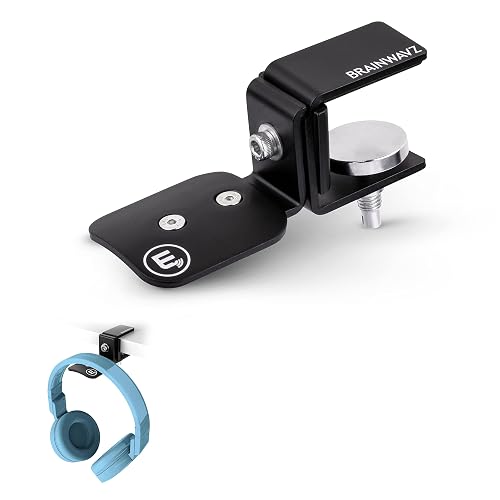
- Under-desk clamp eliminates all desk footprint
- Adjustable arm positions headphones for easy reach
- Works with desks up to 2.5 inches thick
Satechi Aluminum Headphone Stand with USB Hub

- USB hub ports at base charge phones and accessories
- Premium aluminum alloy construction
- Weighted base provides excellent stability
Brainwavz Zirconia Headphone Stand
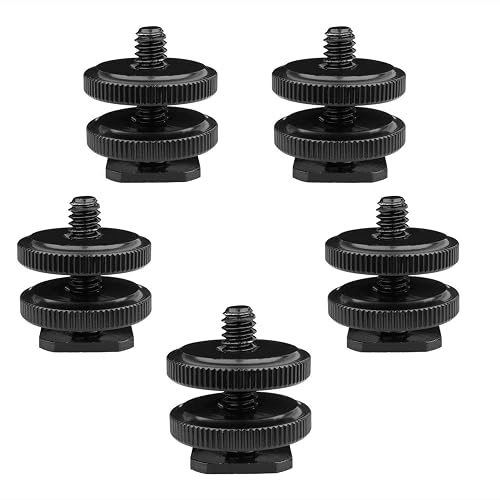
- Heavy cast base resists tipping under full headphone weight
- Silicone hook padding protects headband coating
- Clean single-piece design fits any desk aesthetic
Brainwavz Icon Dual Headphone Stand

- Holds two full-size headphones on one base
- Vertical hook spacing prevents earcup contact between pairs
- Single footprint for two-headphone capacity
Brainwavz Hooka Headphone Wall Mount

- Zero desk footprint — mounts directly to wall
- Lowest price in this guide at $14.99
- Simple two-screw installation with included hardware
Brainwavz CSTAND Headphone Stand

- Compact footprint fits crowded desk setups
- Lightweight for easy repositioning
- Clean minimalist aesthetic suits most workspaces
I tested each home office product over four to six weeks of daily use, evaluating ergonomic design, build quality, and performance under real-world office conditions. Each product was assessed against OSHA and Mayo Clinic ergonomic guidelines to verify its ability to support healthy working postures during extended sessions.
Buying Guide
Stand Type and Mounting Style
The most fundamental choice when selecting a headphone stand is where it will mount. Desktop stands sit on the work surface and are the simplest option — they require no installation and can be repositioned freely. Under-desk clamp stands attach to the desk's edge with a screw clamp, suspending headphones below the surface and freeing up the entire desktop footprint of a traditional stand. This is particularly valuable for small desks or setups where every square inch matters. Wall-mount stands require drilling two anchor points into the wall but once installed add no desk or floor footprint and keep headphones at eye level. Floor stands use a weighted base on the floor below the desk — uncommon but useful for studio environments with dedicated equipment pedestals. When choosing between types, consider the permanence of your setup: if you rent or rearrange your workspace frequently, a desktop or under-desk clamp model is more flexible than a wall mount that leaves holes when removed. Measure the available clearance under your desk before choosing a clamp model — some stands require at least three inches of clearance below the desk surface for headphones to hang without contacting the desk underside. Also verify that your desk has a straight, accessible edge without cable management rails that would prevent the clamp from seating flush.
Height and Headband Compatibility
Not all headphone stands work with all headphone designs. Full-size over-ear headphones have wide headbands that fit most standard stands. On-ear headphones are smaller and may slide off stands designed for wider headbands. In-ear monitors and earbuds cannot use a traditional headphone stand — they require a hook or small clip. Headphone stand height determines how much of the cup hangs below the hook. Most standard stands position cups 10 to 14 inches above the desk surface, which works for virtually all over-ear designs. Adjustable-height stands offer the most flexibility — if you use multiple headphone types on the same stand, an adjustable model prevents needing a second stand. Check that the hook or arm width matches the natural expanded width of your headphones: hooks narrower than 2 inches concentrate pressure at a single headband point and can cause localized foam compression on padded headbands over time. Hooks wider than 5 inches may not provide enough lateral support for compact on-ear headphones, which tend to slide off wide horizontal arms. If your headphones have a rigid metal headband without padding at the arch, any hook width works without concern for compression — but if the headband has integrated foam or leatherette padding at the crown, prioritize a hook with a soft silicone or rubber sleeve to prevent surface wear at the contact point.
Material and Build Quality
Headphone stand materials fall into three main categories: plastic, aluminum alloy, and wood. Plastic stands are the most common at lower price points — lightweight, inexpensive, and available in any finish color. Quality varies: thin injection-molded plastic flexes under headphone weight and cracks at stress points with heavy use; quality ABS plastic is rigid enough to support a 400g headphone indefinitely. Aluminum alloy stands are the premium choice — heavier, more rigid, and more refined in appearance. Aluminum resists surface scratches better than plastic, and the weight contributes to stability. Solid wood occupies a niche segment: warm aesthetic suitable for high-end audio setups, but typically hand-crafted and more expensive. For most users, a quality aluminum or ABS plastic stand provides sufficient durability for years of daily use. Examine finish quality on aluminum stands — anodized aluminum resists fingerprints and corrosion better than bare metal; brushed finishes hide fingerprints better than polished ones. Weight is directly related to stability: stands under 200g will tip over easily when headphones are placed quickly; stands over 400g with a wide base resist tipping under normal use. Check that the underside has rubber non-slip feet — stands without them slide on smooth desk surfaces and can scratch both the stand base and the desk surface when shifted repeatedly.
USB Hubs and Integrated Features
Several premium headphone stands integrate USB hubs into the base, turning a passive storage stand into an active desk accessory. USB hub stands add two to four USB-A or USB-C ports at the base, convenient for charging smartphones and accessories without reaching behind a computer. The most important specification to check is the USB standard: older USB-A ports deliver only 500mA (2.5W), which is insufficient for fast-charging modern phones, while USB-A 3.0 ports deliver up to 900mA (4.5W) for slower but functional phone charging. For meaningful fast-charging, you need USB-C Power Delivery ports, which can deliver 18W to 45W depending on the hub's AC adapter. When evaluating a USB hub stand, determine whether the hub is bus-powered (draws power from the computer via USB) or AC-powered via its own wall adapter. Bus-powered hubs have limited total output current and cannot charge large devices quickly when multiple ports are active simultaneously. AC-powered hubs provide consistent charging current regardless of computer load. Some stands include a 3.5mm audio pass-through at the base, letting you plug in corded headphones via a short cable rather than reaching directly to the computer. Cable routing channels in the stand base keep USB and charging cables organized. If primary USB charging speed matters more than the headphone stand function, a dedicated USB-C charger dock paired with a simpler stand will outperform most all-in-one stands.
Stability and Base Design
A headphone stand that tips over when headphones are placed or removed defeats its purpose and can damage the headphones or items on the desk. Stability comes from two factors: base weight and base footprint. A heavy, narrow base can tip in one direction if headphones are placed with lateral force; a lighter but wide base may be adequately stable for most uses. The most stable designs use a heavy cast base — typically aluminum or zinc alloy — with a modest footprint, combining mass with good weight distribution. Rubber non-slip pads on the base are essential: a stand without them slides on smooth desk surfaces when headphones are placed quickly. Most quality stands include rubber feet; verify these are present before purchasing, as bare plastic or metal bases scratch both the stand and the desk. Under-desk clamp stands bypass the stability concern entirely — the clamp mechanism locks the stand to the desk itself, making tipping physically impossible regardless of headphone weight. For wall-mount stands, the anchoring hardware determines stability: plastic drywall anchors are sufficient for headphones under 500g, but toggle bolts or wood-screw anchors into studs are needed for heavier headphones or repeated high-force interactions. When evaluating a desktop stand in person, pick up the base and feel its weight — stands under 150g typically lack the ballast to resist tipping when headphones are grabbed quickly in one hand.
Desk Footprint and Cable Management
Headphone stands occupy desk space that could otherwise hold speakers, plants, or workspace tools. A traditional upright desktop stand with a 5-inch base takes up roughly the footprint of a coffee mug — small but still visible. Under-desk clamp stands eliminate this entirely: the only desk-surface element is the thin clamp body at the edge, with headphones hanging in otherwise unused space below. Wall mounts take this further, moving the headphones completely off the desk and onto the wall. For aesthetic fit, match the stand material to the dominant materials in your workspace: brushed aluminum suits desks with metal computer hardware; matte black ABS suits gaming setups; wood stands complement warm natural desk aesthetics. Some stands include a fabric or silicone pad on the hook to prevent the headband's faux leather or rubber coating from wearing at the contact point — a useful detail for stands holding expensive headphones daily for years. If you use multiple headphone types, a dual-mount stand like the Brainwavz Icon Dual doubles capacity without doubling footprint: two hooks share one base and stack vertically rather than requiring two separate base areas. Stands with integrated cable routing channels — slots or clips on the upright or base where USB and charging cables thread — reduce the visible cable clutter that undermines an otherwise organized desk. Measure your available desk space and compare against the stand's listed base dimensions before purchasing, as online photos often obscure the true footprint relative to surrounding items.
Frequently Asked Questions
Do headphone stands damage headphones or their headbands?
The primary concern with headphone stands is headband stretch: when headphones rest on a hook that is too wide, it can gradually stretch the headband's suspension system beyond its natural position. Most headphone manufacturers design headbands to expand to fit different head sizes, and long-term storage on an appropriately-sized hook does not cause damage. The risk occurs primarily with very wide hooks (over 4 inches) used with headphones that have tension-based spring headbands — constant stretch over months can reduce the headband's clamping force. The solution is to choose a stand where the hook width closely matches the natural expanded width of the headphones when worn. Silicone-padded hooks protect the headband surface coating (leather, protein leather, or rubber) from surface wear at the contact point. Bare metal or sharp-edged hooks can mark soft headband coatings over time. For headphones with sliding-adjustment headbands (where the size is set by position rather than spring tension), resting on a hook at a comfortable head-width setting and adjusting back when wearing is the recommended practice. Studio monitor headphones designed for extended wear — such as the Audio-Technica ATH-M50x — can be stored on standard hooks without concern since their headbands are designed for frequent adjustment and are not spring-loaded in a way that creates ongoing stretch pressure when stored.
Can I use a headphone stand for gaming headsets with boom microphones?
Yes — most gaming headsets with boom microphones fit standard headphone stands without difficulty. The boom arm typically folds flat against the headset or retracts when not in use, and the headset rests on the stand's hook via the headband just like any other headphone. There are a few considerations specific to gaming headsets. First, gaming headsets tend to be wider than audiophile headphones to accommodate larger earcup designs and the microphone attachment point — verify the stand's hook is wide enough to fit without squeezing the earcups together. Most standard desktop headphone stands accommodate headsets up to 8 inches wide. Second, headsets with non-retractable fixed boom microphones can rest awkwardly on some hooks if the microphone arm protrudes and creates an unbalanced resting position. For these headsets, a stand with a wider or slightly angled hook distributes weight more evenly and prevents the headset from tipping forward off the hook. Third, wireless gaming headsets with integrated batteries should be stored at a moderate charge level — fully discharged lithium batteries degrade faster than those stored at 40–70% charge. If you use both a gaming headset and a second pair of headphones for music or calls, the Brainwavz Icon Dual holds both pairs on a single base without requiring separate stands for each.
Are under-desk clamp headphone stands practical for standing desks?
Under-desk clamp stands are particularly well-suited for standing desks because they work the same way regardless of desk height — the clamp attaches to the edge of the desk surface, and the headphones move with the desk as it raises and lowers. This is a significant advantage over desktop stands: a stand sitting on the desk surface stays at the same absolute height regardless of desk position, which means it may be at the wrong ergonomic height for reaching headphones when standing versus sitting. With a clamp stand, headphones are always directly below your working surface at a consistent relative position whether you're sitting or standing. The practical limitation is desk edge construction. Most clamps are designed for flat desk edges 1 to 2.5 inches thick. Desks with very thick edges, rounded edges, or T-molding trim can prevent the clamp from seating properly. If your standing desk has a wire management channel along the front edge — common on electric standing desks — verify it does not prevent the clamp from reaching the flat underside surface. Some clamp designs leave visible hardware at the desk edge that may conflict with the aesthetic of high-design desks. For most sit-stand setups, the under-desk clamp provides the best combination of zero footprint, consistent grab position, and fully flexible height adjustment.
Do USB hub headphone stands provide enough power to charge modern smartphones?
USB hub headphone stands vary significantly in charging capability, and this is the most important specification to verify before purchasing. Basic USB-A ports on hub stands deliver only 500mA (2.5W) — insufficient for charging a modern smartphone at any meaningful speed and too slow to prevent a tablet from discharging during active use. USB 3.0 Type-A ports deliver up to 900mA (4.5W), which charges a phone slowly when the phone is idle but cannot keep pace with a phone under active screen use. For meaningful fast-charging, you need USB-C Power Delivery ports, which require the stand's hub to include USB-C PD and an AC adapter rather than a bus-powered USB connection to the computer. Stands with USB-C PD hubs can deliver 18W to 65W — sufficient for fast-charging most smartphones and tablets. Before purchasing, read the full specification sheet and identify the exact port types, wattage per port, and whether the hub draws power from an AC adapter or from the computer's USB port. Bus-powered hubs are limited by the current the computer provides — typically 4.5W to 18W total across all ports — and cannot charge large devices quickly when multiple ports are active. If fast charging is a priority, a dedicated USB-C charger alongside a simple headphone stand will consistently outperform any all-in-one stand with integrated but lower-spec USB ports.
Can a dual headphone stand hold very large or very compact headphones?
Dual headphone stands hold two standard-size over-ear headphones on two hooks mounted vertically on a shared upright post. The practical capacity is exactly two full-size pairs — most dual stands are not designed to support three or more pairs, and overloading a dual stand beyond its rated limit stresses the base and upright at the connection point. Hook spacing matters: if the two hooks are too close vertically, the earcups of the lower pair contact the headband of the upper pair, which causes surface marks on both over time. Quality dual stands position hooks at least 5 to 6 inches apart vertically, providing clearance for most headphone earcup depths up to 2 inches. For size compatibility at the extremes: very large earcups (some full-size planar magnetic headphones or ANC headphones with extended cups) may be too wide to rest securely on hooks designed for standard circumaural sizing. Very compact on-ear headphones sometimes sit poorly on hooks designed for larger headbands, as the narrower headband may not engage the hook at the intended balance point and tips forward. For a mixed collection — one large gaming headset and one standard pair of over-ear headphones — verify the stand's hook width matches the wider of the two headphones first, then confirm the lower hook's spacing provides cup clearance for the larger pair. The Brainwavz Icon Dual is designed for standard over-ear sizing and performs best with two pairs of similar size.
How important is ergonomics when choosing home office equipment?
Ergonomics is the most important factor for home office equipment used for 4 or more hours per day, as discomfort and poor posture accumulate into musculoskeletal problems over months and years. OSHA and Mayo Clinic ergonomic guidelines identify the chair and desk height relationship as the most critical factor — forearms should be parallel to the floor when typing, with feet flat on the floor or a footrest. Monitor height should position the top of the screen at eye level or slightly below to prevent neck flexion. Investing in ergonomically sound primary equipment (chair, desk, monitor position) provides a higher return on health and productivity than any other home office upgrade.
What is the best way to set up a home office for productivity?
An effective home office setup prioritizes visual ergonomics, audio quality for calls, and lighting that minimizes eye strain. Position the primary monitor directly in front of you at arm's length, with the top of the screen at or slightly below eye level. Place task lighting to the left or right of the monitor (never behind or in front) to prevent glare and reflections. Use a dedicated headset or microphone and camera for video calls rather than laptop built-ins to project a professional presence. Separate your workspace visually from living areas when possible — a dedicated room significantly improves focus compared to working from a couch or dining table, even if only separated by a room divider.
Our Verdict
The Brainwavz Hengja at $29.99 is our top pick — its under-desk clamp design eliminates desk footprint entirely while keeping headphones at arm's reach, and it fits any desk up to 2.5 inches thick. For users who want USB charging integrated with their stand, the Satechi Aluminum Stand at $39.99 is the only USB hub option in this guide with premium aluminum construction. The Brainwavz Zirconia at $24.99 is the best traditional desktop stand for users who prefer headphones displayed above the desk. For dual-headphone storage, the Brainwavz Icon Dual at $34.99 holds two full-size pairs on a single base without doubling footprint. Budget buyers who can spare two wall screws should consider the Brainwavz Hooka at $14.99 — the most space-efficient solution in this guide.