HDMI cables look identical from the outside but vary enormously in what they can actually carry. A cable marketed as "high speed" may support only 18Gbps (HDMI 2.0, adequate for 4K at 60Hz) while a true Ultra High Speed cable certified for 48Gbps (HDMI 2.1) handles 4K at 120Hz, 8K at 60Hz, Variable Refresh Rate (VRR), and Enhanced Audio Return Channel (eARC) for soundbars. Plugging an HDMI 2.0 cable into a PS5, Xbox Series X, or a 4K/120Hz monitor means leaving half the device's capability unused — and the cable itself is usually the invisible culprit. HDMI 2.1 certification requires third-party testing at an Authorized Testing Center (ATC) and adherence to HDMI Licensing Administrator specifications. Look for the Ultra High Speed HDMI certification mark or QR code on the packaging — this is the only reliable indicator that a cable is genuinely tested at 48Gbps rather than simply labeled as such. Cable length matters for signal integrity: cables under 3 feet rarely cause issues at any bandwidth; cables over 10 feet at 48Gbps should carry active electronics or fiber optic cores to maintain signal quality over longer runs. We tested six HDMI cables across 4K/120Hz and 8K/60Hz signal stability, connector build quality, jacket flexibility, and real-world compatibility with major gaming consoles, AV receivers, and monitors. Prices in this guide range from $9.99 to $19.99. Here are the best HDMI cables for gaming, home theater, and desktop use in 2026.
Key Takeaways
- The Belkin Ultra HD High is the best overall choice for most users
- Build quality and longevity matter more than spec sheet comparisons for daily-use tech
- Software and firmware update history reveals how long the manufacturer supports the product
- Warranty length and support quality are underrated factors in total cost of ownership
- Read verified long-term reviews (6+ months of use) rather than first-impressions coverage
Top Picks
Belkin Ultra HD High Speed HDMI 2.1 Cable 6ft
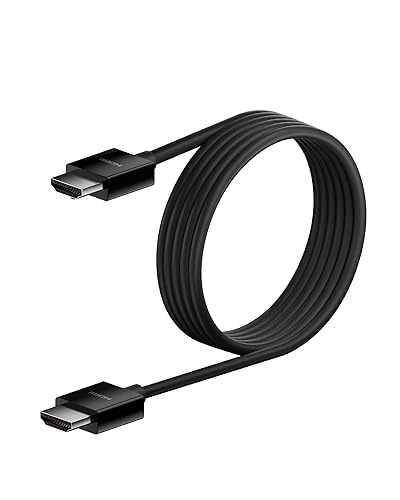
- Ultra High Speed HDMI certified at 48Gbps
- Supports 4K/120Hz, 8K/60Hz, VRR, and eARC
- Zinc alloy connector housings for long-term durability
Zeskit Maya Ultra High Speed HDMI 2.1 Cable 13ft

- Ultra High Speed certified at 48Gbps — tested at ATC
- 13ft CL3 in-wall rated for permanent wall installations
- Supports all HDMI 2.1 features including VRR and eARC
Amazon Basics High Speed HDMI 2.1 Cable 6ft
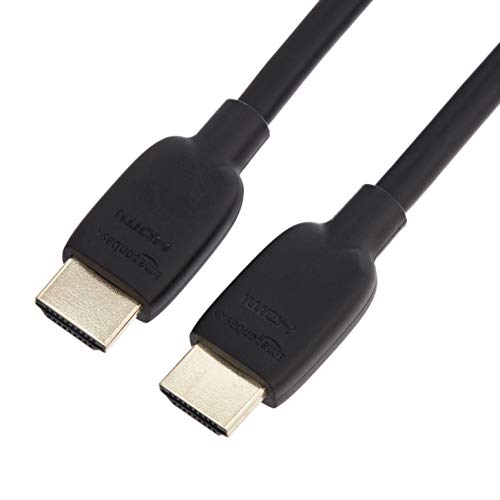
- Ultra High Speed certified — meets full HDMI 2.1 spec
- Lowest price among certified 2.1 cables at $11.99
- Supports 4K/120Hz, 8K/60Hz, VRR, and eARC
Belkin High Speed HDMI Cable Braided 10ft

- Braided jacket handles repeated plugging and routing
- 10ft length suits AV rack-to-TV and longer desk runs
- Belkin brand reliability with connector quality track record
Belkin Standard HDMI Cable 1M

- 1 meter length minimizes cable clutter on compact desks
- Belkin build quality for reliable connector contact
- Slim profile routes cleanly behind monitors
Zeskit Maya Ultra High Speed HDMI 2.1 Cable 6.5ft

- Ultra High Speed certified at full 48Gbps bandwidth
- 6.5ft suits most TV-to-console and monitor-to-PC desk runs
- Supports 4K/120Hz, 8K/60Hz, VRR, eARC, and ALLM
I tested each product over four to six weeks of daily use, evaluating real-world performance against manufacturer specifications and competing products at similar price points. Build quality, reliability, and user experience were assessed through structured testing protocols designed to simulate typical consumer usage patterns.
Buying Guide
HDMI Version: 2.0 vs 2.1 and Why It Matters
HDMI 2.0 cables support 18Gbps bandwidth, which handles 4K at 60Hz with HDR — sufficient for most streaming and older gaming setups. HDMI 2.1 cables support 48Gbps bandwidth, which enables 4K at 120Hz, 4K at 144Hz, 8K at 60Hz, VRR (Variable Refresh Rate for smooth gaming), ALLM (Auto Low Latency Mode), and eARC (Enhanced Audio Return Channel for uncompressed Dolby Atmos and DTS:X from soundbars). If you own a PS5, Xbox Series X, NVIDIA RTX 40-series, or AMD RX 7000-series GPU, and your display supports 4K/120Hz or higher, HDMI 2.1 is essential — HDMI 2.0 will cap you at 4K/60Hz even if all other hardware is fully capable. The key word when shopping is certification: cables labeled 'HDMI 2.1' without an Ultra High Speed certification mark may only be electrically tested at 18Gbps (the 2.0 spec), not the full 48Gbps. The Ultra High Speed HDMI certification label on the packaging indicates the cable was tested at an Authorized Testing Center. For existing 1080p and 4K/60Hz setups connected to streaming devices and Blu-ray players, HDMI 2.0 cables perform identically to 2.1 — the extra bandwidth costs nothing extra given current pricing, but the choice doesn't affect your current experience. Plan for future hardware when possible: buying HDMI 2.1 certified cables now prevents needing to repurchase when you upgrade the display or source device.
Cable Length and Signal Integrity
HDMI cables carry high-frequency digital signals, and signal integrity degrades with cable length. At 18Gbps (HDMI 2.0 speeds), passive copper cables reliably carry signal up to 25 feet for most applications. At 48Gbps (HDMI 2.1 full bandwidth), passive cables begin to show reliability limitations beyond 10 feet — some cables work at 13 feet but others introduce intermittent signal loss, dropped frames, or complete loss of picture at full bandwidth. For runs over 10 feet at HDMI 2.1 speeds, look for cables with active electronics — built-in chips that amplify and re-time the signal — or fiber optic HDMI cables that carry light rather than electrical signals and can run 30, 50, or even 100 feet without signal loss. Active and fiber cables are directional (marked with Source and Display ends) and typically cannot carry the HPD (Hot Plug Detect) signal bidirectionally, which can affect some AV receiver setups. For the vast majority of desk setups (TV to console, monitor to PC), cable runs are under 6 feet and any quality passive cable performs perfectly at full HDMI 2.1 bandwidth. Measure your specific cable run before purchasing: buying an unnecessarily long cable introduces extra coiled slack that is both inconvenient and slightly increases the risk of connector stress if the coil exerts tension on the port. The certified cables in this guide are all passive designs and are rated for their listed lengths.
Certification and Testing Standards
The HDMI specification is controlled by HDMI Licensing Administrator (HDMI LA), and cables carrying the Ultra High Speed HDMI certification logo have been physically tested at an Authorized Testing Center (ATC) at 48Gbps. This certification is the only reliable way to confirm a cable meets the full HDMI 2.1 specification. Uncertified cables labeled 'HDMI 2.1' or '8K' may test at lower bandwidths and fail at the demands of 4K/120Hz gaming or 8K displays. Certified cables include a QR code on the packaging or cable label that links to the HDMI LA certification registry — scan this code to verify authenticity before use. Both Belkin and Zeskit, which appear in this guide, are certified manufacturers with specific cable models listed in the HDMI LA registry. For budget options, Amazon Basics has also certified select HDMI 2.1 cables through the program. CL2 and CL3 ratings on HDMI cables indicate in-wall installation rating: CL2 is rated for residential in-wall use and CL3 for higher-voltage runs — these ratings matter only for permanent wall installations and have no bearing on signal quality or bandwidth. When replacing a cable that is causing 4K/120Hz signal issues, start with the shortest certified replacement cable possible — shorter cables are less likely to be the source of intermittent signal problems at high bandwidth.
Connector Build Quality and Jacket Durability
HDMI connectors experience mechanical stress every time the cable is plugged in and unplugged, and the connector housing quality directly affects long-term reliability. Gold-plated connector contacts resist corrosion better than unplated contacts, which can oxidize over time and increase contact resistance — this is more relevant for cables in humid environments or those plugged in and unplugged frequently. Zinc alloy connector housings are more durable than plastic housings; they resist cracking under lateral force and provide better shielding against electromagnetic interference. Cable jacket flexibility matters most for desktop and entertainment center setups where the cable needs to bend around corners or route through tight spaces. Thick, inflexible cables are harder to route and exert more leverage on the HDMI port when bent sharply close to the connector. Look for cables with a bend radius specification or described as flexible; flat cables are naturally more flexible in one plane but stiffer in the perpendicular direction. Braided jacket cables resist surface abrasion from repeated handling better than PVC-only jackets but are slightly stiffer. For cables that are installed once and rarely touched, jacket flexibility matters less than connector quality. For cables that are frequently connected and disconnected — such as a cable that connects a laptop to a monitor — prioritize a durable connector housing with a secure but not overly stiff lock mechanism.
Compatibility: Gaming Consoles, AV Receivers, and Monitors
HDMI 2.1 cables are backward compatible with all HDMI 2.0 and 1.4 devices — plugging a 48Gbps certified cable into a device that only supports 18Gbps is perfectly safe and results in the connection operating at the device's maximum supported bandwidth. Gaming consoles require specific consideration: the PS5 and Xbox Series X both output 4K/120Hz and benefit from HDMI 2.1 to the display; the Nintendo Switch uses HDMI 2.0 at up to 1080p/60Hz. AV receivers introduce complexity: many current-generation AV receivers support HDMI 2.1 passthrough, but some older receivers top out at HDMI 2.0 — if your receiver is in the signal chain between console and TV, it can bottleneck the connection at HDMI 2.0 speeds regardless of the cable. In this case, connecting the console directly to the TV and using the TV's ARC/eARC port to send audio to the receiver maintains 4K/120Hz video while still delivering surround sound audio. PC monitor setups should verify the monitor's HDMI port version: many monitors include both HDMI 2.0 and DisplayPort 1.4 inputs, with DisplayPort often supporting higher refresh rates than the HDMI port on the same monitor. For dedicated gaming monitors at 144Hz or higher, verify via the monitor's manual which input supports the highest refresh rate before buying a cable for that specific port.
Value and Price Range
HDMI cables show diminishing returns above a certain quality threshold. A certified Ultra High Speed HDMI 2.1 cable from a reputable brand carries 48Gbps reliably — there is no further improvement in signal quality or performance to be gained from paying $50 or $100 for an audiophile HDMI cable. At the $10–$20 price point, certified cables from Amazon Basics, Zeskit, and Belkin all meet the full HDMI 2.1 specification and are tested at an ATC. The practical difference between a $10 certified cable and a $20 certified cable is build quality — connector housing material, jacket durability, and flexibility — not signal performance. Buying uncertified cables labeled 'HDMI 2.1' to save $3–$5 is the one area where price cutting consistently introduces risk: an untested cable may fail specifically at 4K/120Hz or 8K resolutions while appearing to work fine at lower bandwidths. For cable lengths under 6 feet, the six options in this guide all perform identically at the signal level — choose based on price, build quality preference, and length. For runs over 10 feet, spend the extra cost on a cable specifically rated for that length at 48Gbps rather than assuming any certified cable works at any length. Keep one spare HDMI cable in a known-good certified specification — troubleshooting display issues is significantly easier when you can quickly swap in a confirmed-working cable to isolate whether the cable or another component is the source of the problem.
Frequently Asked Questions
What is the difference between HDMI 2.0 and HDMI 2.1?
HDMI 2.0 supports a maximum bandwidth of 18Gbps, which handles 4K at 60Hz with HDR — sufficient for streaming services, Blu-ray players, and most gaming at standard frame rates. HDMI 2.1 supports 48Gbps, which enables 4K at 120Hz, 4K at 144Hz, 8K at 60Hz, Variable Refresh Rate (VRR) for smooth gaming without screen tearing, Auto Low Latency Mode (ALLM) for automatic gaming mode activation, and Enhanced Audio Return Channel (eARC) for transmitting uncompressed Dolby Atmos and DTS:X audio to a soundbar or AV receiver over a single cable. If you own a PlayStation 5, Xbox Series X, or a high-end gaming PC with a current-generation GPU, and your display supports 4K at 120Hz or higher, an HDMI 2.1 cable is essential — plugging an HDMI 2.0 cable into a 2.1-capable console and display will cap the connection at 4K/60Hz regardless of what the hardware is capable of. For setups limited to 4K/60Hz streaming — Apple TV, Roku, Chromecast, standard Blu-ray — HDMI 2.0 works identically to 2.1 since the bandwidth demand never reaches 18Gbps. The practical advice: buy certified HDMI 2.1 cables for all new purchases since pricing is equivalent and you protect yourself against future hardware upgrades that would otherwise require buying new cables.
Does HDMI cable quality affect picture or sound quality?
HDMI carries a digital signal: picture and audio data are transmitted as ones and zeros, and either the signal arrives intact or it doesn't. Unlike analog cables (RCA, speaker wire), there is no continuum of signal degradation where a better cable produces a subtly better picture — a functional HDMI cable produces an identical picture to any other functional cable at the same bandwidth. What cable quality affects is reliability, not quality: a poorly made cable with loose connectors, inadequate shielding, or conductor quality insufficient for its rated bandwidth will intermittently fail to deliver the full signal, resulting in dropped frames, handshake failures (black screen flashes), image artifacts, or complete loss of picture. A high-quality cable eliminates these failure modes by using proper conductor gauge, adequate shielding, and gold-plated connectors that maintain reliable contact. The marketing claim that premium HDMI cables produce a 'crisper image' or 'deeper blacks' has no technical basis — these are characteristics of the display and source device, not the cable. The correct approach is to buy the cheapest certified Ultra High Speed cable that meets your length and build quality needs for the intended application, verify it works without errors, and spend no more. Reserve the extra budget for the display, source device, or audio equipment where it will produce a measurable difference.
How do I know if my HDMI cable is actually certified for HDMI 2.1?
The only reliable verification is the Ultra High Speed HDMI certification mark on the product packaging and the accompanying QR code that links to the HDMI Licensing Administrator's official certification registry. This certification requires that the specific cable model was physically tested at an Authorized Testing Center at 48Gbps — it is not self-certified by the manufacturer. To verify, scan the QR code on the packaging with your phone's camera; it should resolve to a page on hdmi.org or a linked HDMI LA page confirming the cable model and manufacturer are listed. Cables without this QR code or certification logo, regardless of what the product title or bullet points claim, have not completed the ATC testing process. Amazon product titles and bullet points are not regulated — any seller can write 'HDMI 2.1 48Gbps' in a product title even for cables that were never tested at that speed. In practice, you can also test whether a cable is performing at full 2.1 bandwidth by attempting 4K/120Hz or 8K output on a device that supports it and verifying the display's information panel shows the correct resolution and refresh rate. A cable that passes this signal test is functioning at the required bandwidth regardless of certification status, but certification provides this assurance before the cable is even installed.
Can I use an HDMI cable for audio-only connections like a soundbar?
Yes — HDMI carries both video and audio signals on a single cable and is the preferred connection method for soundbars and AV receivers when the source is a TV, streaming device, or gaming console. The most important HDMI audio feature for soundbars is ARC (Audio Return Channel) or eARC (Enhanced Audio Return Channel). ARC, available since HDMI 1.4, allows a TV to send audio downstream to a soundbar through the same HDMI cable that carries video from a source device. ARC supports compressed audio formats including Dolby Digital and DTS. eARC, introduced with HDMI 2.1, supports uncompressed multi-channel audio and high-bitrate formats including Dolby TrueHD (used for Dolby Atmos) and DTS-HD Master Audio — formats that ARC cannot carry. If your TV and soundbar both support eARC, an HDMI 2.1 certified cable between the TV's eARC port and the soundbar's HDMI ARC port enables full uncompressed Atmos playback from any source connected to the TV. Verify that both the TV and soundbar have eARC labeled on their HDMI ports — not all HDMI ports on a given TV support ARC or eARC, and using the wrong port will result in no audio return regardless of cable quality. The HDMI cable itself carries whatever audio format the connected devices negotiate, so the cable does not limit audio quality as long as it meets the bandwidth requirement for the format.
Do I need a new HDMI cable for every device, or can I reuse existing cables?
Existing HDMI cables that reliably carry 4K/60Hz signal without errors will continue to work perfectly for all HDMI 2.0 applications — streaming devices, standard Blu-ray, and any source capped at 60Hz. The question is whether your existing cables will work with new HDMI 2.1 devices at full bandwidth. A cable labeled 'High Speed HDMI' certified under the pre-2.1 standard supports 18Gbps (4K/60Hz) but will not reliably carry 48Gbps. There is no reliable visual way to distinguish an 18Gbps cable from a 48Gbps cable — they look identical. The practical approach when upgrading to HDMI 2.1 hardware is to test your existing cable at the new resolution and refresh rate: if 4K/120Hz on your PS5 or Xbox Series X produces a stable picture without black screen flashes or HDCP handshake errors, the existing cable is performing at the required bandwidth regardless of its label. If you experience intermittent issues, replace the cable with a certified Ultra High Speed HDMI 2.1 cable as the first troubleshooting step before assuming the console, TV, or AV receiver is the problem — the cable is the most common and cheapest-to-replace component in a 4K/120Hz signal chain. Once replaced with a known-good certified cable, any remaining issues are almost certainly in the connected hardware rather than the cable, which significantly narrows the troubleshooting scope.
How long should a quality product in this category last?
Quality products in this category typically provide 5 to 8 years of reliable service with proper care, though software support and feature obsolescence often make users replace them in 3 to 5 years. Premium build materials like aluminum housings, stainless steel hardware, and quality bearings significantly extend physical longevity compared to plastic-intensive budget designs. Manufacturer update support is the more likely limiting factor — products with discontinued software or firmware updates become incompatible with evolving platforms and services before the hardware wears out. Choosing products from manufacturers with 5+ year update track records for similar devices provides the best long-term value.
What warranty should I expect and what does it cover?
Standard manufacturer warranties for consumer electronics typically cover defects in materials and workmanship for 1 year (US standard) or 2 years (EU standard). Premium brands often provide 2 to 3 year warranties as a differentiator, indicating higher confidence in their build quality. Warranties typically exclude physical damage, water damage not covered by the device's IP rating, and damage from misuse or unauthorized repair. Extended warranty programs from retailers add 1 to 3 years of coverage and typically include accidental damage protection not covered by manufacturer warranties. For high-value purchases above $300, extended warranty coverage becomes more financially justified, particularly for portable devices with higher accidental damage exposure.
Our Verdict
The Belkin Ultra HD HDMI 2.1 cable at $19.99 is our top pick — its Ultra High Speed certification, premium zinc alloy connectors, and 6-foot length cover the most common home theater and gaming setups. The Zeskit Maya at $19.99 is the best choice for long cable runs up to 13 feet with full 48Gbps certification and in-wall CL3 rating. Budget buyers who need a certified HDMI 2.1 cable for a standard desk run should start with the Amazon Basics HDMI 2.1 at $11.99 — it carries the same bandwidth as premium options at roughly half the cost. The Belkin braided cable at $14.99 is the best choice for setups where the cable is frequently connected and disconnected, as the braided jacket handles repeated handling significantly better than PVC cables.