A document camera is an overhead visualizer that points down at your desk so a class, a meeting, or a recording can see a worksheet, a textbook page, a circuit board, or your hands as you work. It is a different tool from a flatbed document scanner: a scanner digitizes paper into files, while a document camera streams a live, full-motion view in real time over USB or HDMI. That distinction matters because teachers, tutors, and remote workers increasingly need to show physical material on Zoom, Google Meet, or a classroom projector without fumbling a phone over the desk. We evaluated six current models that ship with live Amazon listings, spanning a $85 flexible-arm budget unit to a $329 standalone 4K presenter. The category is dominated by a handful of specialists, IPEVO, Elmo, INSWAN, HUE, and AVer, so brand spread matters less than how each handles autofocus, capture area, lighting, and microphone quality during real sessions. This guide ranks each camera by sensor resolution, frame rate, the size of the document it can frame, and how quickly it locks focus when you swap a page. We also flag which models run independently of a computer for projector-only classrooms, and which double as a webcam for hybrid meetings.
Key Takeaways
- The IPEVO V4K PRO leads at $99 with an 8-megapixel sensor capturing a full A3 spread at 3264 x 2448 plus 30fps USB video.
- The Elmo MX-P3 is the $329 premium pick, outputting true 4K over HDMI with 16x zoom and a 13-megapixel, 4160 x 3120 sensor that runs without a computer.
- On a budget, the HUE HD Pro delivers 1080p capture, a built-in LED, and a microphone for about $85.
- Capture area mattered more than megapixels: the INSWAN INS-2 frames a full A3 sheet, while the AVer M5 tops out near A4.
Top Picks
IPEVO V4K PRO Ultra HD USB Document Camera

- 8-megapixel sensor captures stills at 3264 x 2448 and streams video at 30fps over a single USB-C cable
- Dual AI-enhanced microphones cut background noise so a separate headset is not needed on calls
- Dual-hinge arm folds flat and frames a full A3 (11 x 17 inch) spread without repositioning the base
Elmo MX-P3 4K Ultra HD Visual Presenter

- 13-megapixel sensor outputs true 4K at 4160 x 3120 through HDMI, RGB, and USB 3.0 simultaneously
- Runs standalone without a computer, driving a classroom projector directly over HDMI
- 16x digital zoom and 0 to 180 degree image rotation handle small parts and bound textbooks
INSWAN INS-2 4K USB Document Camera
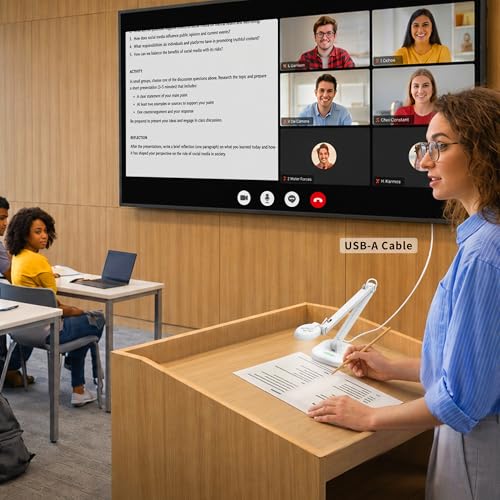
- 13-megapixel sensor with dual autofocus frames a full A3 sheet at up to 3840 x 2160
- Dual-lens design adds a forward-facing camera for showing your face and the page together
- Supplemental LED light and built-in microphone work across Windows, Mac, iPad, and Chromebook
HUE HD Pro Flexible USB Document Camera

- Captures native 1080p (1920 x 1080) with a manual focus ring for close-up detail
- Bendable gooseneck arm holds any angle and frames sheets up to 11 x 17 inches
- Built-in LED lights and microphone keep the total cost near $85 with no add-ons
AVer M5 USB Document Camera

- 5-megapixel sensor with mechanical autofocus locks on a swapped page in about one second
- Foldable arm collapses to roughly the size of a stapler for travel between rooms
- Plug-and-play USB with a built-in microphone certified for Zoom, Teams, and Google Meet
IPEVO V4K-13MP Ultra USB Document Camera

- 13-megapixel sensor captures stills up to 3840 x 3104, the sharpest still resolution in this group
- Continuous autofocus re-locks in under a second when you lift or replace a document
- Foldable plug-and-play body weighs under 1 pound and needs no external power brick
I ran each camera through two weeks of live lessons and remote calls, swapping worksheets, books, and small electronics under the lens. I timed autofocus on each page change, measured the largest sheet that filled the frame, and judged the built-in lights and microphones during real video calls before checking prices.
Buying Guide
Document Camera vs Document Scanner: What You Actually Need
These two devices are often confused, but they solve different problems. A document scanner, like a flatbed or sheet-fed model, digitizes paper into PDF or JPEG files you store and search later. A document camera is an overhead visualizer that streams a live, full-motion view of whatever sits under its lens, so a class or a meeting sees the page in real time. If your goal is archiving receipts or contracts, buy a scanner. If your goal is showing a worksheet, demonstrating a science experiment, or sharing handwritten math during a Zoom call, you need a document camera. Every model in this guide, from the $85 HUE HD Pro to the $329 Elmo MX-P3, is built for live presentation rather than batch scanning. Some, like the IPEVO V4K-13MP, can also grab a high-resolution still at 3840 x 3104, blurring the line, but their core job remains the live overhead feed.
Resolution and Frame Rate: Where the Numbers Matter
Document cameras advertise two different resolution figures, and confusing them leads to disappointment. Still-capture resolution describes the photo a camera can snap, which is where 8-megapixel and 13-megapixel sensors shine, while live-video resolution describes the moving feed your audience actually watches on a call. The IPEVO V4K PRO carries an 8-megapixel sensor yet streams live video at 1080p and 30fps, and the 13-megapixel IPEVO V4K-13MP does the same for motion despite a 3840 x 3104 still mode. Only the Elmo MX-P3 pushes true 4K live video, and it does so over HDMI rather than USB. For most teaching and meeting work, 1080p at 30fps is enough to read 11-point type on a worksheet. Pay for higher still resolution only if you photograph fine detail, such as circuit boards or small print, where the 13-megapixel INSWAN INS-2 and IPEVO V4K-13MP pull ahead of the 5-megapixel AVer M5.
Capture Area: Will It Frame Your Whole Page?
The single most overlooked spec is how large a document the camera can frame at its maximum height. A camera that only covers A4 (8.3 x 11.7 inches) forces you to slide a larger sheet around mid-lesson, which breaks the flow of a demonstration. The IPEVO V4K PRO and HUE HD Pro both reach an 11 x 17 inch (A3) spread, enough for a double-page textbook or a large worksheet. The INSWAN INS-2 also frames a full A3 sheet and adds a dual-lens option. By contrast, the webcam-style AVer M5 tops out closer to A4, which suits single sheets and small objects but not oversized diagrams. Measure the largest material you regularly show before buying. Arm height and hinge design dictate this number more than megapixels do, so check the maximum shooting area listed for each model rather than assuming a higher-resolution sensor automatically covers more page.
Standalone vs Computer-Tethered Operation
Most USB document cameras need a connected computer to display anything, because they send their feed into software like the free IPEVO Visualizer app or directly into Zoom. That is fine for a laptop-driven classroom or a home office, but it fails in rooms where a projector is the only display. The Elmo MX-P3 is the standout here: with HDMI and RGB outputs, it drives a projector or monitor on its own, no computer required, which is why it commands a $329 price. If your room already has a teacher laptop wired to the projector, a USB-only model like the $99 IPEVO V4K PRO or the $99 AVer M5 saves money and cabling. Decide based on your room first. Buying a standalone HDMI presenter for a laptop-centric setup wastes money, while buying a USB-only camera for a projector-only room leaves you unable to display anything without adding a computer.
Lighting, Microphones, and Autofocus in Real Sessions
Three features separate a smooth session from a frustrating one. Built-in LED lighting fixes the shadow your own head casts over the desk; the HUE HD Pro and INSWAN INS-2 include supplemental LEDs, while the IPEVO models rely on room light. Microphone quality matters when the camera doubles as your call audio: the IPEVO V4K PRO uses dual AI-enhanced mics with noise cancellation, and the AVer M5 carries a Zoom-certified mic, so neither needs a separate headset. Autofocus speed is the third factor, because every page swap forces the lens to re-lock. The AVer M5 and IPEVO V4K-13MP both re-focus in about one second, while the manual focus ring on the HUE HD Pro requires a deliberate hand adjustment each time. If you change material frequently during a lesson, prioritize fast continuous autofocus over a manual ring to keep the audience from staring at a blurry page.
Portability, Compatibility, and Total Cost
If you move between rooms or work from more than one location, weight and folding design matter. The IPEVO V4K-13MP weighs under 1 pound and folds flat, and the AVer M5 collapses to roughly the size of a stapler, while the 2.4-pound Elmo MX-P3 is built to stay on one desk. Compatibility is broad across this group: every model supports Windows, macOS, and Chromebook over standard USB, and the INSWAN INS-2 adds iPad support, which matters for tablet-based classrooms. Factor in the full cost too. The HUE HD Pro bundles lights and a microphone for about $85, so there are no add-ons, whereas a bare USB camera may need a separate desk light. Across the range, expect to spend $85 to $159 for a capable USB unit, and step up to $329 only when you need the standalone 4K HDMI output of the Elmo MX-P3 for a projector-driven classroom.
Frequently Asked Questions
What is the best document camera in 2026?
The IPEVO V4K PRO is our best overall document camera for 2026 at $99. It pairs an 8-megapixel sensor that captures stills at 3264 x 2448 with smooth 1080p video at 30fps, all over a single USB cable, so setup takes seconds on Windows, macOS, or a Chromebook. Its dual-hinge arm folds flat for travel yet extends far enough to frame a full A3 (11 x 17 inch) spread, which covers a double-page textbook without sliding the paper around. The dual AI-enhanced microphones with noise cancellation mean you can present and talk on Zoom without a separate headset. The main trade-off is the lack of an HDMI output, so it needs a connected computer to display, and live video is capped at 1080p. For teachers, tutors, and remote workers who run a laptop, that combination of price, capture area, and image quality is hard to beat, which is why it tops this ranking ahead of pricier standalone units.
What is the difference between a document camera and a document scanner?
A document camera and a document scanner look similar but do opposite jobs. A scanner, whether flatbed or sheet-fed, digitizes paper into stored files such as searchable PDFs, and its priority is accuracy and batch speed for archiving receipts, contracts, or records. A document camera is an overhead visualizer that streams a live, full-motion video of whatever sits beneath its lens, so a class or a video call sees the page, the object, or your hands in real time. You would not use a scanner to demonstrate a math problem on Zoom, and you would not use a document camera to file a year of invoices. The confusion grows because some document cameras, like the 13-megapixel IPEVO V4K-13MP, can also snap a high-resolution 3840 x 3104 still, which overlaps with light scanning. Still, their core purpose is the live overhead feed. If you need archiving, buy a scanner; if you need live presentation for teaching or meetings, buy a document camera like the ones ranked here.
Do I need a 4K document camera or is 1080p enough?
For most teaching and meeting work, 1080p live video is enough, and chasing 4K can waste money. The key is separating live-video resolution from still-capture resolution. The IPEVO V4K PRO streams a 1080p feed at 30fps, which renders 11-point worksheet type clearly on a projector or a Zoom window, and that covers the vast majority of classroom and home-office needs. True 4K live output is rare in this category; among our picks only the $329 Elmo MX-P3 delivers it, and it does so over HDMI rather than USB. Where higher numbers pay off is still capture: the 13-megapixel INSWAN INS-2 and IPEVO V4K-13MP grab photos up to 3840 x 3104, which helps when you photograph small print, circuit boards, or fine artwork. So if your audience watches a live feed on a call, 1080p like the $99 V4K PRO is plenty. Pay for 4K only when you drive a large display directly or need detailed still images of intricate objects.
Can a document camera work without a computer?
Most document cameras cannot work without a computer, but one in this guide can. Standard USB models such as the IPEVO V4K PRO, IPEVO V4K-13MP, and AVer M5 send their video into software on a connected laptop or directly into a conferencing app, so unplugging the computer leaves nothing to display. That design keeps them cheap and portable, with the V4K PRO at $99 and the V4K-13MP at $129. The exception is the Elmo MX-P3 at $329, which has HDMI and RGB outputs alongside USB 3.0. Those video outputs let it drive a classroom projector or a monitor on its own, with no computer in the loop, which is essential in rooms where the projector is the only display. Before buying, look at how your room is wired. If a teacher laptop already feeds the projector, a USB-only camera saves money; if the projector stands alone, you need the standalone HDMI output that only the Elmo MX-P3 provides among these picks.
Which document camera is best on a budget?
The HUE HD Pro is the best budget document camera in this guide at about $85, and it earns the spot by bundling features that cheaper no-name units leave out. It captures native 1080p (1920 x 1080) video, and its flexible gooseneck arm bends to any angle, holding position so you can point it straight down at a worksheet or angle it toward a 3D object. Built-in LED lights cancel the shadow your head casts over the desk, and an integrated microphone covers call audio, so the $85 price is the total cost with no add-on lighting or mic needed. Its frame reaches an 11 x 17 inch (A3) spread, matching far pricier cameras for capture area. The trade-offs are real: 1080p resolution trails the 8-to-13-megapixel sensors above it, and the manual focus ring needs a hand adjustment each time you change the subject distance. For tutors, students, and anyone testing a document camera for the first time, it is the lowest-risk entry point.
How long do document cameras last and are they durable?
A quality document camera is a multi-year purchase, and durability comes down to the arm hinges and the lens mechanism rather than the electronics, which rarely fail. The folding and gooseneck arms take the most stress because they are bent and repositioned daily. The IPEVO V4K PRO uses a dual-hinge metal arm rated for repeated folding, and the Elmo MX-P3, at 2.4 pounds with a rigid base, is built for years of fixed classroom use. Manual-focus models like the HUE HD Pro have one extra moving part in the focus ring, but it is simple and robust. To extend lifespan, fold the arm gently rather than forcing it, keep the lens covered or facing down to avoid dust and scratches, and avoid lifting the unit by the camera head. Because these devices have no battery to degrade, they typically outlast laptops they connect to. A USB camera that gets daily classroom use can reasonably last five years or more with basic care, and standalone presenters like the Elmo are built for even longer institutional service.
Can I use a document camera as a webcam for video calls?
Yes, most document cameras double as a webcam, and a few are built specifically for hybrid calls. Because they connect as standard USB video devices, apps like Zoom, Microsoft Teams, and Google Meet recognize them automatically, letting you switch between your face and the desk view mid-meeting. The AVer M5 is the standout for this use: it is plug-and-play, certified for Zoom and Teams, and includes a built-in microphone, so it serves as both your overhead view and your call camera. The IPEVO V4K PRO adds dual AI-enhanced noise-cancelling microphones, which means it can also handle your call audio without a headset. The INSWAN INS-2 goes further with a dual-lens design that shows your face and the page at the same time. The main limitation is mounting angle: an overhead arm points down at the desk, so to use it as a face camera you tilt the head forward, which can leave a slightly downward angle. For desk demonstrations during calls, though, every model here works as a capable webcam.
Our Verdict
The IPEVO V4K PRO is our best overall document camera for 2026 at $99, combining an 8-megapixel sensor, full A3 capture, and dual noise-cancelling microphones in a foldable USB unit that suits most teachers and remote workers. If your classroom runs on a projector without a computer, step up to the Elmo MX-P3 at $329 for its standalone 4K HDMI output and 16x zoom. Budget buyers should start with the $85 HUE HD Pro, which bundles 1080p capture, lighting, and a microphone, while anyone who photographs fine detail will prefer the 13-megapixel still resolution of the IPEVO V4K-13MP at $129. Match the camera to your room and the size of the documents you show.