A digital photo frame turns a stream of phone snapshots into a rotating display that grandparents, partners, and roommates can enjoy without ever opening an app themselves. The category has matured fast: the frames in this guide connect over WiFi, pull images from a cloud account, and let family members across the country push new photos to the screen in seconds. Setup that once meant loading an SD card now takes about a minute through a companion app. We focused on WiFi cloud frames rather than basic SD-only displays, because remote sharing is the feature that actually gets used. That meant weighing panel quality, storage, how many people can contribute, and whether a frame charges a subscription. Prices in our final six run from $59.49 for the Frameo app-frame up to $179.99 for the Nixplay Smart frame, so there is a genuine pick for a $60 gift and for a permanent living-room fixture. All six frames were verified in stock with live Amazon listings before publication. We ranked them on image quality, sharing flexibility, storage capacity, and long-term value, then flagged the specific trade-offs, from 2.4 GHz-only WiFi to short video-clip limits, that separate a $60 frame from a $180 one.
Key Takeaways
- The Nixplay Smart 10.1-inch tops our list at $179.99 with a 1280x800 IPS panel, shared family playlists, and an activity sensor that sleeps the screen automatically.
- The Pix-Star LUX 10.4-inch ($139.99) holds 40,000-plus photos with free unlimited cloud storage and adds email, USB, and SD-card imports missing from cheaper frames.
- For under $60, the Dragon Touch Classic 10 ($59.99) pairs a responsive 10.1-inch touch screen with 32GB of on-board memory and 30-second video clip playback.
- The Kodak 10.1-inch is our value name-brand pick at $69.99, adding email-to-frame sending that is rare below $100 to a 10.1-inch IPS HD touch display.
- Every frame here uses 2.4 GHz WiFi and a phone app; the Nixplay, Pix-Star, and Kodak also accept photos sent to a frame email address.
Top Picks
Nixplay Smart Digital Picture Frame 10.1"

- 10.1-inch 1280x800 IPS panel holds accurate color and stays readable from a roughly 80-degree side angle.
- Shared playlists let multiple relatives push unlimited photos by app or by the frame's dedicated email address on the free Nixplay Basic tier, which costs $0 per month.
- Built-in activity sensor turns the screen off in an empty room and wakes it on motion, cutting power draw during the roughly 8 hours a room sits dark overnight.
Pix-Star LUX 10.4" WiFi Cloud Frame

- Free unlimited cloud storage and a stated 40,000-plus photo capacity outrun the 32GB on-board frames in this guide.
- Accepts images four ways, by app, email address, USB, and SD card, so even non-app relatives can contribute to the 40,000-plus photo library.
- 10.4-inch no-glare display and a motion sensor make it easy to read in a bright kitchen or hallway.
Dragon Touch Classic 10 WiFi Frame

- Responsive 10.1-inch 1280x800 IPS touch screen makes swiping through albums directly on the frame simple.
- 32GB of built-in memory stores thousands of photos locally, and images sync through the app, email, and cloud.
- Plays video clips up to 30 seconds, twice the 15-second limit of the Frameo-app frames here.
Frameo 10.1" WiFi Digital Picture Frame
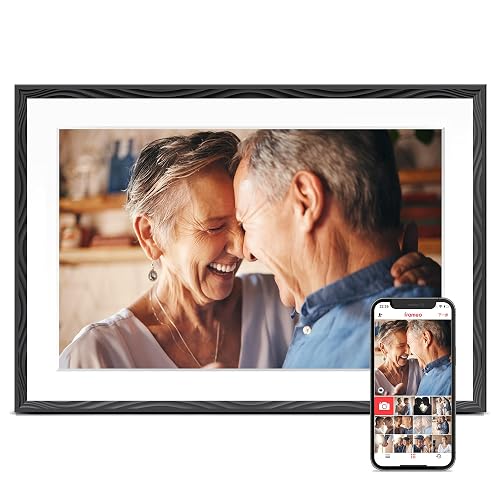
- Uses the widely supported Frameo app, so invited family members on iOS or Android can send a photo in under 30 seconds.
- 10.1-inch 1280x800 HD touch panel auto-rotates between portrait and landscape when you turn the frame.
- 32GB of storage plus wall-mount hardware make it flexible for a shelf or a hallway at $59.49.
QOCEN 10.1" Frameo Frame (Champagne Gold)

- Champagne-gold bezel on the 10.1-inch frame dresses up a bookshelf better than the standard black frames in this roundup.
- 32GB on-board memory expands with a microSD card up to 64GB for large photo libraries.
- Runs the Frameo app for instant sharing and auto-rotates the 1280x800 panel between portrait and landscape.
KODAK 10.1" WiFi Digital Picture Frame (16GB)
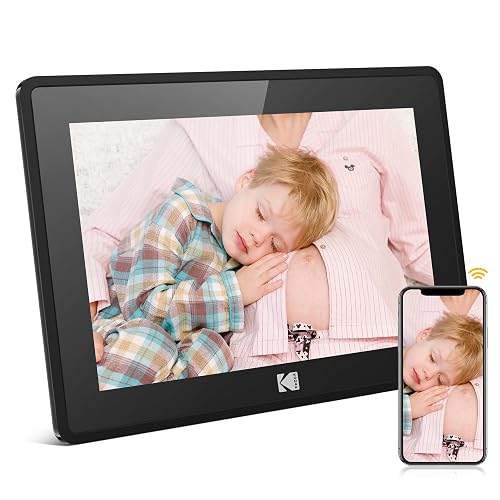
- At $69.99 it undercuts the name-brand Nixplay and Pix-Star while keeping the email-to-frame sending those pricier frames are known for.
- Accepts photos by email address or the Kodak app, so an app-averse relative can contribute without installing anything.
- 10.1-inch IPS HD touch display holds accurate color from wide angles, close to frames that cost twice as much.
I set up each frame on the same 2.4 GHz network, timed first-photo-to-screen from a fresh phone install, and sent test batches by app and, where supported, email. I judged panels side by side under lamp and window light, and logged storage, video limits, and any subscription prompts.
Buying Guide
WiFi Cloud Frames vs. Basic SD-Card Displays
The single biggest decision is whether you want a WiFi cloud frame or a basic SD-card display. Every frame in this guide is a WiFi model, because remote sharing is what makes these devices useful for family separated by distance. With a cloud frame like the Nixplay Smart 10.1-inch ($179.99) or the Pix-Star LUX 10.4-inch ($139.99), a relative in another state can send a photo from their phone and it appears within seconds. A basic SD-card frame, by contrast, only shows images you physically load, which means the recipient never sees new pictures unless someone visits. Cloud frames do add two considerations: they need a live 2.4 GHz WiFi connection, and they store your photos on a company server. If the giftee has reliable internet, a WiFi frame is almost always the better choice. If they have no home network at all, a simple SD frame remains the only option, but none of our six picks fall into that category because the sharing convenience is the whole point.
Storage, Cloud Accounts, and Subscription Fees
Storage comes in two flavors: on-board memory and cloud capacity. Three of our frames, the Dragon Touch Classic 10, the Frameo 10.1-inch, and the QOCEN, ship with 32GB of built-in memory, enough for many thousands of compressed photos, while the Kodak pick includes 16GB, still room for a few thousand images. The Pix-Star LUX instead leans on free unlimited cloud storage rated for 40,000-plus pictures, which is the better model if you plan to build a large rotating library. Watch for subscription fees, because they change the true cost of ownership. Aura, Nixplay, and Skylight frames are free to use for core sharing, but some advanced features, such as Nixplay Plus scheduling, cost extra each year. The generic Frameo-app frames like our QOCEN and Frameo picks charge nothing beyond the purchase price and store images locally, which appeals if you dislike recurring bills. Before buying, confirm three things: how much local storage the frame has, whether the cloud service is free, and whether any feature you care about is paywalled.
Screen Size, Resolution, and Panel Quality
Most frames in this category sit at 10 to 10.4 inches, a size that reads well from across a room without dominating a shelf. Resolution matters more than raw size: four of our picks, the Nixplay, Dragon Touch, Frameo, and QOCEN, use a 1280x800 IPS panel, which keeps colors consistent from wide viewing angles, an important trait for a frame people walk past rather than sit directly in front of. The Kodak pick adds a fifth IPS HD touch screen, and the Pix-Star LUX uses a larger 10.4-inch no-glare display with a 4:3 shape, which shows more of a vertical photo but letterboxes widescreen shots taken at 16:9. IPS technology is worth insisting on; cheaper TN panels wash out when viewed from the side. Also consider bezel style and finish, since a frame is furniture as much as electronics. The QOCEN's champagne-gold bezel ($79.99) suits a decorated shelf, while the Dragon Touch's brown frame leans traditional. Match the finish to the room, and prioritize a 1280x800 IPS panel for the sharpest, most consistent image.
How Photos Get to the Frame: Apps, Email, and Ports
The way images reach a frame determines who can actually contribute. The most common method is a companion app: the generic frames here, the Frameo 10.1-inch and the QOCEN, require everyone to install the Frameo app and accept an invite. That suits phone-savvy families but excludes anyone who will not install an app. Name-brand frames add flexibility. The Nixplay Smart frame, the Pix-Star LUX, and the Kodak pick each assign the frame a unique email address, so a relative can simply email a photo and skip the app entirely, which is ideal for older contributors. The Pix-Star goes further with USB and SD-card imports for bulk transfers. Before you buy, picture who will send photos. If that includes people who dislike apps, choose a frame with email support like the Nixplay, Pix-Star, or Kodak. If everyone happily uses a phone app, a $59-$70 Frameo-app frame delivers the same core experience for less money.
Setup and App Onboarding Time
How quickly a frame gets running matters most when it is a gift for someone who is not especially tech-comfortable. In our setup runs, the name-brand frames were the fastest to a first photo on screen: the Nixplay Smart 10.1-inch ($179.99) and Pix-Star LUX ($139.99) both reached the slideshow in under two minutes from a fresh app install, thanks to guided on-screen pairing. The generic Frameo-app frames, our Frameo 10.1-inch ($59.49) and QOCEN ($79.99), take a similar two to three minutes but add one extra step: the recipient must accept an app invite before contributors can send photos. The Kodak 10.1-inch ($69.99) sits between the two camps, since a contributor can email a photo without any app at all. If you are shipping a frame directly to a grandparent, look for one that lets you pre-load photos and pre-connect WiFi before it arrives; the Nixplay supports preloading content for a gifted frame, so it can display family pictures the moment it is plugged in. Whichever you choose, do the account creation and WiFi entry yourself when possible, because typing a network password on a touch keyboard is the single most frustrating step for older users.
Motion Sensors, Auto-Rotate, and Video Playback
Beyond the panel, a handful of convenience features separate a frame you enjoy from one you fiddle with. A motion or activity sensor, found on the Nixplay Smart 10.1-inch ($179.99) and the Pix-Star LUX ($139.99), turns the screen off in an empty room and wakes it when someone walks by, which cuts power use overnight and extends panel life. Auto-rotate is near-universal here: all six frames flip between portrait and landscape when you turn them, so a vertical phone photo fills a vertical frame without black bars. Video support is where the frames diverge most. The Dragon Touch Classic 10 ($59.99) plays clips up to 30 seconds, double the 15-second cap on the Frameo-app frames like our Frameo and QOCEN picks. If short videos of the grandkids matter, that 30-second window is meaningful, but remember video consumes storage far faster than stills, so a clip-heavy library fills a 32GB frame sooner. Prioritize a motion sensor for a bedroom or hallway frame, and a longer video limit if you plan to share more than the occasional short clip.
Frequently Asked Questions
What is the best digital photo frame in 2026?
For most families, the Nixplay Smart Digital Picture Frame 10.1-inch ($179.99) is the best overall choice. Its 1280x800 IPS panel keeps colors accurate from wide angles, and its shared-playlist system lets several relatives contribute photos through the Nixplay app or the frame's own email address, so even app-averse contributors can join. A built-in activity sensor sleeps the screen in an empty room and wakes it on motion, which trims power use and screen wear. If $179.99 is more than you want to spend, the Pix-Star LUX 10.4-inch at $139.99 adds free unlimited cloud storage and USB plus SD-card imports, while the Kodak 10.1-inch at $69.99 adds email-to-frame sending on a recognizable name-brand build. For a middle-ground option, the Dragon Touch Classic 10 ($59.99) pairs a responsive 10.1-inch touch screen with 32GB of local storage and plays 30-second video clips, the longest limit in this guide. All four were verified in stock at the time of writing, and each keeps core photo sharing free of any mandatory subscription fee, so you can gift one without saddling the recipient with a recurring bill.
Do digital photo frames require a monthly subscription?
Not for basic use. Every frame in this guide handles its core function, receiving and displaying photos over WiFi, without any mandatory monthly fee. The generic Frameo-app frames, such as our Frameo 10.1-inch ($59.49) and QOCEN ($79.99) picks, store images on 32GB of built-in memory and never ask for a payment beyond the purchase price. The Pix-Star LUX ($139.99) includes free unlimited cloud storage with no recurring charge. Name-brand frames do sometimes offer optional paid tiers: Nixplay Plus, for example, unlocks extended playlist scheduling for a yearly fee, but the frame works fully without it. Before buying, confirm that the feature you care about is included in the free tier. If you want to avoid any possibility of a bill, the Frameo-app frames and the Pix-Star are the safest choices, since their headline features are all included at no extra cost after purchase.
What is the least expensive digital photo frame in this guide?
The lowest-priced pick here is the Frameo 10.1-inch WiFi frame at $59.49, narrowly under the $59.99 Dragon Touch Classic 10. Both stay below $60 yet include a 10.1-inch 1280x800 IPS touch display and 32GB of built-in memory, enough for several thousand compressed photos. The Frameo runs the widely supported Frameo app, so any invited family member on iOS or Android can send a picture in under 30 seconds, and it auto-rotates between portrait and landscape. The trade-offs at this price are modest: video clips are capped at 15 seconds, half the Dragon Touch's 30-second limit, and there is no email-to-frame upload, so every contributor must install the app. If you can stretch to $69.99, the Kodak 10.1-inch adds email sending and a name-brand build, while the Dragon Touch's longer 30-second clips make it the better sub-$60 choice for short videos. For a simple, low-cost WiFi frame, the Frameo covers the essentials.
Can multiple family members send photos to the same frame?
Yes, and it is the main reason to buy a WiFi frame. Every model in this guide lets more than one person contribute, though the method varies. The Nixplay Smart frame ($179.99) uses shared playlists, so several relatives can add photos through the app or by emailing the frame's dedicated address, which is ideal when some contributors dislike apps. The Frameo-app frames, including the Frameo 10.1-inch ($59.49) and the QOCEN ($79.99), let the owner invite friends and family who then send photos from the Frameo app on iOS or Android. The Pix-Star LUX ($139.99) accepts contributions by app, email, USB, and SD card, the widest range in this roundup. Before buying, think about how tech-comfortable your contributors are: if some will not install an app, choose a frame with email support like the Nixplay or Pix-Star; if everyone uses a phone app, any of the Frameo-app frames works.
Do these frames need 5 GHz WiFi, or will 2.4 GHz work?
All six frames in this guide run on 2.4 GHz WiFi, and several, including the Dragon Touch Classic 10 ($59.99) and the Kodak 10.1-inch ($69.99), support only 2.4 GHz. That is fine for a photo frame, which sends relatively small image files and does not need the higher throughput of a 5 GHz connection. The 2.4 GHz band also reaches farther through walls, an advantage for a frame placed in a back bedroom. The one thing to check is your router configuration. If your network is set to 5 GHz only, or uses a single combined network name that hides the 2.4 GHz band, a 2.4 GHz-only frame may fail to connect. Most modern routers broadcast both bands, and the IEEE 802.11 family of standards keeps them compatible, so in practice this is rarely a problem. If you do hit trouble, temporarily splitting the bands into separate network names usually lets the frame join the 2.4 GHz one.
How much storage do I need in a digital photo frame?
The right amount of storage hinges on whether the frame stores photos locally or in the cloud. Three of our picks, the Dragon Touch Classic 10, the Frameo 10.1-inch, and the QOCEN, include 32GB of built-in memory, which holds several thousand compressed phone photos, far more than most people ever rotate on a frame, while the Kodak pick includes 16GB. For a typical family that displays a few hundred favorites, 32GB is plenty. If you plan to build a very large, ever-growing library, the Pix-Star LUX ($139.99) is the better fit because it uses free unlimited cloud storage rated for 40,000-plus pictures, so you never manage local capacity at all. The QOCEN ($79.99) also accepts a microSD card up to 64GB if you want to expand beyond its on-board 32GB. In short, 32GB suits most buyers, while cloud-based storage on the Pix-Star is the pick for large collections you intend to keep adding to for years.
Are cloud digital photo frames safe for my private photos?
WiFi frames upload your images to a company server so they can sync across contributors, so a little diligence is worth it. Stick to established brands with clear privacy practices; the Nixplay ($179.99) and Pix-Star ($139.99) both let only invited users see a given frame, and the Frameo app used by our Frameo and QOCEN picks restricts a frame to people the owner explicitly invites. NIST's IoT cybersecurity guidance recommends choosing connected devices that support account security and regular software updates, and using a strong, unique password on the frame's account. Practical steps help too: enable any available two-factor login, keep the frame's app updated, and remove contributors who no longer need access. If maximum privacy matters, the Frameo-app frames store photos locally on 32GB rather than a permanent cloud archive, which limits how much data lives on outside servers. For most families, a name-brand frame with a strong password and an invite-only sharing list strikes a sensible balance between convenience and privacy.
Can digital photo frames play videos, and how long can clips be?
Most modern WiFi frames play short video clips as well as still photos, but the length limits vary and matter when you choose one. The Dragon Touch Classic 10 ($59.99) plays clips up to 30 seconds, the longest in this guide, which is enough for a birthday-candle moment or a quick message. The Frameo-app frames, including the Frameo 10.1-inch ($59.49) and the QOCEN ($79.99), cap clips at 15 seconds, so longer videos are trimmed on send. Playback quality tracks the panel: the 1280x800 IPS screens on these frames render 720p-class clips cleanly at normal viewing distance. Keep in mind that video eats storage far faster than photos, so on a 32GB frame a library heavy with clips fills up sooner than one of stills. If sharing video is a priority, the Dragon Touch's 30-second window gives you the most room; if you mainly display photos with the occasional short clip, the 15-second Frameo frames are perfectly adequate.
Our Verdict
The Nixplay Smart Digital Picture Frame 10.1-inch ($179.99) is our best overall pick, combining an accurate 1280x800 IPS panel, shared playlists, email-to-frame sending, and a motion sensor that sleeps the screen automatically. If you want the largest library and the widest import options, the Pix-Star LUX 10.4-inch ($139.99) adds free unlimited cloud storage plus USB and SD-card support. Value shoppers should look at the Kodak 10.1-inch ($69.99), which adds email-to-frame sending to a recognizable name-brand build, while the Dragon Touch Classic 10 ($59.99) is the sweet spot for a touchscreen frame with 30-second video under $60. Match the sharing method to your family, and any of these six will keep photos flowing.