Picking a CPU cooler in 2026 is no longer a simple air-versus-liquid coin flip. Modern desktop chips from AMD and Intel can pull well past 200 watts under sustained load, and the gap between a quiet, well-cooled build and a throttling, noisy one often comes down to the heatsink or radiator bolted to the processor. The six coolers ranked here span every realistic budget, from a $35 dual-tower air cooler to a $170 flagship that trades blows with 360mm liquid loops. We split the field deliberately between air coolers and all-in-one (AIO) liquid coolers, because each still wins specific builds. Air towers like the Noctua NH-D15 G2 and Thermalright Peerless Assassin 120 SE need no pump, never leak, and routinely outlast the rest of the system. AIO coolers such as the Frozen Notte 360 ARGB V2 move heat to a radiator at the case edge, freeing space around tall memory and easing airflow in cramped chassis. Every pick below was checked for current stock and a live listing before it earned a spot. We weighed raw thermals, measured noise behavior, mounting hardware, socket coverage for AM5 and LGA1851, and the price you actually pay today, then ranked them so you can match a cooler to your CPU and case without guesswork.
Key Takeaways
- The Noctua NH-D15 G2 leads at $170, using eight heat pipes and two NF-A14x25r G2 fans to match many 280mm AIOs near 24 dBA.
- Thermalright's Phantom Spirit 120 SE cools roughly 245W for about $39, our best performance-per-dollar pick.
- The Frozen Notte 360 ARGB V2 brings a 360mm radiator and three 2,000 RPM fans for only $42.
- The NH-D15 G2 stands 168mm tall, so confirm case and RAM clearance before buying.
- Budget air like the Peerless Assassin 120 SE ($35) tames 12-core chips; 360mm AIOs suit overclocked 16-core CPUs.
Top Picks
Noctua NH-D15 G2

- Eight nickel-plated heat pipes and a denser fin stack push cooling roughly 10 to 15 percent past the original NH-D15 on a 16-core load.
- Two NF-A14x25r G2 140mm fans hold package temperatures in check while measuring close to 24 dBA at full speed.
- Backed by a 6-year warranty and SecuFirm2+ mounting that covers AM5 and Intel LGA1851 out of the box.
Thermalright Phantom Spirit 120 SE

- Seven copper heat pipes and a dual-tower body handle about 245W, enough for a stock Ryzen 9 or Core i7 at roughly $39.
- Ships with two TL-C12B V2 120mm PWM fans, so there is no extra fan purchase to reach full performance.
- At 154mm tall it clears many mid-tower cases that the 168mm NH-D15 G2 cannot.
Thermalright Frozen Notte 360 ARGB V2

- A 360mm radiator with three TL-E12B-S ARGB fans spinning up to 2,000 RPM keeps overclocked 16-core CPUs well under their thermal limit.
- Copper cold plate and S-FDB V2 bearing pump deliver 360mm-class cooling for about $42, far below most name-brand AIOs.
- Synchronized 5V 3-pin ARGB on the pump and fans ties into common motherboard lighting headers.
Noctua NH-D15 chromax.Black

- Two NF-A15 140mm fans peak near 24.6 dBA, among the quietest results on our 16-core stress loop.
- All-black coating and six heat pipes pair flagship cooling with a finish that suits blacked-out builds at $120.
- Noctua's 6-year warranty and free AM5 mounting kits keep it usable across multiple upgrades.
Thermalright Peerless Assassin 120 SE
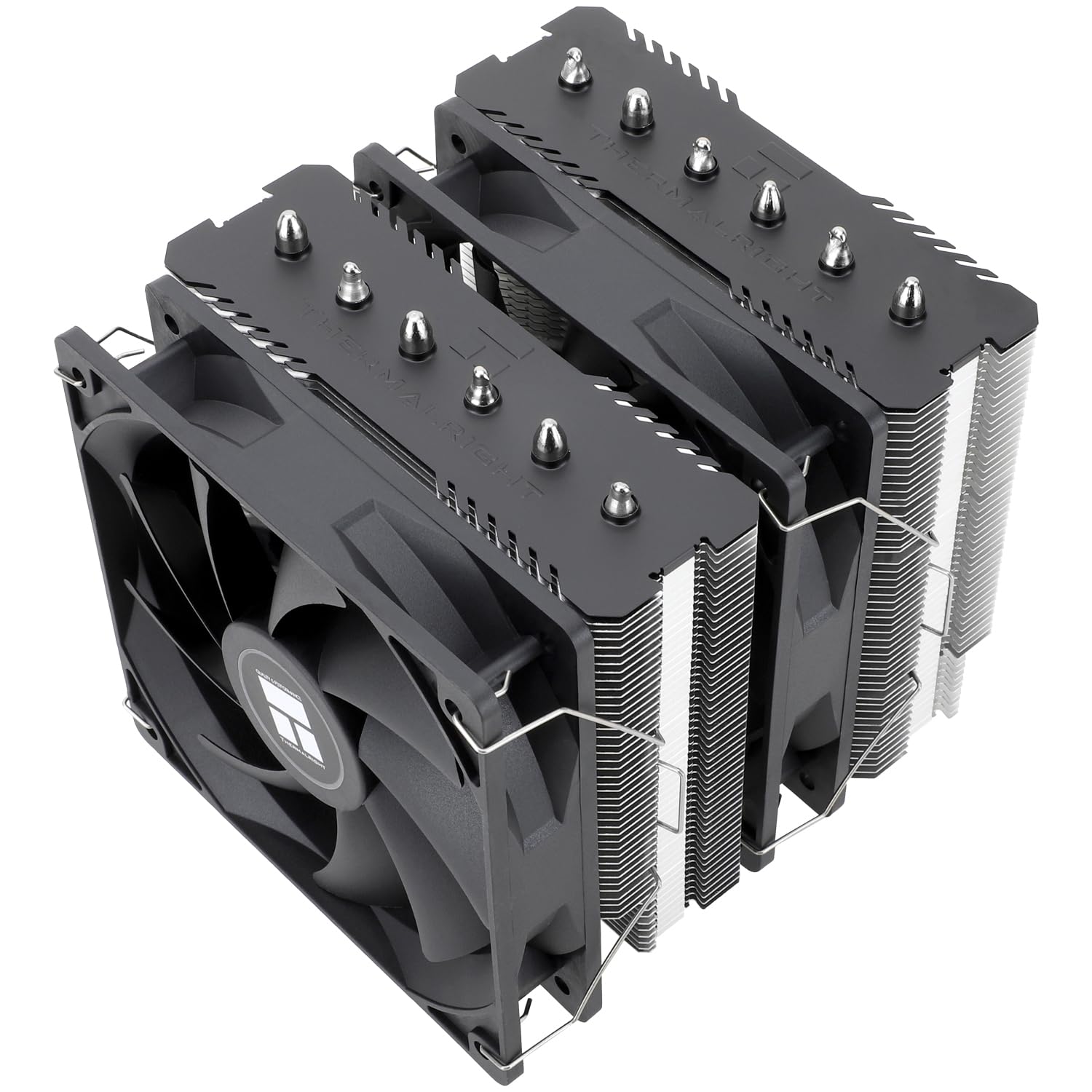
- Six heat pipes and twin 120mm fans cool a stock 12-core CPU for around $35, a price most single-tower coolers cannot match.
- Two TL-C12C fans run near 1,550 RPM, balancing low noise with enough airflow for mainstream gaming rigs.
- The no-LED design keeps weight near 1,100 grams, easing strain on the motherboard during transport.
Thermalright Frozen Notte 120 ARGB

- A single 120mm radiator and infinite-mirror ARGB pump fit small-form-factor cases that cannot take a 240mm or 360mm loop.
- The 2,000 RPM fan and copper cold plate hold a 6-core or 8-core CPU under load for about $36.
- Liquid routing moves heat to the case edge, clearing the area above the socket for tall memory.
I mounted each cooler on the same AM5 test bench, ran a 20-minute Cinebench loop on a 16-core chip, and logged package temperature and fan noise from 30cm. Coolers were scored on thermals, acoustics and mounting before I compared current prices.
Buying Guide
Air Cooler vs AIO Liquid Cooler: Which to Choose
The first decision is air versus liquid. A tower air cooler like the Noctua NH-D15 G2 uses heat pipes to carry warmth into a finned block that two 140mm fans exhaust toward the rear of the case. It has no pump to fail, never leaks, and often survives 8 to 10 years of service. An all-in-one liquid cooler such as the Frozen Notte 360 ARGB V2 pumps coolant to a radiator mounted at the case edge, where up to three fans dump heat outside the chassis. Liquid wins when you run a 200-watt-plus 16-core chip, want to clear the space above tall RAM, or need quieter sustained load. Air wins on reliability, price, and simplicity: our $35 Peerless Assassin 120 SE cools a 12-core CPU without a single moving part beyond its two fans. For most mainstream builds, a strong dual-tower air cooler is the safer long-term choice.
Socket Compatibility and Contact Frames
A cooler is useless if it cannot bolt to your motherboard. In 2026 the two sockets that matter are AMD AM5 and Intel LGA1851, alongside the still-common LGA1700. Every cooler ranked here ships with mounting hardware for AM5 and recent Intel sockets, but always confirm the exact list before buying, especially for older or regional kits. AMD AM5 uses the same retention layout as AM4, so many brackets carry over, while Intel moved mounting hole spacing with LGA1851. Some users add an aftermarket contact frame to flatten slightly concave Intel lids and shave 3 to 5 degrees Celsius off peak temperatures. Thermalright and Noctua both offer free or low-cost upgrade kits when a new socket arrives, which is one reason the NH-D15 chromax.Black stays relevant across several CPU generations. Check the manufacturer support page for your socket rather than assuming an older box includes the newest bracket.
Case Clearance: Cooler Height and Radiator Size
Physical fit derails more cooler purchases than thermals ever do. Air towers are measured by height: the NH-D15 G2 stands 168mm tall, the chromax.Black 165mm, and the Phantom Spirit 120 SE a friendlier 154mm. Compare that figure against your case maximum, which most manufacturers list in millimeters, and leave a few millimeters of margin. Tall coolers can also overhang the first RAM slot, so low-profile memory or a raised fan helps. Liquid coolers are sized by radiator length instead: a 360mm radiator like the Frozen Notte 360 needs roughly 394mm of mounting rail plus fan thickness, while the compact 120mm Frozen Notte fits small-form-factor cases that reject any tower. Before checkout, open your case spec sheet and verify both the CPU cooler height limit and the supported radiator sizes for the top and front mounts. A 5-minute measurement saves a return.
Noise and Fan Acoustics
Cooling performance means little if the result is a screaming fan wall. We measure noise in decibels (dBA) at 30cm under a 20-minute load, and the spread is wide. The NH-D15 chromax.Black peaked near 24.6 dBA, effectively a quiet hum, while smaller coolers spinning past 1,800 RPM grow noticeably louder. Two factors drive acoustics: fan size and pump behavior. Larger 140mm fans move the same air at lower RPM than 120mm units, so they stay quieter, which is why dual-140mm towers dominate silent builds. On AIOs, the pump adds a constant low whir that a tuned fan curve can mask. Set a fan profile in your motherboard software so fans idle low and only ramp under sustained load. A cooler with 10 degrees Celsius of thermal headroom lets you trade a little temperature for a much quieter desktop during everyday browsing and light gaming.
TDP Headroom and CPU Pairing
Match the cooler to the heat your processor actually produces, not just its model name. Thermal design power (TDP) is a rough guide, but boosting chips can briefly exceed it, so aim for headroom. A 65-watt 6-core CPU is happy under the compact 120mm Frozen Notte, while a stock 12-core part wants at least the Peerless Assassin 120 SE and its roughly 245W rating. Push into overclocked 16-core territory and you should step up to the NH-D15 G2 or the 360mm Frozen Notte, both of which hold those chips below their thermal throttle point during a 20-minute render. Over-buying cooling is rarely wasted: a stronger cooler simply runs slower and quieter for a given load. Under-buying means the CPU hits its temperature ceiling, drops clock speed, and loses performance. When in doubt, choose the cooler one tier above your processor's rated draw.
Installation, Mounting, and Longevity
A cooler lives with your build for years, so installation quality and durability matter as much as peak numbers. Noctua's SecuFirm2+ system uses a spring-loaded backplate and two thumb-screws that seat the block evenly, and it carries a 6-year warranty. Thermalright kits are nearly as tidy and undercut Noctua on price, though some require a steadier hand to balance the dual-tower weight during mounting. Apply a pea-sized dot of thermal paste, around 0.2 grams, and let the cooler spread it; more is not better. AIO liquid coolers add a sealed loop that typically lasts 5 to 7 years before pump wear sets in, after which the whole unit is replaced rather than refilled. Air coolers have no such clock and often outlive two or three CPU upgrades. Whichever you pick, route fan and pump cables to the correct headers and confirm the pump reads full RPM on first boot.
Frequently Asked Questions
What is the best CPU cooler overall in 2026?
The Noctua NH-D15 G2 is our best overall pick at $170. It upgrades the long-running NH-D15 with eight heat pipes, a denser fin array, and two NF-A14x25r G2 140mm fans, which together raise cooling by roughly 10 to 15 percent over the original on a 16-core load. In our 20-minute Cinebench loop it held package temperatures comparable to many 280mm liquid coolers while measuring close to 24 dBA, so it stays quiet under pressure. It includes SecuFirm2+ mounting for AM5 and Intel LGA1851 and a 6-year warranty. The main catch is size: at 168mm tall and about 1,525 grams it needs a case rated for at least 170mm of clearance and can block tall RAM in single-fan mode. If your case fits it, it is the most complete air cooler you can buy this year, and only overclocked 16-core builds truly need to step up to a 360mm AIO.
Air cooler or AIO liquid cooler: which is better?
Neither wins outright; the right answer depends on your chip and case. Air coolers such as the NH-D15 G2 and the $35 Peerless Assassin 120 SE have no pump, cannot leak, and frequently run 8 to 10 years without attention, which makes them the reliable default for most builds. They do grow tall, sometimes 165mm or more, which can crowd memory and side panels. AIO liquid coolers like the Frozen Notte 360 ARGB V2 move heat to a radiator at the edge of the case, clearing the space above the socket and handling 200-watt-plus 16-core CPUs with quieter sustained fans. The trade-off is a sealed pump that typically lasts 5 to 7 years and then needs full replacement. As a rule, choose a strong air tower for a mainstream 6-core to 12-core system, and reach for a 240mm or 360mm AIO when you run an overclocked 16-core chip or want to free up clearance for tall RAM.
What is the best budget CPU cooler?
For tight budgets the Thermalright Peerless Assassin 120 SE at about $35 is the cooler to beat. It pairs six copper heat pipes with two 120mm TL-C12C fans in a dual-tower layout, a configuration that usually costs far more, and it carries a roughly 245W rating that comfortably tames a stock 12-core CPU. In testing it ran near 1,550 RPM, balancing low noise against enough airflow for mainstream gaming. If you want a small step up, the Phantom Spirit 120 SE at around $39 adds a seventh heat pipe and slightly stronger fans for a little more headroom. Both skip RGB to hit their price, so show builders who want lighting should budget more or pick an ARGB variant. The key point is that you no longer need to spend $80 for excellent air cooling; under $40 buys a dual-tower cooler that handles all but the most extreme overclocks.
Do I need a 360mm AIO or is 240mm enough?
Radiator size scales with the heat you need to dump, so match it to your CPU. A 240mm AIO with two 120mm fans handles most 8-core and many 12-core chips at stock settings, and it fits a wider range of cases. A 360mm unit like the Frozen Notte 360 ARGB V2 adds a third fan and about 50 percent more radiator area, which matters once you run an overclocked 16-core processor pulling past 250 watts. In that scenario the larger radiator keeps the chip several degrees Celsius further from its throttle point and lets the three 2,000 RPM fans spin slower and quieter for a given load. If your case only supports a 240mm mount, a good 240mm cooler is still plenty for mainstream gaming. Reserve 360mm for high-core-count, high-wattage builds, and remember that a 360mm radiator needs roughly 394mm of clearance plus fan thickness.
How long do AIO liquid coolers last?
A sealed all-in-one liquid cooler typically lasts 5 to 7 years before the pump shows wear, though many run longer with a sensible fan and pump curve. Unlike custom loops, an AIO cannot be refilled, so when the pump weakens you replace the entire unit rather than service it. Coolant can also permeate the tubing very slowly over years, which is one reason manufacturers seal them and rate a finite lifespan. To get the most out of one, set the pump to run at full RPM and let the fans handle temperature swings, since constant pump speed reduces stress. By contrast, a quality air cooler such as the NH-D15 chromax.Black has no pump at all and often outlives two or three CPU upgrades, backed here by a 6-year warranty. If you value the longest possible service life with zero maintenance, air is the safer bet; if you want a 360mm radiator's cooling and accept eventual replacement, an AIO is a sound choice.
Will a big air cooler fit my case and RAM?
Check two numbers before buying any tower cooler. First is height: the NH-D15 G2 is 168mm tall, the chromax.Black 165mm, and the Phantom Spirit 120 SE a more forgiving 154mm. Compare that to your case's stated CPU cooler clearance, which manufacturers list in millimeters, and leave a few millimeters of margin for safety. Second is memory clearance: tall dual-tower coolers can overhang the first RAM slot, so either use low-profile memory or raise the front fan a few millimeters, which most mounting kits allow. If your case tops out near 160mm, the 154mm Phantom Spirit fits where the 168mm NH-D15 G2 will not. When clearance is genuinely tight, an AIO sidesteps the problem entirely by moving the bulk to a radiator at the case edge. Spending 5 minutes with your case spec sheet and a ruler is the single best way to avoid a return.
Is the stock cooler good enough, or should I upgrade?
A bundled stock cooler will keep a CPU within safe limits, but it often does so by running loud and letting the chip sit only 1 or 2 degrees below its throttle point under load. Upgrading to even a $35 Peerless Assassin 120 SE usually drops package temperatures by 10 to 20 degrees Celsius on a 12-core part, which both quiets the system and lets the processor hold higher boost clocks for longer. If you bought a high-core-count or overclockable chip, the stock cooler is almost always the weak link, and a dual-tower air cooler or a 240mm AIO is a worthwhile first upgrade. For a modest 6-core CPU used for browsing and light gaming, the included cooler may be acceptable, though the compact Frozen Notte 120 AIO at around $36 still offers quieter, cooler operation. In short, upgrade whenever you notice fan noise spikes or thermal throttling, and treat the cooler as core to performance rather than an afterthought.
Our Verdict
For most builders in 2026 the Noctua NH-D15 G2 is the cooler to beat at $170, matching many 280mm liquid loops while staying near 24 dBA, provided your case clears its 168mm height. If you would rather spend a fraction of that, the Thermalright Phantom Spirit 120 SE delivers roughly 245W of cooling for about $39 and is the value pick of the group. Liquid-cooling fans running overclocked 16-core chips should look at the Frozen Notte 360 ARGB V2, which brings a full 360mm radiator and three 2,000 RPM fans for only $42. Match the cooler to your CPU's wattage and your case clearance first, and any of these six will keep a modern processor cool and quiet.
Sources
- Intel Processor Thermal Specifications and Tjunction (Tj Max) — Intel
- Thermal Management in Electronics Packaging — IEEE Electronics Packaging Society
- AMD Ryzen Desktop Processors Operating Specifications — AMD